

When to Use a Read Intensive SSD for Server Workloads
Learn how endurance, interfaces, and workload patterns guide the right enterprise SSD choice
-
Read Intensive SSDs suit low-write workloads and are often rated around 1 DWPD for analytics, content delivery, and similar applications.
-
TBW and DWPD show how much writing a drive can handle, helping you match SSD endurance to real workload demands.
-
You can combine Read Intensive and Mixed-Use SSDs in some RAID configurations, but mixing SATA and SAS drives is generally not recommended.
Choosing the right server SSD starts with understanding how your applications use storage. A database that constantly updates records needs a different drive than a content delivery platform that serves the same files thousands of times. A Read Intensive SSD is designed for environments where reads dominate and writes remain relatively light. That design can lower acquisition costs while delivering strong latency and throughput for suitable workloads. However, read intensive does not mean universally better. You still need to check endurance ratings, controller compatibility, RAID behavior, interface speed, power protection, and support terms before placing these drives in a production server or data center.
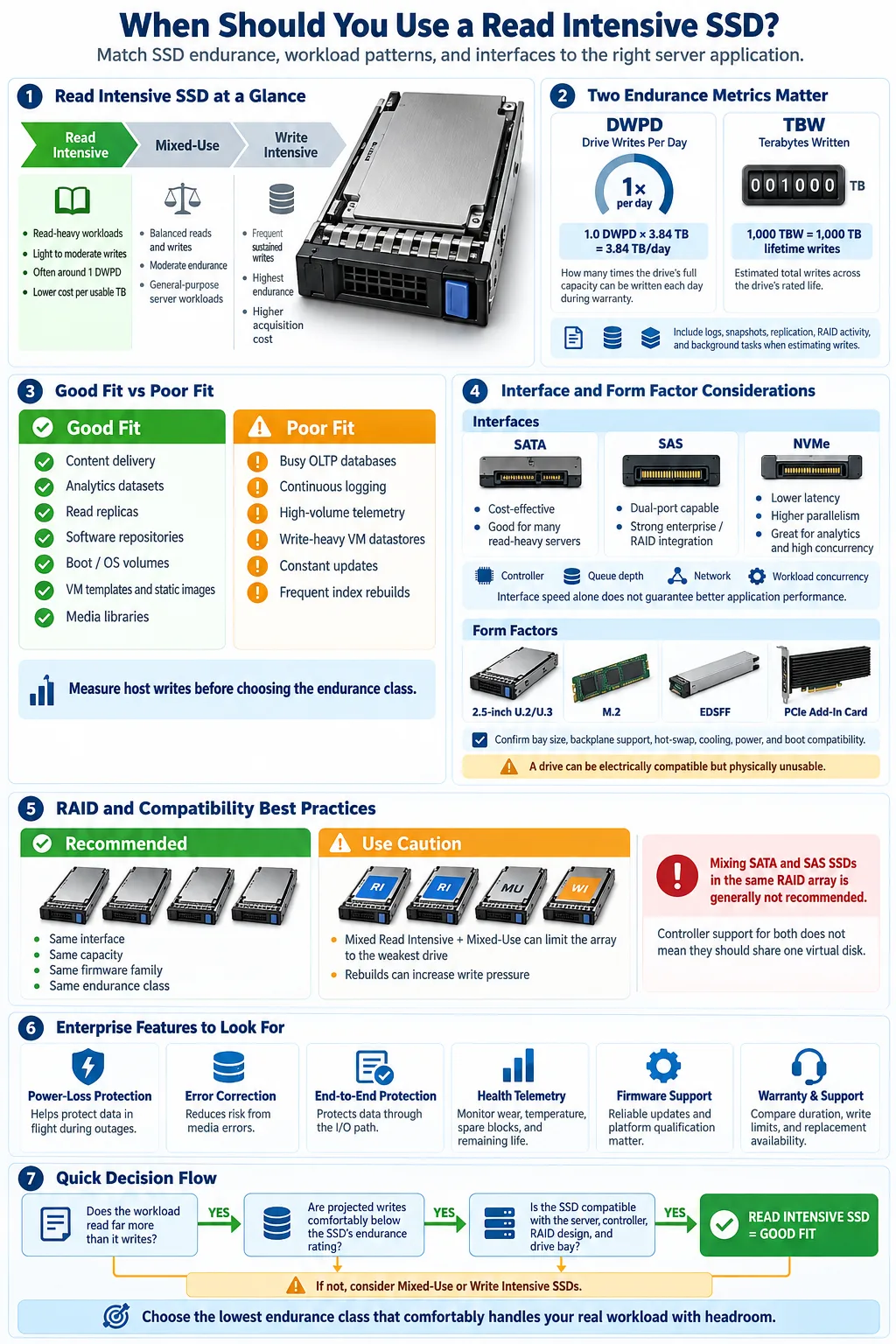
What Is a Read Intensive SSD?
Definition and Characteristics
A Read Intensive SSD is an enterprise solid-state drive built for workloads that read data far more often than they rewrite it. Manufacturers typically use lower-cost flash configurations and optimize firmware for dependable read performance, predictable latency, and moderate write endurance. Many models are rated at approximately 1 drive write per day, although the exact rating varies by capacity and product family.
These drives are usually more affordable per usable terabyte than higher-end enterprise models. They may also offer features such as stable performance under sustained access, enhanced error correction, telemetry, and compatibility with server RAID controllers. Capacity matters because larger drives often have a higher total write allowance even when their daily endurance rating is similar.
How Read Intensive SSDs Differ from Write Intensive and Mixed-Use SSDs
A write-intensive SSD is designed for workloads that write data repeatedly, such as high-frequency transaction processing, logging, or real-time ingestion. It usually offers a much higher endurance rating and costs more. A mixed-use SSD sits between the two, handling balanced read and write activity with moderate to high endurance.
The best choice depends on your measured workload, not the label alone. A read-heavy application can use a Read Intensive SSD efficiently, while an application with constant updates may exhaust it sooner than expected.
Understanding SSD Endurance Metrics
Terabytes Written (TBW)
Terabytes Written (TBW) estimates the total amount of data you can write to a drive during its rated life. For example, a 1,000 TBW rating indicates that the manufacturer has specified a planned write limit of 1,000 terabytes under stated conditions. TBW is useful for comparing drives, but it is not a promise that the SSD will fail immediately afterward. Actual service life also depends on temperature, workload shape, overprovisioning, and the controller.
Drive Writes Per Day (DWPD)
Drive Writes Per Day (DWPD) expresses how many times you can overwrite the drive's full usable capacity every day during its warranty period. A 1.0 DWPD, 3.84 TB drive supports roughly 3.84 TB of rated writes per day. To estimate TBW, multiply capacity by DWPD, the number of warranty days, and any applicable decimal conversion.
Why Endurance Matters for SSD Selection
Endurance affects reliability, warranty coverage, write consistency, and replacement planning. Estimate daily writes from application logs, database changes, temporary files, replication, RAID parity, and garbage collection overhead. Then compare that estimate with the drive's rating and leave practical headroom. A drive that appears inexpensive can cost more if frequent replacements cause downtime or migration work.
Monitor host writes and media wear after deployment. Measurements from the operating system, RAID controller, or management software provide better evidence than a workload label based only on application type.
When Should You Use a Read Intensive SSD?
Typical Use Cases for Read Intensive SSDs
Use a Read Intensive SSD when applications retrieve data frequently but modify it infrequently. Common examples include read replicas, operating system volumes, software repositories, boot services, reference databases, backup catalogs, and large media libraries. These drives also fit content delivery systems where files are written during publishing and then served repeatedly.
Workload Patterns Suitable for Read Intensive Drives
The strongest fit is a workload with a high read-to-write ratio, predictable access patterns, and limited daily data churn. Check whether writes occur in short bursts or remain continuous, because sustained background activity can consume endurance faster than average daily figures suggest. Also account for metadata updates, caching, RAID rebuilds, and snapshots.
Examples: Data Analytics, Content Delivery, Virtualized Environments
Data analytics platforms often scan large datasets repeatedly, making read throughput and low latency more important than extreme write endurance. Content delivery platforms similarly read published objects many times after a relatively small number of writes. In virtualized environments, read intensive drives can work well for template libraries, static virtual machine images, and desktop pools with modest write activity.
They are less suitable for busy OLTP databases, write-heavy virtual machine datastores, high-volume telemetry, or systems that constantly rebuild indexes. Profile your actual host writes before choosing. A Kingston SSD may be appropriate for one server tier, while a higher-end model is safer for another tier with heavier write amplification.
Comparing SSD Interfaces and Form Factors
SATA vs SAS for Read Intensive SSDs
SATA SSDs are widely available, cost-effective, and suitable for many read-heavy servers. They use a familiar storage interface and often deliver strong value when the server does not require dual-port connectivity or advanced enterprise features. SAS SSDs can provide dual-port operation, stronger enterprise management, and better integration with shared storage and compatible RAID platforms. SAS may also offer more predictable behavior in systems designed around SAS backplanes.
Do not assume that a faster specification automatically improves application performance. Queue depth, controller limits, network speed, and workload concurrency can matter more than the interface's theoretical maximum.
NVMe Considerations
NVMe SSDs connect through PCI Express and generally provide lower latency and higher parallelism than SATA or SAS. They are attractive for analytics, virtualization, and high-concurrency applications, but require server, backplane, firmware, and operating system support. NVMe drives may also use different RAID methods and management tools.
Form Factor Options and Their Impact
An SSD interface defines how the drive communicates with the host, while an SSD form factor describes its physical design. Common options include 2.5-inch U.2 or U.3 drives, M.2 modules, EDSFF designs, and add-in cards. Confirm bay dimensions, hot-swap support, carrier requirements, cooling, power delivery, and boot compatibility before ordering. A drive can be electrically compatible yet physically unusable in your server.
Can You Mix Read Intensive SSDs with Other SSD Types?
Mixing Read Intensive and Mixed-Use SSDs in RAID
You can sometimes combine Read Intensive and mixed-use SSD models in RAID configurations, but it is rarely the ideal design. The array may operate at the capacity of the smallest drive, while performance and endurance can be constrained by the slowest or least durable member. During a rebuild, the lower-endurance drive may face especially high write pressure.
For a new array, use matched models with the same capacity, firmware family, interface, and endurance class whenever possible. If you must mix types, place them only in an array whose workload and replacement plan have been tested.
Risks of Mixing Different Interfaces (SATA vs SAS)
Mixing SATA and SAS SSDs in the same array is generally not recommended. A backplane or controller may support both standards separately, but that does not guarantee that a single virtual disk can combine them. Differences in command handling, dual-port behavior, error recovery, queueing, and link negotiation can create compatibility or reliability problems.
Best Practices for SSD Compatibility
Check the server's qualified hardware list, controller documentation, firmware notes, and drive carrier requirements. Confirm that the RAID controller supports the exact SSD family and that all members expose compatible sector sizes and health data. Test failure, hot replacement, rebuild, and firmware update procedures before production use. For example, a Dell PowerEdge R740XD with a PERC H740P RAID card should be validated against the selected drive models rather than relying on physical fit alone.
Additional Enterprise SSD Features to Consider
Power-Loss Protection
Power-loss protection uses capacitors and firmware controls to flush data in flight when external power fails. It reduces the risk of corrupted metadata and incomplete writes, which matters even in read-heavy systems because operating systems, file systems, and RAID controllers still perform background writes. Verify that the product has genuine enterprise protection rather than relying only on a consumer-style claim.
Data Security and Error Prevention
Look for end-to-end data protection, strong error correction, uncorrectable bit error rate specifications, secure erase, encryption support, and health telemetry. These features help detect problems before they become outages. A good enterprise SSD should report wear, temperature, spare blocks, media errors, and remaining life through supported management tools.
Support, Warranty, and Total Cost of Ownership
Total cost of ownership includes the purchase price, power, cooling, support, replacement labor, downtime, and migration effort. Compare warranty duration and its write limit, not just the headline capacity. Confirm whether the vendor supports your server and controller combination. Independent testing, including reviews from sites such as Hardwareluxx, can help reveal sustained performance behavior, but your own workload testing should guide the final decision.
Also check firmware availability and replacement lead times. A slightly more expensive drive can be the better choice if it has predictable support and a longer service life.
How to Choose the Right SSD for Your Server or Data Center
Evaluating Your Workload Requirements
Start with measured reads, writes, latency, queue depth, capacity growth, and peak activity. Separate application traffic from background tasks such as snapshots, replication, antivirus scans, and RAID maintenance. These details define your data center workloads more accurately than labels such as database or virtualization.
Balancing Performance, Endurance, and Cost
Choose the lowest endurance class that comfortably handles projected writes with headroom. Then confirm that latency and throughput meet peak requirements. A read intensive model can lower cost for static data, but a mixed-use or write-intensive model may be cheaper over time if frequent replacements would otherwise disrupt service. Consider capacity, because overprovisioning and free space can improve sustained performance and endurance.
Case Study: Using Read Intensive SSDs in Dell PowerEdge Servers
Suppose you deploy a Dell PowerEdge R740XD for a media catalog, read replica, or virtual machine template tier. You could evaluate compatible SATA or SAS read intensive drives, confirm support through the PERC H740P RAID card, and reserve higher-endurance SSDs for databases and logging. Before deployment, measure writes during publishing, indexing, snapshots, and rebuilds. A similar process applies to an HPE ProLiant server or an MSA 2062 array, although each platform has its own qualification list and management requirements.
Document the selected model, firmware, RAID layout, spare policy, endurance estimate, and replacement process. This makes future expansion safer and prevents an apparently compatible drive from becoming a support problem.
Use a Read Intensive SSD when your system reads data heavily, writes it modestly, and can tolerate an endurance rating near the lower enterprise range. Confirm the workload with monitoring, calculate expected writes, and match the drive to your controller, interface, form factor, and RAID design. Prioritize power protection, qualification, and support for production systems. If writes are higher than expected, choose a mixed-use or write-intensive model instead of hoping a lower-cost drive will endure. A careful workload assessment gives you better performance, fewer replacements, and a more predictable storage budget.
What is a Read Intensive SSD best used for?
It is best for applications that read data frequently but perform relatively few writes, such as content delivery, analytics queries, read replicas, static virtual machine images, and software repositories.
Is 1 DWPD enough for a server SSD?
It can be enough when daily writes remain below the drive's rated allowance and you maintain reasonable headroom. Measure host writes and include logs, snapshots, RAID activity, and background processing before deciding.
What is the difference between TBW and DWPD?
TBW estimates the total terabytes a drive is rated to write over its life. DWPD describes how many times the drive's full capacity can be written each day during the warranty period.
Can you use SATA and SAS SSDs in the same RAID array?
This is generally not recommended. Even when a controller supports both interfaces, differences in command handling, error recovery, and connectivity can create compatibility and reliability issues.
Are Read Intensive SSDs suitable for virtualization?
They can work well for template libraries, read-heavy virtual machines, and desktop pools with modest write activity. Busy virtual machine datastores with constant updates, logging, or snapshots may require mixed-use or write-intensive SSDs.
Does a Read Intensive SSD need power-loss protection?
Power-loss protection is strongly recommended for production servers. It helps protect data in flight and file-system metadata during unexpected outages, even when the overall workload is mostly read activity.




