What Businesses Use the HPE ProLiant DL360 Gen10 For
Explore its business workloads, features, storage options, and deployment advantages
-
The HPE ProLiant DL360 Gen10 is a versatile 1U rack server for virtualization, private cloud, and enterprise storage where space is limited.
-
Dual Intel Xeon Scalable processors deliver balanced performance, strong security, and cost-effective scalability for medium and large businesses.
-
Customizable storage, RAID controllers, and networking let you tailor the server to different business workloads.
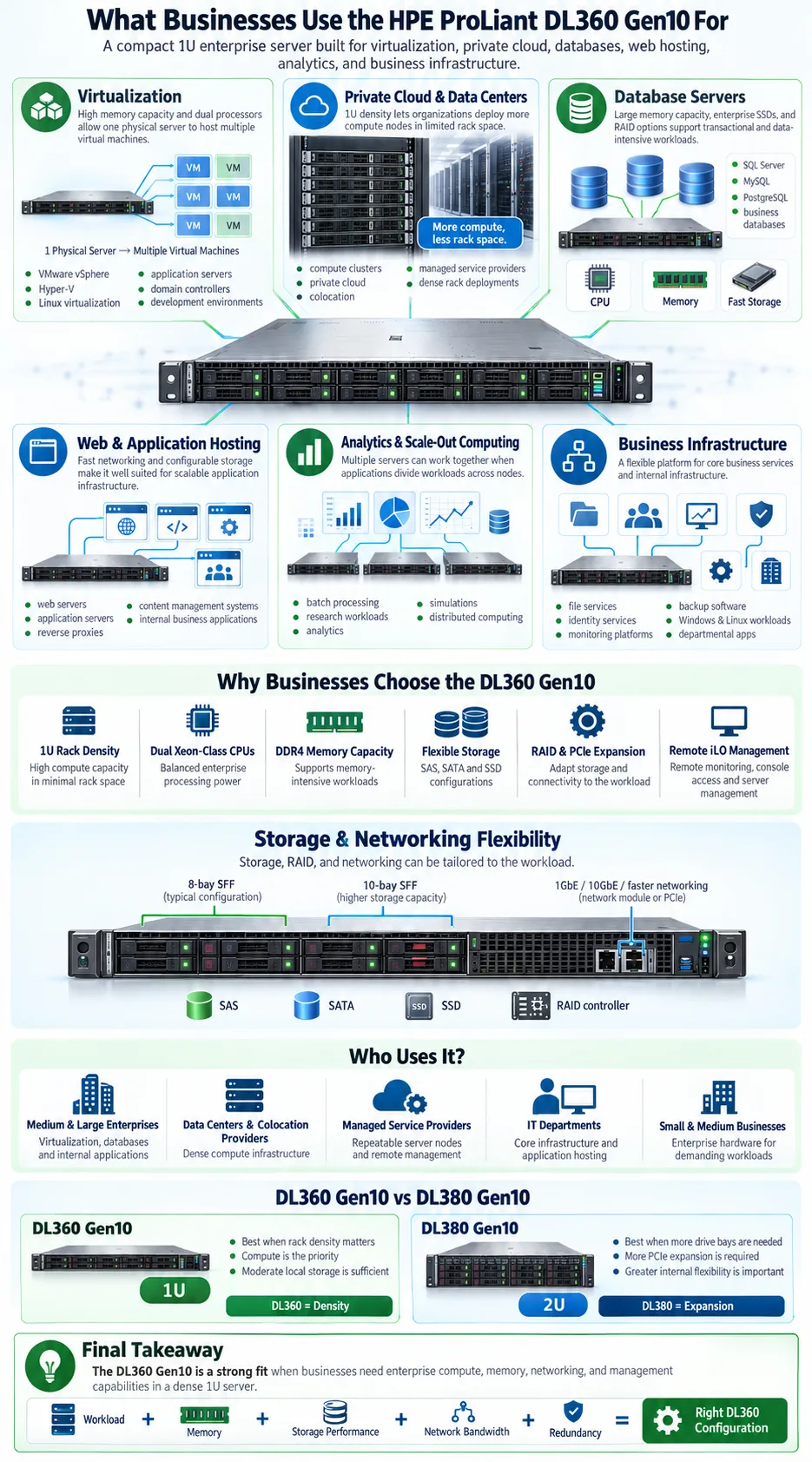
The HPE ProLiant DL360 Gen10 is a compact enterprise server designed for organizations that need dependable computing power without using much rack space. Businesses deploy it for virtual machines, private cloud services, web hosting, databases, analytics, and infrastructure management. Its value comes from the balance between performance, security, storage flexibility, and a small footprint. The server supports two Intel Xeon Scalable processors, substantial memory capacity, multiple storage layouts, and HPE management tools. This guide explains which businesses use the DL360 Gen10, what workloads it handles well, how it compares with related servers, and how to configure it for your environment.
What is the HPE ProLiant DL360 Gen10?
Overview and key features
The HPE ProLiant DL360 Gen10 is a 1U, dual-socket rack server built for data centers and business infrastructure. Its compact form factor allows organizations to install significant processing capacity in racks where space, power, or cooling is limited. HPE designed the DL360 Gen10 for general-purpose enterprise computing rather than one narrowly defined application.
Core features include support for dual Intel Xeon Scalable processors, DDR4 memory, hot-plug storage options, PCIe expansion, redundant power supplies, and HPE Integrated Lights-Out management. Depending on configuration, the server can support internal SAS, SATA, or solid-state drives, along with hardware RAID and high-speed network adapters.
Hardware specifications
The chassis is approximately one rack unit high and is available with different front drive layouts. Common configurations include 8-bay and 10-bay SFF storage designs, although exact support depends on the system board, drive backplane, and controller selected. The server can use redundant fans and hot-plug power supplies to improve uptime.
Processor and memory support
Two CPU sockets support Intel Xeon Scalable processors, giving you flexibility to choose between efficient midrange chips and higher-core-count processors. The platform uses DDR4 registered memory and provides many DIMM slots for expanding capacity. That combination makes the DL360 Gen10 suitable for dense virtual machine hosting, application services, and memory-intensive databases. Actual processor, memory, and drive limits vary by model and firmware, so confirm the specific QuickSpecs document before ordering.
Which Businesses Use the ProLiant DL360 Gen10?
Medium and large enterprises
Medium and large organizations use the DL360 Gen10 for departmental applications, virtualization clusters, identity services, monitoring platforms, and business databases. Its dual-socket design provides room to increase compute capacity without immediately moving to a larger chassis. Enterprises may deploy multiple identical servers in a cluster so they can distribute workloads, perform maintenance, and improve service availability.
The server also suits companies standardizing on HPE infrastructure. IT teams can use consistent firmware tools, support processes, and management policies across several ProLiant models. This simplifies operations when a business runs both dense 1U systems and larger storage-oriented servers.
IT professionals and data centers
Managed service providers, colocation operators, systems integrators, and internal data center teams often choose the DL360 Gen10 when rack density matters. A 1U chassis lets providers place more nodes in a cabinet, which can improve available capacity per rack. IT professionals also value iLO because they can configure, monitor, and troubleshoot the server remotely.
Small to medium-sized business workloads
Small and medium-sized businesses can use the DL360 Gen10 for file services, line-of-business applications, Microsoft Windows or Linux workloads, email platforms, backup software, and virtualization. It may be more capable than a small office needs, but refurbished or used systems can make enterprise hardware accessible at a lower cost. The right choice depends on licensing, power, support, and storage requirements. For a single light application, a lower-cost tower or entry-level server may be more practical.
What Are the Common Use Cases for the DL360 Gen10?
Virtualization and private cloud deployments
Virtualization is one of the most common reasons businesses deploy the DL360 Gen10. Two processors, high memory capacity, and multiple network options allow one physical host to run several virtual machines. Organizations use it with platforms such as VMware vSphere, Microsoft Hyper-V, and Linux-based virtualization stacks. It can host domain controllers, application servers, development environments, and database guests on the same physical node.
It is also well suited to private cloud deployments that require a repeatable pool of compute resources. Several DL360 Gen10 servers can form a cluster with shared storage or a hyperconverged design, depending on the software platform. Before choosing the server, check CPU licensing, memory per virtual machine, storage latency, and the network bandwidth required by the cluster.
Web hosting and database management
Hosting companies and internal IT teams use the server for web servers, application servers, reverse proxies, and content management systems. SSDs can reduce response times for frequently accessed data, while RAID protects against individual drive failures when configured correctly.
For databases, the DL360 Gen10 can provide dedicated compute and memory for Microsoft SQL Server, MySQL, PostgreSQL, and similar platforms. Database performance depends heavily on memory size, drive type, controller cache, transaction volume, and backup design. RAID improves availability, but it is not a substitute for tested backups.
High-performance computing and analytics
High-performance computing workloads such as simulations, batch processing, research jobs, and analytics can use the DL360 Gen10 in a scale-out cluster. It is most effective when an application divides work across multiple nodes. Specialized accelerator requirements, very large memory needs, or unusually high local storage demands may point to a different HPE server platform.
How Does the DL360 Gen10 Support Storage and Scalability?
Storage options: 8-bay and 10-bay chassis
The DL360 Gen10 offers customizable storage options so you can match the front drive layout to your workload. Common 8-bay and 10-bay chassis configurations use small form factor drives, often called SFF drives. Eight bays may be enough for a boot volume and a moderate application dataset, while ten bays provide more room for capacity, performance tiers, or separate data and log volumes.
Some configurations use rear drive locations or internal storage arrangements. Compatibility depends on the backplane, cabling, firmware, and selected controller. When buying a used or refurbished server, verify that the listed drive trays, caddies, and backplane match the exact chassis. HPE SC trays are associated with specific small form factor drive systems, so do not assume every tray fits every generation.
Compatible hard drives and RAID configurations
The platform can support enterprise SAS, SATA, and solid-state drives, subject to the controller and backplane. RAID controllers from HPE Smart Array families can provide configurations such as RAID 1 for mirrored boot disks, RAID 5 for usable capacity with fault tolerance, and RAID 10 for stronger write performance and redundancy. RAID 6 may be appropriate for larger arrays where protection from two drive failures is important.
Expansion slots and networking capabilities
PCIe expansion slots allow you to add network adapters, storage controllers, host bus adapters, or specialized cards. Options can include 1GbE, 10GbE, and faster adapters, depending on the riser and configuration. This supports scalability by letting you expand connectivity without replacing the server. Plan slot usage carefully because a second processor, additional riser, storage controller, and network card may compete for space or require specific options.
What Security and Management Features Does It Offer?
Built-in security technologies
The DL360 Gen10 includes several security features designed to protect the server from unauthorized changes and compromised firmware. HPE Silicon Root of Trust helps validate essential firmware during startup, while secure boot and firmware verification support a more controlled boot process. Depending on the configuration, you can also use TPM technology, authenticated updates, secure erase functions, and role-based administrative access.
These tools reduce risk, but they do not replace sound security practices. You still need strong administrator passwords, network segmentation, timely patches, encrypted backups, access logging, and a documented recovery plan.
Integrated Lights-Out management
Server management is handled primarily through HPE Integrated Lights-Out, commonly called iLO. Administrators can access a remote console, power-cycle the system, inspect hardware health, review event logs, update firmware, and mount virtual media without being physically present. This is particularly valuable in colocation facilities and distributed offices.
Licensing levels affect the management features available, so review the iLO license included with the server. Centralized HPE tools can also help monitor firmware and hardware status across multiple ProLiant systems.
Energy efficiency and reliability
Energy efficiency matters when a data center operates many 1U servers. The DL360 Gen10 uses power supplies, fan controls, and processor options designed to balance performance with consumption. Redundant hot-plug power supplies and fans can help maintain service during component failure or maintenance. High availability still depends on the complete design, including clustered applications, redundant network paths, storage protection, and tested failover procedures.
How Does the DL360 Gen10 Compare to Other Servers?
Comparison with DL380 Gen10
The DL360 Gen10 and DL380 Gen10 use the same broad HPE ProLiant Gen10 technology family, including Intel Xeon Scalable processors, DDR4 memory, iLO management, and similar security capabilities. The main difference is chassis design. The DL360 is a 1U server focused on rack density, while the DL380 is a 2U platform with more room for drive bays, PCIe cards, cooling, and expansion.
Choose the DL360 when compute density and limited rack space are priorities. Choose the DL380 when you need more local storage, additional expansion cards, or greater internal flexibility.
Differences from previous generations
Compared with earlier ProLiant generations, the Gen10 platform adds newer Intel Xeon processors, stronger firmware protection, updated management capabilities, and broader support for fast storage and networking. Memory architecture and processor features also improve the platform's ability to handle virtualized and data-intensive workloads. However, older servers may still be appropriate when purchase price and basic processing needs matter more than power use, warranty coverage, or current support.
Competitive positioning against Dell R640
The Dell PowerEdge R640 is a close competitor because it is also a dense 1U, dual-socket server based on Intel Xeon Scalable processors. The decision often comes down to existing management tools, preferred support contracts, storage layouts, firmware processes, and pricing. HPE buyers may prefer iLO and Smart Array integration, while Dell environments may favor iDRAC and their established PowerEdge workflows. Compare the exact CPU, memory, drive backplane, RAID controller, network adapter, and warranty rather than comparing model names alone.
How to Customize and Deploy the DL360 Gen10?
Build-your-own server options
You can configure the DL360 Gen10 around the workload instead of buying the highest specification available. Start with the number of CPU cores, memory capacity, boot device, data drives, RAID controller, network speed, power supplies, and required risers. A virtualization host usually needs more memory and faster networking, while a basic application server may need fewer cores but reliable mirrored storage.
Configuration tips for different workloads
Workload optimization begins with measuring demand. For virtualization, prioritize memory capacity, balanced CPU cores, and redundant network connections. For databases, use enterprise SSDs where latency matters, separate operating system and data volumes when appropriate, and select a RAID level based on write patterns and recovery requirements. For web hosting, prioritize network bandwidth, fast storage for cached content, and a design that can add nodes as traffic increases.
Check firmware compatibility before combining processors, memory modules, drive controllers, and network cards. Use matching memory modules in the recommended population order, and avoid mixing unsupported drive types in the same array. Confirm that the server includes the correct drive caddies, rails, power cables, and iLO license.
Support and warranty services
New systems may be covered by HPE warranty and support options, while refurbished units may have shorter reseller coverage. Ask whether the seller tests every drive bay, fan, power supply, memory module, and RAID controller. For production workloads, consider an HPE support contract or a reputable third-party maintenance provider. Keep current backups and replacement plans even when the server has redundant components.
The DL360 Gen10 makes sense when you need enterprise-grade compute in a dense rack design. It can support virtual machines, private cloud platforms, databases, web services, analytics, and many general business applications. Choose the configuration by starting with memory, storage performance, network bandwidth, redundancy, and support requirements. If you need more drive bays or expansion room, compare the DL380 Gen10 before buying. A carefully matched processor, memory, RAID, and networking setup will deliver more value than simply selecting the largest available specification.
What is the HPE ProLiant DL360 Gen10 used for?
Businesses use it for virtualization, private cloud infrastructure, web hosting, databases, analytics, file services, and general enterprise applications. Its 1U design is useful when rack space is limited.
Is the DL360 Gen10 suitable for virtualization?
Yes. Its dual Intel Xeon Scalable processor support, high memory capacity, storage options, and networking flexibility make it suitable for VMware, Hyper-V, and other virtualization platforms.
How much storage can a DL360 Gen10 support?
Storage capacity depends on the chassis, backplane, drive type, RAID controller, and configuration. Common layouts include 8-bay and 10-bay SFF options, with support for compatible SAS, SATA, and solid-state drives.
What is the difference between the DL360 Gen10 and DL380 Gen10?
The DL360 Gen10 is a 1U server designed for density, while the DL380 Gen10 is a 2U server with more room for storage, expansion cards, and internal components. The DL380 is usually better when local storage and expansion are more important than rack space.
Does the DL360 Gen10 include remote management?
Yes. HPE Integrated Lights-Out, or iLO, provides remote console access, power control, hardware monitoring, event logs, and firmware management. Some advanced features require an appropriate iLO license.
Is the HPE ProLiant DL360 Gen10 still a good choice for a small business?
It can be a good choice for a small business that needs reliable virtualization or application hosting and can support enterprise server power and maintenance requirements. For light workloads, a lower-cost tower or entry-level server may be more economical.