

Redundant vs Non-Redundant Power Supplies Explained
Compare reliability, cost, maintenance, and best uses before choosing your PSU
-
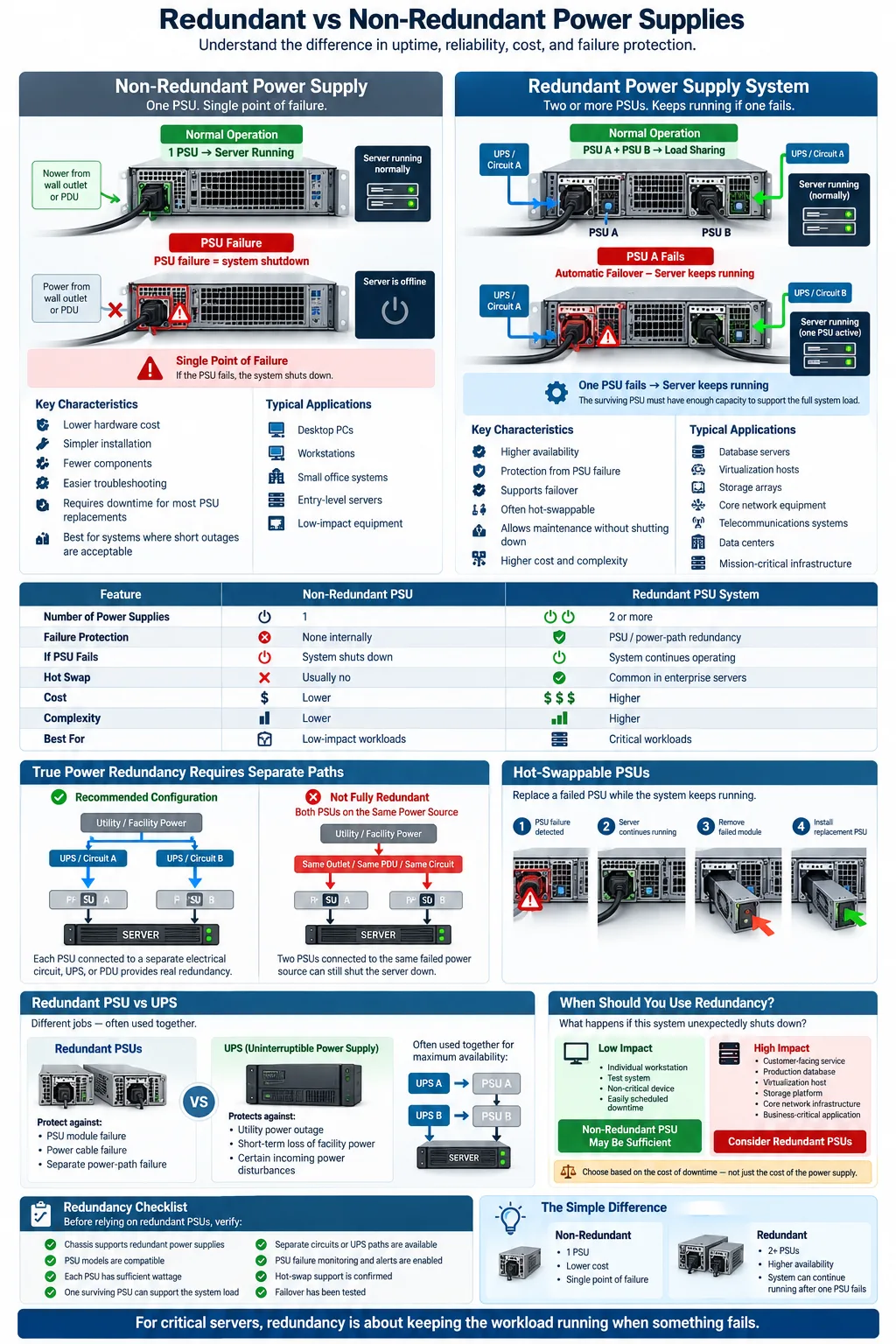
Redundant power supplies use multiple PSUs for backup, while non-redundant systems use one PSU with no built-in backup.
-
Redundant PSUs support high-availability servers and data centers by reducing downtime after a power supply failure.
-
Non-redundant PSUs cost less and are simpler, but their single point of failure makes them unsuitable for many mission-critical systems.
Choosing between a redundant power supply and a non-redundant power supply affects more than your hardware budget. It determines how your system responds when a PSU fails, how quickly you can replace a component, and whether critical workloads keep running. A standard power supply unit (PSU) may be perfectly suitable for a desktop or small office device. Servers, storage systems, and network equipment often need a different approach because an unexpected shutdown can interrupt services, damage active processes, or cause expensive downtime. This guide explains how both designs work and when each makes sense.
What Is a Power Supply Unit (PSU)?
Basic Function of a PSU
A power supply unit (PSU) converts electricity from a wall outlet or facility power system into the regulated voltages that computer components need. It distributes power to the motherboard, processors, memory, storage drives, cooling fans, and expansion cards. A PSU also filters electrical noise and provides protections against conditions such as overvoltage, overcurrent, short circuits, and overheating.
Every PSU has a rated output, usually measured in watts. You should choose a model that can handle the system's peak demand while leaving reasonable headroom for upgrades and transient power spikes. Efficiency ratings, connector types, cooling design, and input voltage range also matter. A poorly matched PSU can cause instability even when its wattage appears sufficient.
Types of Power Supplies
Power supplies vary by form factor, output capacity, efficiency, and installation method. Desktop computers commonly use ATX units, while compact systems may use SFX models or external adapters. Rack servers often use modular units that slide into dedicated bays. These modules may operate independently or as part of a redundant system.
The most important distinction for availability is whether the device has one active PSU or multiple PSUs. A single unit is simpler and less expensive. Multiple units can distribute the electrical load and continue supplying the system if one module stops working. That design choice affects the entire server hardware platform, not just the component installed in the power bay.
What Is a Redundant Power Supply?
Definition and Purpose
A redundant power supply system uses two or more PSUs in one device or chassis. Each unit can provide some or all of the power required by the system, depending on the configuration. The purpose is to maintain operation when a PSU, power cable, circuit, or related power path fails.
How Redundancy Works
In a typical arrangement, both modules are connected and monitored by the system. Under normal conditions, they may use load sharing, with each PSU carrying part of the electrical demand. In other designs, one module carries the load while the other remains ready to take over. If the active unit fails, the controller initiates failover and shifts power to the remaining unit.
For genuine protection, each PSU should connect to a separate electrical circuit, uninterruptible power supply, or power distribution unit. Plugging both modules into the same failed outlet does not provide full protection. Redundancy also depends on capacity. The surviving PSU must be able to handle the system's required load without overheating or triggering an overload shutdown.
Common Use Cases
Redundant designs are common in database servers, virtualization hosts, storage arrays, telecommunications systems, and core network equipment. They are also standard in many data centers where continuous service matters. A redundant configuration improves resilience, but it does not eliminate every possible failure. A faulty motherboard, cooling system, circuit, or software issue can still stop the system.
What Is a Non-Redundant Power Supply?
Definition and Characteristics
A non-redundant power supply system has one PSU responsible for delivering all power to the device. If that unit loses power or fails internally, the connected computer or appliance normally shuts down immediately. There is no second module inside the chassis to take over automatically.
This design has fewer components, fewer cables, and less monitoring hardware. It is usually easier to install and troubleshoot because there is only one power path to inspect. However, the single PSU becomes a single point of failure. Even a high-quality unit can eventually fail because of age, heat, electrical stress, or a defective component.
A non-redundant design does not always mean poor protection. You can improve resilience with a quality PSU, surge protection, an uninterruptible power supply, a spare unit, and regular maintenance. Those measures reduce risk, but they do not provide automatic continuity in the way multiple internal PSUs can.
Typical Applications
Non-redundant PSUs are common in home computers, workstations, point-of-sale systems, small office devices, entry-level servers, and many standalone appliances. They are also practical for systems where a short outage has limited consequences or where the device can be taken offline during maintenance.
For example, a desktop used for occasional office work may not justify the extra cost and complexity of a redundant design. A small business can often protect that system with an external UPS and a replacement plan. The right choice depends on the consequences of downtime, not simply the size or purchase price of the equipment.
Key Differences Between Redundant and Non-Redundant Power Supplies
Reliability and Uptime
The clearest difference is how each system handles a PSU failure. A redundant configuration can keep running after one module fails, provided the remaining module has enough capacity and a separate power path. This improves uptime and supports stronger hardware reliability for services that must remain available. A non-redundant configuration usually stops when its only PSU fails.
Redundancy protects against some power component failures, but it is not a substitute for complete disaster recovery. You still need protection against utility outages, cooling failures, software errors, and damaged circuits.
Cost and Complexity
A redundant system costs more because it requires additional PSU modules, a compatible chassis, monitoring circuitry, and sometimes separate power distribution equipment. It also adds cabling and configuration decisions. A non-redundant system costs less and is easier to deploy, but the lower purchase price may be offset by lost productivity or service revenue after a failure.
Maintenance and Replacement
Many server designs use hot-swappable PSU modules. You can remove and replace a failed unit while the server continues operating on the remaining module. A single-PSU device generally must be shut down before replacement unless an external system provides another power path.
Redundant systems also provide alarms, logs, and status indicators that help you identify a failed module early. However, you must stock compatible replacements and test both power paths. A redundant PSU that has never been tested may not provide the protection you expect.
Advantages and Disadvantages of Redundant Power Supplies
Benefits for Critical Systems
The main benefit is improved continuity. If one module fails, the remaining unit can continue powering the system while you investigate the alert and replace the failed component. This reduces unplanned downtime and protects system availability for applications such as databases, online services, storage, and communications.
Redundant systems also support planned maintenance. You can often remove one module, clean or replace it, and return it to service without stopping the server. When PSUs use separate electrical circuits, the design can also protect against a failed power path rather than only a failed module.
Another advantage is better operational awareness. Management software can report voltage problems, fan faults, temperature warnings, and module failures. Early alerts let you correct a problem before the second power path is placed under unnecessary stress.
Potential Drawbacks
The major drawback is cost. You pay for extra modules and compatible infrastructure, even though the backup PSU may sit lightly loaded much of the time. Installation also takes more planning, especially when you need separate circuits, power distribution units, or uninterruptible power supplies.
Redundancy can increase energy use and heat output. Under power supply efficiency considerations, two lightly loaded units may operate less efficiently than one correctly sized unit, depending on their efficiency curves. You must also replace failed modules promptly. If you ignore an alarm, the system may run temporarily with no remaining protection.
When to Choose Redundant vs. Non-Redundant Power Supplies
Assessing System Requirements
Start by asking what happens if the device shuts down without warning. If an outage could interrupt customer transactions, corrupt active workloads, stop production, or violate a service agreement, redundancy deserves serious consideration. Systems supporting healthcare, finance, communications, manufacturing, and critical IT services commonly need it.
Review the device's power rating, expansion plans, workload, operating environment, and required service window. A redundant server power supply is often appropriate for a virtualization host or storage appliance, while a non-redundant PSU may be sufficient for a lightly used workstation.
Budget Considerations
Compare the full cost of ownership rather than the PSU purchase price alone. Include compatible chassis hardware, replacement modules, electrical circuits, UPS capacity, monitoring, spare parts, and technician time. For a low-impact device, these costs may not produce meaningful value. For a revenue-generating service, preventing one major outage may justify the investment.
Risk Management
Consider how quickly you can detect, diagnose, and repair a failure. If you have staff available around the clock and a spare unit on site, a non-redundant design may be acceptable for some workloads. If replacement could take hours or require a service visit, redundancy reduces exposure.
Remember that backup power and PSU redundancy solve different problems. A UPS helps cover utility interruptions, while multiple PSUs help cover a failed power module or power path. For high-risk systems, use both and document the recovery procedure.
How to Implement Redundant Power Supplies
Installation Best Practices
Begin by confirming that the chassis, motherboard, backplane, and firmware support the intended configuration. Check the PSU wattage, connector design, voltage range, and manufacturer compatibility. Do not assume that two units automatically provide full protection. The remaining module must be rated to carry the complete system load, including startup demand and future upgrades.
Use separate electrical circuits whenever possible. Connect each PSU to a different power distribution unit or UPS that is itself connected to independent facility power paths. Label both cables and outlets clearly. This approach creates a stronger power redundancy plan and reduces the chance that one breaker or cable disconnects every power source.
Follow the manufacturer's airflow and installation instructions. Keep spare modules in a controlled environment, and avoid mixing incompatible PSU models in the same chassis. Record serial numbers, circuit assignments, and replacement procedures.
Monitoring and Testing
Enable alerts for PSU failure, input loss, temperature, fan faults, and abnormal voltage. Route notifications to the team responsible for the equipment, not just to a local console. Review logs regularly so a degraded system is repaired before the remaining module fails.
Test the design during a scheduled maintenance window. Disconnect one PSU at a time and verify that the system remains stable, alarms are generated, and the surviving unit handles the load. Also test each UPS, circuit, and power distribution path. A documented test confirms that your power supply architecture works in practice rather than only on a diagram.
The choice between redundant and non-redundant power supplies comes down to the cost of interruption. A single PSU is often the sensible option for personal computers and low-impact equipment. Multiple PSUs are a stronger fit when your server hardware, network equipment, or business service must keep operating through a component failure. Assess the workload, power paths, repair time, and recovery plan first. Then choose the simplest design that provides an acceptable level of protection, and test it before you depend on it.
What is the main difference between redundant and non-redundant power supplies?
A redundant system uses two or more PSUs so another unit can continue powering the equipment if one fails. A non-redundant system uses one PSU, so that unit is a single point of failure.
Does a redundant PSU keep a server running if one power supply fails?
Usually, yes, provided the remaining PSU has enough capacity and the system is configured correctly. Separate electrical circuits provide stronger protection than connecting both PSUs to the same outlet or power distribution unit.
Are redundant power supplies worth the extra cost?
They are often worth the cost when downtime affects revenue, customer access, data processing, or safety. For a home computer or low-impact device, a quality non-redundant PSU and an external UPS may be more practical.
Can you replace a redundant power supply without shutting down the server?
Many enterprise servers use hot-swappable PSU modules, allowing you to replace one failed unit while the other continues operating. Confirm that the server and replacement module support hot swapping before removing any component.
Does a UPS replace a redundant power supply?
No. A UPS provides backup power during utility interruptions and can condition incoming electricity. Redundant PSUs protect against failures inside the equipment or along separate power paths, so critical systems may need both.
What should you check before installing redundant PSUs?
Check chassis compatibility, wattage, connectors, firmware support, airflow, and the capacity of the surviving PSU. Also verify that each module can connect to a separate circuit, UPS, or power distribution path.




