

Standard Memory vs Flash Memory: Key Differences Explained
Learn how RAM and flash memory differ in speed, storage, power use, and everyday applications
-
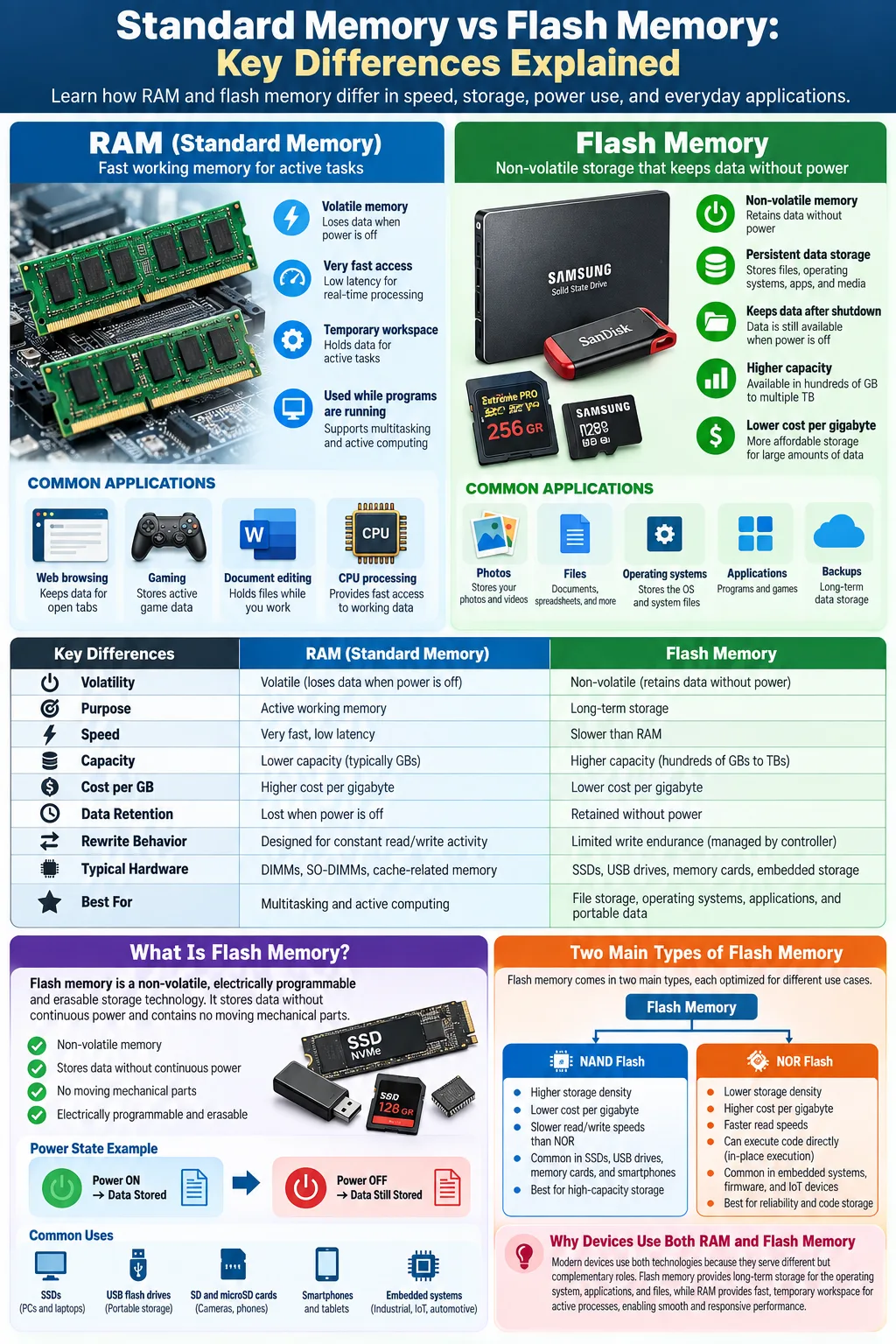
Flash memory is non-volatile storage that keeps data without power, while RAM is volatile working memory for active processes.
-
NAND and NOR are the two main flash types, with different designs and uses in SSDs, memory cards, and devices.
-
RAM is faster and more expensive with less capacity, while flash memory is slower but offers higher capacity for long-term storage.
When people say standard memory, they usually mean RAM, the fast working space a computer uses while programs are running. Flash memory serves a different purpose. It stores files, applications, photos, and operating systems even after you shut a device down. Both technologies hold digital data, but they differ in how they store information, how quickly they respond, how much they cost, and how long they last. Understanding the difference helps you choose the right storage for a laptop, phone, camera, gaming system, or embedded device.
What Is Flash Memory?
Definition and Characteristics
Flash memory is a type of non-volatile memory that preserves data when electrical power is removed. It stores information in memory cells made from semiconductor transistors. Unlike a hard disk, it has no spinning platters or moving read heads, so it is compact, silent, and resistant to physical shock.
Flash memory is electrically programmable and erasable. It is related to EEPROM, or electrically erasable programmable read-only memory, but flash usually erases data in larger blocks instead of one byte at a time. This design makes it practical for high-capacity consumer storage.
Types of Flash Memory: NAND vs NOR
NAND flash connects memory cells in a dense array and is optimized for storing large amounts of data. It is common in solid-state drives, memory cards, smartphones, and a USB flash drive. NOR flash provides faster random reading and supports direct code execution, making it useful for firmware, embedded systems, and device boot instructions. NAND generally offers greater density and lower cost per gigabyte.
History and Invention
Fujio Masuoka developed flash memory while working at Toshiba in the 1980s. Toshiba introduced the technology as a practical way to erase and rewrite large groups of memory cells. Its low size, low power needs, and ability to retain data helped it spread from embedded electronics to cameras, phones, computers, and enterprise storage.
What Is RAM?
Definition and Characteristics
RAM is the computer's short-term workspace. It holds the operating system data, application instructions, and files that the processor needs immediately. This memory is usually volatile memory, meaning its contents disappear when power is interrupted. RAM is designed for frequent reading and writing rather than permanent file storage.
Types of RAM: DRAM vs SRAM
Dynamic RAM (DRAM) stores each bit in a capacitor controlled by a transistor. Because the capacitor gradually loses its charge, DRAM needs regular refresh operations. It is relatively dense and affordable, so it forms the main memory in desktops, laptops, servers, and game consoles.
Static RAM (SRAM) uses a flip-flop circuit to hold each bit while power is available. It does not need the same refresh process and responds very quickly, but it uses more circuitry per bit and costs more. SRAM is therefore common in processor caches rather than large system memory modules.
Role of RAM in Computing
When you open a browser, edit a document, or load a game, the system copies needed data from permanent storage into RAM. The processor can then access that working data far more quickly. More RAM lets you keep more applications open and reduces the need to move data repeatedly between storage and the processor. However, adding RAM cannot permanently save files because its contents vanish after shutdown.
Key Differences Between Standard Memory and Flash Memory
Volatility: Non-Volatile vs Volatile
The most important difference is persistence. Flash memory is non-volatile, so it retains files without power. RAM is volatile, so it loses its working contents when the device turns off. This is why an SSD stores your operating system while RAM temporarily holds the programs currently in use.
Speed and Performance
Access speed is another major difference. RAM typically responds in nanoseconds, while flash storage usually responds in microseconds or, in some operations, longer. RAM also supports rapid random access and frequent rewriting. Flash storage must manage pages, blocks, and erase operations, which adds latency.
Storage Capacity and Cost
Storage capacity is usually much higher in flash devices. A computer may have several terabytes of flash storage but only a fraction of that amount in RAM. RAM costs more per gigabyte because it is optimized for speed. Flash is more economical for keeping large files, applications, and backups.
Physical Architecture and Technology
RAM uses circuits designed for immediate access, including capacitors in DRAM and latching circuits in SRAM. Flash uses arrays of charge-storing transistors and a controller that manages addressing, error correction, and data movement. The two technologies can exist in the same device, but they perform different jobs rather than serving as interchangeable substitutes.
How Flash Memory Works
Floating-Gate Transistor Technology
Most traditional flash memory relies on a floating-gate transistor. The transistor contains an electrically isolated gate that can trap electrons. The amount of trapped charge changes the transistor's electrical behavior. The memory system measures that behavior to determine whether a cell represents a zero, a one, or, in multi-level designs, several bits.
Data Storage and Erasure Process
Writing data moves electrons onto or away from the floating gate through controlled electrical voltage. Reading measures the cell's threshold voltage without removing the stored charge. Erasing requires a higher voltage to remove charge from an entire block or group of cells. This block-based erasure explains why flash storage uses a controller to reorganize data before rewriting it.
Modern NAND designs may store multiple bits in one cell, such as multi-level cell, triple-level cell, or quad-level cell formats. More bits increase density and reduce cost per gigabyte, but they also make voltage levels harder to distinguish and can reduce endurance.
Wear Leveling and Longevity
Each cell supports a limited number of write cycles before its insulating layers degrade. A flash controller uses wear leveling to spread writes across available cells instead of repeatedly using the same location. It also uses error correction, spare blocks, and garbage collection to maintain reliable performance. These systems help modern SSDs last for years, although heavy workloads can consume endurance faster.
How RAM Works
Data Storage Mechanism in DRAM and SRAM
In dynamic RAM, each bit is represented by the charge in a tiny capacitor. A charged or discharged state corresponds to different binary values. Accessing a DRAM cell can disturb its charge, so the memory circuitry reads and restores the value. SRAM instead uses several transistors arranged as a stable latch. That latch keeps its state as long as power continues.
Volatility and Refresh Cycles
Both DRAM and SRAM are volatile because their circuits need continuous power. DRAM also needs regular refresh cycles, during which the memory controller reads and restores stored charges. These refresh operations consume some energy and can briefly affect availability, although modern memory systems manage them efficiently. SRAM avoids refresh cycles but requires more silicon area, which makes large amounts impractical.
Interaction with CPU and System Performance
The processor uses RAM as a staging area between fast CPU registers and slower permanent storage. A memory controller coordinates requests, manages timing, and transfers data through the memory bus. If a computer does not have enough RAM, it may use part of its flash storage as virtual memory. That prevents a crash in many cases, but performance drops because flash has much higher latency than actual RAM.
Common Applications of Flash Memory and RAM
Flash Memory in SSDs, USB Drives, and Mobile Devices
Flash memory appears in devices that must retain information after power loss. A solid-state drive (SSD) uses NAND flash to store an operating system, applications, and personal files. Compared with a mechanical hard drive, an SSD usually provides faster startup, quieter operation, and better shock resistance.
A USB flash drive uses a small flash controller and NAND chips to provide portable file storage. Memory cards in cameras, drones, and handheld consoles use the same basic technology. Smartphones and tablets often combine embedded flash storage with mobile RAM on a compact circuit board. NOR flash remains useful for firmware and boot code because processors can read instructions directly from its address space.
RAM in Computers, Servers, and Gaming Consoles
RAM supports active computing tasks. Desktop and laptop systems use DRAM modules for the operating system and applications. Servers need substantial RAM to manage databases, virtual machines, and many simultaneous users. Gaming consoles use high-speed memory for game assets, rendering data, and system processes.
SRAM is commonly built into CPUs as cache memory. It stores frequently needed instructions and data close to the processor, reducing the time spent waiting for system RAM. In every case, flash provides persistent storage, while RAM supplies the temporary workspace needed during operation.
Advantages and Limitations of Flash Memory and RAM
Durability and Reliability
Flash has no moving parts, which gives it strong resistance to vibration and impact. It is well suited to portable devices and industrial equipment. RAM is also physically solid-state, but it cannot preserve information without power. Both technologies depend on reliable controllers, electrical design, and error management.
Power Consumption
Flash uses very little power when idle because it does not need to maintain a stored charge continuously. Writing and erasing can consume more energy, especially in high-performance storage. DRAM requires ongoing refresh activity, while SRAM uses power to maintain its latch state. Power-efficient RAM and flash designs are important in phones, laptops, and battery-powered sensors.
Cost Efficiency
Flash is more cost efficient for large, permanent data collections. It can provide hundreds of gigabytes or several terabytes at a reasonable price. RAM costs more per gigabyte because its circuitry prioritizes low latency and rapid access. If you need a computer to hold more active applications, more RAM helps. If you need to keep more files, a larger flash device is usually the better investment.
Write Cycle Limitations in Flash Memory
Flash cells have finite write cycles, while RAM is built for far more frequent temporary updates during normal operation. Flash controllers reduce wear with wear leveling, overprovisioning, and error correction. Even so, repeated recording workloads, such as heavy video capture or database activity, should be matched with a drive designed for suitable endurance.
Choosing Between Flash Memory and RAM for Your Needs
Factors to Consider: Speed, Capacity, Cost
Start by deciding whether you need temporary working space or persistent storage. Choose RAM when low latency and rapid access matter most, such as multitasking, compiling software, editing media, or running virtual machines. Choose flash when you need files to remain available after shutdown, especially when capacity, portability, and resistance to shock matter.
Consider the full system balance. Adding RAM may improve responsiveness if applications are running out of memory, but it will not fix a nearly full storage drive. Replacing a slow hard drive with an SSD can make startup and file loading much faster, but it does not provide the same benefit as adding RAM to a system that is already swapping heavily.
Use Cases and Performance Requirements
For an everyday laptop, a practical setup includes enough RAM for your workload plus an SSD for the operating system and files. A gaming computer benefits from adequate RAM, fast flash storage, and a graphics system with its own memory. A phone needs both technologies: flash for photos and apps, and RAM for active mobile processes.
For servers and professional workstations, evaluate sustained write demands, endurance ratings, error correction, and upgrade options. For embedded products, NOR flash may suit boot firmware while NAND handles bulk data. Match each technology to its role rather than asking which one is universally better.
Flash memory and RAM are complementary technologies, not direct replacements. Flash keeps your operating system and files when power is off, while RAM gives the processor fast access to active data. When choosing hardware, prioritize enough RAM for your workload and enough flash capacity for your applications and files. Then check speed, endurance, power use, and upgrade options. That approach will give you a system that starts quickly, runs smoothly, and stores your data reliably.
Is flash memory the same as RAM?
No. Flash memory is non-volatile storage that keeps data without power, while RAM is volatile working memory that holds data only while a device is running.
Which is faster, RAM or flash memory?
RAM is much faster. It is designed for immediate processor access, while flash memory must manage pages, blocks, erase operations, and controller overhead.
Why does a computer need both RAM and flash memory?
Flash stores the operating system, applications, and files permanently. RAM temporarily holds the data and instructions that the CPU needs while those programs are running.
What is the difference between NAND and NOR flash?
NAND flash offers high density and low cost for storage products such as SSDs and memory cards. NOR flash supports fast random reads and direct code execution, so it is often used for firmware and boot code.
Does flash memory wear out?
Yes. Flash cells support a limited number of write and erase cycles. Controllers extend usable life through wear leveling, error correction, spare blocks, and garbage collection.
Will adding RAM make my computer storage larger?
No. Adding RAM can improve multitasking and reduce slowdowns, but it does not increase the space available for files. To increase file storage, you need a larger flash drive or another storage device.




