

Buffered vs Unbuffered RAM: Understand the Key Differences
Compare speed, stability, compatibility, cost, and ideal system uses before upgrading your memory
-
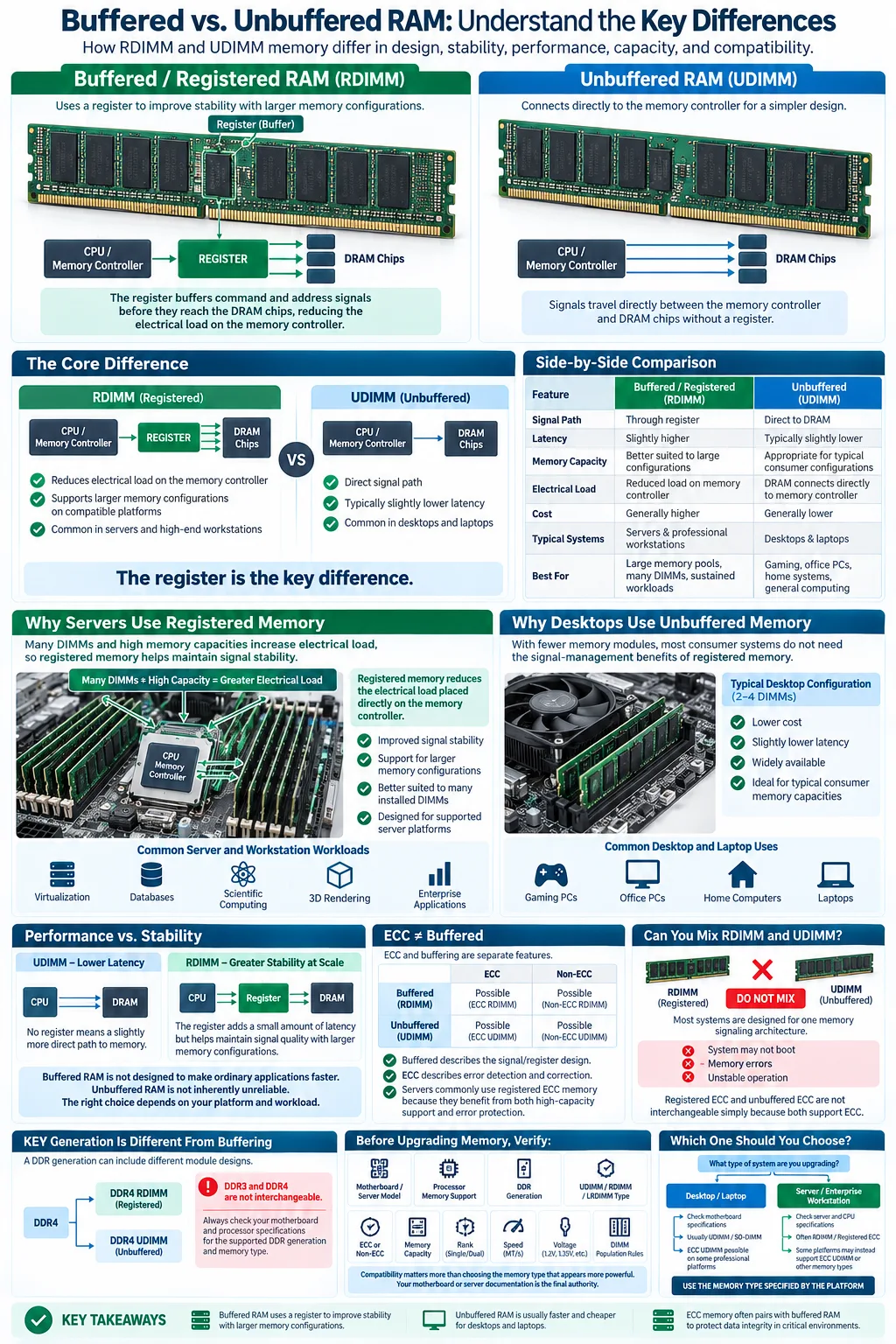
Buffered RAM uses an additional register to improve stability during heavy workloads, making it suitable for servers and workstations.
-
Unbuffered RAM is usually faster and cheaper, so it is common in desktops and laptops where a buffer is unnecessary.
-
ECC memory often pairs with buffered RAM to protect data integrity in critical computing environments.
RAM is not simply a matter of capacity. The way memory communicates with the processor also affects compatibility, reliability, cost, and practical performance. The main distinction between buffered RAM and unbuffered RAM is the presence of a register between the memory controller and the DRAM chips. That small design change makes registered memory better suited to systems with many memory modules, while standard unbuffered memory is the normal choice for most personal computers. Understanding this difference helps you avoid incompatible upgrades and choose memory that matches your motherboard, processor, and everyday tasks.
What Is RAM and How Does It Work?
Basic RAM Functionality
RAM, or random access memory, is the computer's short-term working space. When you open an application, load a game, or edit a video in Final Cut Pro, the operating system moves active program data from storage into RAM. This gives the processor much faster access than it would have from an SSD or hard drive.
RAM is temporary, so its contents disappear when power is removed. Capacity affects how many applications and files you can keep active, while speed and timings affect how quickly the system can exchange data. The memory controller, located in the processor on most modern systems, coordinates these transfers and determines which memory standards the platform supports.
Types of RAM: SRAM vs DRAM
DRAM stores each bit in a capacitor and must be refreshed continually. It is relatively dense and affordable, which makes it the foundation of ordinary system memory such as DDR3 and DDR4. SRAM uses flip-flop circuits instead of capacitors. It is faster but more expensive and less dense, so it is mainly used for processor cache rather than large memory modules.
Buffered and unbuffered designs generally refer to how DRAM modules connect to the memory controller. They are not separate categories from DDR generations. A DDR4 module, for example, can be unbuffered or registered depending on its design and intended system.
What Is Buffered RAM?
Definition and Characteristics
Buffered RAM, often called registered RAM or RDIMM, places a register between the memory controller and the DRAM chips. The register briefly holds command and address signals before passing them to the memory chips. This reduces the electrical load placed directly on the memory controller, especially when a system contains many modules.
Because the register adds an extra step, registered memory can have slightly higher latency than comparable unbuffered memory. Its main advantage is not a higher speed in ordinary desktop tasks. Instead, it provides greater electrical stability and allows supported platforms to address larger memory capacities. Buffered modules also require compatible motherboard firmware and a processor platform designed for them.
Use Cases in Servers and Workstations
Registered memory is common in servers, professional workstations, and other systems that operate continuously or use large amounts of RAM. A database server, virtualization host, scientific workstation, or 3D rendering machine may contain many memory modules. The register helps the system maintain signal quality as that memory load increases.
Server RAM frequently combines registered design with ECC, although these features are separate. A server can use ECC unbuffered memory, and some registered modules may not provide ECC. Always check the platform's specifications. A workstation used for applications such as Final Cut Pro may benefit from high capacity, but it does not automatically require registered memory.
What Is Unbuffered RAM?
Definition and Characteristics
Unbuffered RAM, also called UDIMM memory, connects the DRAM chips directly to the memory controller. It does not include a register that temporarily holds command and address signals. The simpler path reduces design complexity and typically produces slightly lower access latency than an equivalent registered module.
Unbuffered memory supports the capacity limits and electrical requirements of the consumer platform for which it is designed. That makes it an efficient choice for systems with a modest number of modules. It is available in many forms, including standard DDR3 and DDR4 desktop modules, laptop SO-DIMMs, and some ECC modules intended for compatible workstations.
Common Use in Desktops and Laptops
Most home computers, gaming PCs, office desktops, and laptops use unbuffered memory. This includes systems running Windows, Linux, or Mac OS X, although Apple hardware has specific physical and firmware requirements that must be checked before purchase. A typical desktop motherboard is designed for two to four modules, so it usually does not need the signal-management benefits of a register.
Unbuffered RAM is also normally less expensive and easier to find than registered memory. For web browsing, gaming, schoolwork, photo editing, and most consumer applications, the direct connection provides appropriate performance without the added cost or compatibility requirements of a buffer.
Key Differences Between Buffered and Unbuffered RAM
Performance Comparison
Unbuffered memory often has a small latency advantage because signals travel directly between the memory controller and DRAM chips. In everyday use, however, the difference is usually modest. Capacity, memory speed, processor design, and application behavior often matter more. In a large server, buffered RAM can deliver better real-world results because it supports a larger, more stable memory configuration.
Stability and Reliability
The main advantage of registered memory is stability under heavy electrical loads. The register reduces the number of signals the memory controller must drive directly, which helps when a server has many modules or very high capacity. This does not mean unbuffered memory is unreliable. It is dependable when installed within the limits of a compatible consumer motherboard.
Reliability also depends on cooling, motherboard quality, firmware, and whether the system uses ECC. A properly matched unbuffered kit is a better choice than unsupported registered memory.
Cost Implications
Unbuffered RAM is generally cheaper because its design is simpler and it targets high-volume desktop and laptop markets. Buffered modules cost more and may require server-grade processors or motherboards. Their value appears when you need high capacity, continuous operation, virtualization, or demanding professional workloads.
Do not choose based on speed ratings alone. A registered DDR4 module cannot replace an unbuffered DDR4 module if the motherboard does not support it, and the same applies in reverse.
ECC vs Non-ECC Memory: How They Relate to Buffered and Unbuffered RAM
What Is ECC Memory?
ECC memory, or Error-Correcting Code memory, adds extra bits that let the system detect and correct certain single-bit errors. These errors can result from electrical interference, hardware faults, or random radiation events. Correcting them improves data integrity, which matters when an unnoticed error could corrupt a database, calculation, virtual machine, or professional project.
ECC does not mean the memory is automatically buffered. ECC UDIMMs are unbuffered, while ECC RDIMMs are registered. The extra error-checking circuitry can also introduce platform-specific requirements, so the motherboard and processor must support ECC for its protections to function.
Compatibility with Buffered and Unbuffered RAM
Non-ECC memory lacks the additional error-checking bits and is the normal choice for many consumer systems. It is often less expensive and works well for gaming, office applications, and general use. Some platforms can physically accept an ECC module but operate it without ECC correction, while others will not boot with it at all.
Servers commonly use registered ECC modules because they need both high capacity and error protection. Workstations may use ECC UDIMMs or RDIMMs depending on the processor and motherboard. Check the system manual for the exact type, rank, voltage, maximum capacity, and supported DDR generation before buying.
Can You Mix Buffered and Unbuffered RAM?
Technical Limitations
In most systems, you cannot mix buffered and unbuffered RAM. The motherboard's memory controller and firmware are designed for one signaling architecture, and the modules initialize differently. Installing both types can prevent the computer from starting, produce memory errors, or cause unstable operation. Registered ECC and unbuffered ECC are not interchangeable simply because both use error correction.
There are also other compatibility limits. All modules should use a supported DDR generation, such as DDR3 or DDR4, and the system must support their voltage, capacity, rank layout, and speed. DDR3 cannot be installed in a DDR4 slot, even if the modules look similar.
Best Practices
Start with the motherboard or server manual. Identify whether it requires UDIMM, RDIMM, LRDIMM, or another specified format. Then buy a matched kit whenever possible, using modules with the same capacity, speed, timings, voltage, and ECC status.
For an upgrade, match the existing module's exact type rather than relying only on its brand or advertised speed. If the system already contains registered server RAM, add compatible registered modules. If it uses unbuffered desktop RAM, use additional unbuffered modules within the board's supported capacity. After installation, run the system's memory diagnostic or a reputable bootable test. This confirms that the configuration is stable before you trust it with important files.
Choosing the Right RAM for Your System
Considerations for Desktop Users
Choose unbuffered RAM for most desktops and laptops. Confirm the DDR generation, maximum supported capacity, module format, and number of slots. A gaming desktop may use standard non-ECC UDIMMs, while a professional workstation may support ECC UDIMMs. Do not assume that a faster-rated kit will work if the motherboard does not list it as supported.
Prioritize enough capacity for your applications. A computer used for browsing and office work needs less memory than one running virtual machines, large creative projects, or Final Cut Pro. Reviews from technology sites such as DiamondLobby can help with product comparisons, but your motherboard manual remains the final authority on compatibility.
Considerations for Server and Workstation Users
For servers, virtualization hosts, and demanding workstations, identify whether the platform supports ECC, registered memory, or both. Registered ECC RAM is often the correct choice when you need a large memory pool and continuous operation. Confirm the maximum number of modules per channel, supported ranks, population order, and total capacity.
Think about the application as well as the hardware. Database systems, virtual machines, rendering, engineering simulations, and scientific workloads can benefit from capacity, error correction, and a stable memory layout. If your workstation only has a few slots and moderate memory needs, ECC unbuffered RAM may be more suitable than RDIMMs. The right choice is the type your processor and motherboard explicitly support, not simply the most expensive option.
For most desktops and laptops, unbuffered RAM offers the best balance of price, compatibility, and low latency. Buffered RAM makes more sense when you are building a server or workstation that needs high capacity, many modules, and dependable operation under sustained workloads. ECC is a separate feature that improves error protection and can be available with either design. Before upgrading, check the motherboard manual, processor specifications, DDR generation, module type, and maximum supported capacity. Matching those details will prevent failed boots and give you reliable memory for the way you actually use your system.
Is buffered RAM faster than unbuffered RAM?
Usually not. Unbuffered RAM often has slightly lower latency, while buffered RAM is designed to improve signal stability and support larger memory configurations. In servers, that stability can matter more than the small latency difference.
Can I use registered RAM in a normal desktop?
Usually, no. Most consumer desktop motherboards support unbuffered UDIMMs and do not support registered RDIMMs. Check the motherboard and processor specifications before purchasing.
Is ECC memory the same as buffered RAM?
No. ECC describes error detection and correction, while buffered describes the register placed between the memory controller and DRAM chips. ECC memory can be unbuffered or registered.
Can you mix ECC and non-ECC RAM?
It is generally not recommended, and many systems will not boot with a mixed configuration. Even when the system starts, ECC correction may be disabled. Use modules with matching ECC status unless the platform documentation specifically permits mixing.
What type of RAM do most laptops use?
Most laptops use unbuffered SO-DIMM memory. The exact DDR generation, capacity, speed, and upgradeability depend on the laptop model, and some modern systems have memory soldered directly to the motherboard.
Does DDR4 RAM have to be buffered or unbuffered?
DDR4 modules can use either design. Consumer desktops commonly use unbuffered DDR4, while many servers use registered DDR4. The system's motherboard and processor determine which type is compatible.




