

Layer 2 vs Layer 3 Switches: Key Differences Explained
Learn how switching, routing, VLANs, and network design affect your choice
-
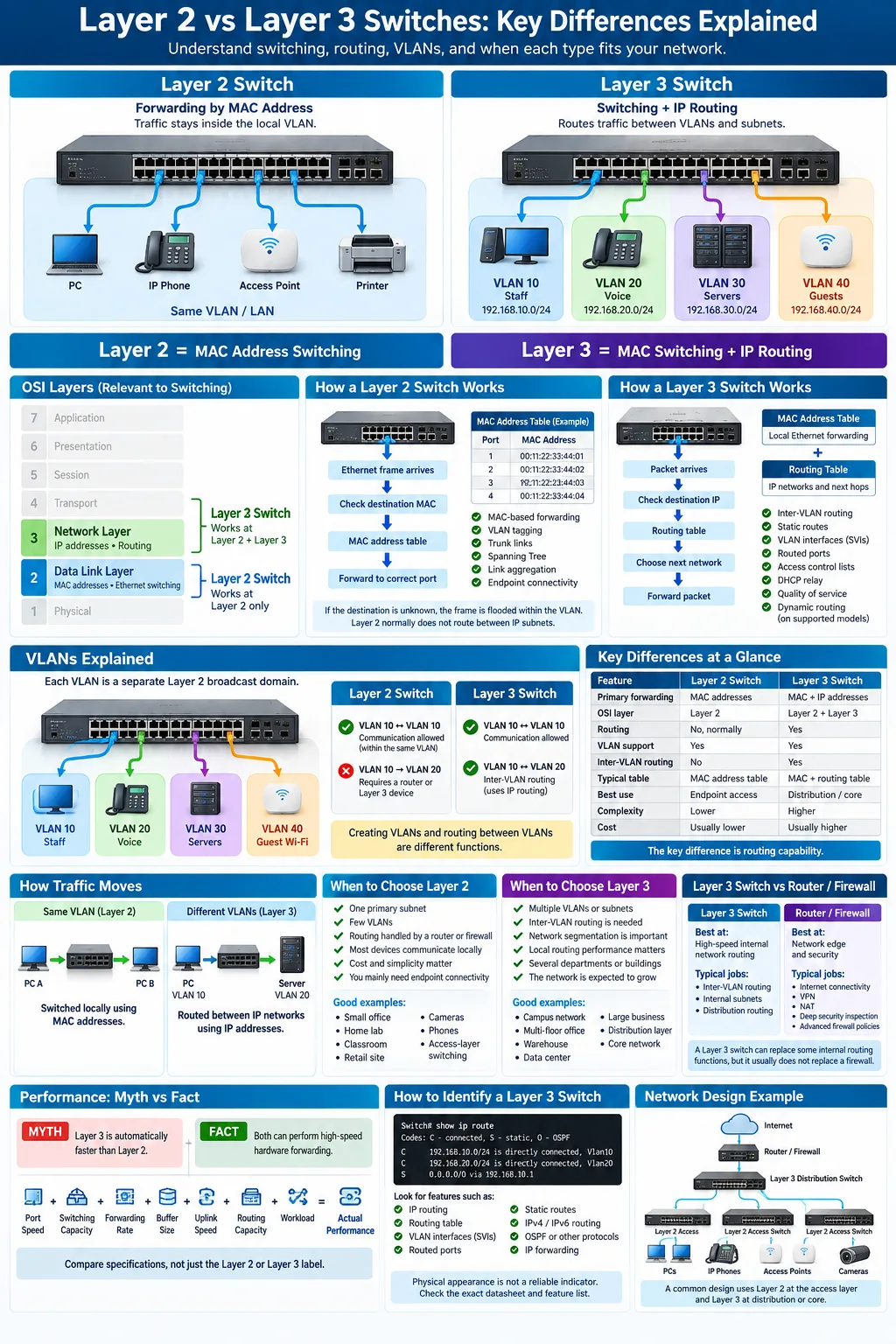
Layer 2 switches work at the Data Link Layer and forward traffic by MAC address within one segment or VLAN.
-
Layer 3 switches combine fast Layer 2 switching with routing for inter-VLAN traffic and management between networks.
-
Choose based on network size and complexity. Larger, segmented networks generally need Layer 3 routing capabilities.
Understanding the difference between a Layer 2 and Layer 3 switch helps you build a faster, cleaner, and more manageable network. Both devices connect Ethernet endpoints and forward frames, but they make decisions using different information. A Layer 2 switch works mainly with hardware addresses inside a local segment. A Layer 3 switch also understands IP networks and can route traffic between them. That difference affects VLAN design, broadcast control, security, performance, management, and cost. This guide explains how each switch works, where each one fits, and what to check before buying equipment for a home lab, office, campus, or data center.
What is a Layer 2 Switch?
Functionality and Operation at the Data Link Layer
A Layer 2 switch operates primarily at the Data Link Layer, or Layer 2, of the OSI model. It receives Ethernet frames, examines their source and destination hardware information, and sends each frame toward the correct connected device. It does not normally make forwarding decisions based on IP networks.
When a frame arrives, the switch records the source address and incoming interface in a MAC address table. This process lets the device learn which endpoint is reachable through each port. Managed models can also support VLAN tagging, trunk links, Spanning Tree Protocol, link aggregation, and access control features.
How Layer 2 Switches Forward Traffic Using MAC Addresses
A MAC address identifies a network interface at the local Ethernet level. If the destination appears in the switch table, the frame goes only to the appropriate port. If the destination is unknown, the switch floods the frame within the relevant VLAN. Broadcast and some multicast traffic are also forwarded across that VLAN.
Use Cases and Network Scenarios Ideal for Layer 2 Switches
Layer 2 switches suit small offices, simple department networks, labs, cameras, phones, and access-layer deployments where routing occurs elsewhere. They are effective when devices mostly communicate inside the same subnet and the network does not need local routing decisions.
What is a Layer 3 Switch?
Combining Switching and Routing Functions
A Layer 3 switch is a switch with IP forwarding functions. It retains the fast frame-forwarding behavior of a traditional switch while adding routing capability between separate IP networks. This makes it a practical choice for distributing traffic across departments, buildings, or application zones.
Most Layer 3 switches still use dedicated switching hardware for common forwarding tasks. They can therefore route local network traffic at high speed, often without sending every packet to a separate router. Exact throughput and features depend on the model, license, and software version.
Operating at Both Data Link and Network Layers
Layer 3 devices operate at the Data Link Layer and the Network Layer, Layer 3 of the OSI model. They use MAC addresses for local Ethernet forwarding and IP addresses, prefixes, and routing tables for traffic between networks. This dual role is why a Layer 3 switch is often described as a hybrid device.
Capabilities Like Static Routing and Inter-VLAN Routing
Common features include static routing, dynamic routing support, default routes, access control lists, quality of service, and DHCP relay. A switch can assign an IP interface to each VLAN, creating a gateway for that subnet. This enables inter-VLAN routing, allowing approved communication between users, servers, voice devices, and other segmented networks.
Key Differences Between Layer 2 and Layer 3 Switches
Routing Capability vs. Switching Only
The central difference is routing. A Layer 2 switch forwards Ethernet frames inside a local network segment, while a Layer 3 switch can forward packets between IP subnets. A Layer 2 design usually relies on a router or firewall for communication between VLANs. A Layer 3 design can place that gateway function directly on the switch.
Layer 2 forwarding uses a MAC address table. Layer 3 forwarding uses a routing table and IP prefixes, then typically resolves the next hop with ARP or Neighbor Discovery. A Layer 3 switch may also support route filtering and access control, although advanced security policies may still belong on a firewall.
Handling of Broadcast Domains and VLANs
A VLAN creates a logical Layer 2 segment. Each VLAN is normally a separate broadcast domain, which limits where broadcasts travel. A Layer 2 switch can create and carry VLANs, but it cannot normally route between them. A Layer 3 switch can provide an IP gateway for multiple VLANs and control traffic between those domains.
Port Density and Performance Considerations
Switch port density describes how many usable interfaces a device provides. Layer 2 access switches often offer many affordable ports for endpoint connectivity. Layer 3 switches may cost more, but they can consolidate routing and reduce unnecessary traffic paths. Compare switching capacity, forwarding rate, uplink speed, buffer size, PoE budget, latency, and routing performance rather than relying on the layer label alone.
When to Choose a Layer 2 Switch
Small or Simple Network Environments
Choose a Layer 2 switch when your network has one primary subnet, limited segmentation, and a router or firewall already handles Internet access and routing. It is a sensible fit for a small office, home lab, retail site, classroom, or basic surveillance installation. Unmanaged switches can work for very simple deployments, while managed models add VLANs, monitoring, loop protection, and port controls.
Reducing Network Congestion Within a Single LAN
Modern switched Ethernet reduces network congestion by giving each connected device a dedicated collision-free link. A Layer 2 switch forwards local traffic directly instead of sending every frame through a shared hub or central router. It can also separate selected traffic with VLANs, although communication between those VLANs still requires a Layer 3 device.
Cost and Performance Benefits
Layer 2 hardware generally costs less and is simpler to configure than a comparable Layer 3 platform. That can lower purchase, licensing, support, and training costs. It also delivers strong line-rate performance for ordinary endpoint traffic. Select a managed Layer 2 model if you need VLAN tagging, link aggregation, Spanning Tree, SNMP, PoE, or remote troubleshooting. Do not choose it solely because it is cheaper if your network will soon need multiple routed segments.
When to Choose a Layer 3 Switch
Large or Complex Networks with Multiple VLANs
A Layer 3 switch is a strong choice for a campus, growing business, multi-floor office, warehouse, or data center with several VLANs and subnets. You can place routing close to users and servers, reducing the need to backhaul local traffic to a central router. This design supports cleaner network segmentation for staff, guests, voice, cameras, servers, and building systems.
Need for Inter-VLAN Routing and Advanced Traffic Management
Choose Layer 3 when users or applications must communicate across VLAN boundaries. The switch can provide gateways, apply access control lists, prioritize voice or video, and use static or dynamic routes. These features help you restrict sensitive systems while allowing required services such as DNS, authentication, printing, and application access. A firewall remains important when traffic requires deep inspection or Internet security policy.
Hybrid Network Setups Combining Speed and Intelligence
Layer 3 switches are useful in hybrid designs that combine high-speed local forwarding with centralized security. For example, a distribution switch can route between access VLANs, send Internet traffic to a firewall, and connect to a data center through routed uplinks. Cisco, Huawei, H3C, and Ruijie offer platforms across access, aggregation, and core roles. Confirm licensing requirements because some models reserve advanced routing or security features for specific software packages.
How to Identify if Your Switch is Layer 2 or Layer 3
Checking Device Specifications and Model Numbers
Start with the manufacturer datasheet, installation guide, and exact model number. Search specifically for terms such as IPv4 routing, IPv6 routing, SVI, routed port, OSPF, static routes, or Layer 3 Lite. A product described only as an Ethernet, smart, or managed switch may still be Layer 2 only. Marketing labels vary, so the technical feature list matters more than the product family name.
Using Network Management Tools
Sign in to the management interface or command-line interface and look for routing tables, VLAN interfaces, IP forwarding, and route configuration. On Cisco equipment, commands such as show ip route and show ip interface brief can reveal Layer 3 functions. Comparable Huawei and H3C commands expose VLAN interfaces and routing status. SNMP platforms, controller dashboards, and topology tools can also show whether the switch is acting as a gateway.
Physical and Software Feature Indicators
Physical appearance is not a reliable test. Both types may have identical rack mounts, fiber uplinks, PoE ports, and management screens. The strongest indicators are configurable IP interfaces on VLANs, routed physical ports, static route settings, dynamic routing protocols, and an enabled IP forwarding option. Some entry-level devices advertise Layer 3 features but support only limited static routing, so check route scale, ACL capacity, IPv6 support, and license restrictions before deployment.
Popular Layer 2 and Layer 3 Switch Models in 2025
Top Layer 2 Switches from Cisco, Huawei, and TP-Link
In 2025, common Layer 2 choices include Cisco Catalyst access switches, Huawei eKit and CloudEngine access products, H3C access platforms, and TP-Link Omada smart or JetStream models. Product availability and software features vary by region. Compare port count, PoE output, uplink speed, VLAN scale, management method, warranty, and cloud or controller support instead of choosing by brand alone.
TP-Link Omada switches can be attractive for small businesses that want centralized management alongside wireless access points. Cisco and Huawei options often provide broader enterprise monitoring, redundancy, and support ecosystems. Match the switch to the network's operational needs and administrator experience.
Leading Layer 3 Switches and Their Features
Layer 3 lines from Cisco Catalyst, Huawei CloudEngine, H3C, Ruijie, and other enterprise vendors commonly add VLAN interfaces, static routing, ACLs, redundancy, and dynamic routing. Higher-end models may include 10, 25, 40, or 100 gigabit uplinks, stacking, telemetry, and large route tables. Validate whether the advertised Layer 3 feature set is included or requires a license.
Emerging Technologies in Switching Hardware
Switching hardware increasingly supports multi-gigabit access, Power over Ethernet for Wi-Fi 6 and Wi-Fi 7, cloud management, automation APIs, zero-touch provisioning, and stronger telemetry. The Ruijie RG-AP820-I and Ruijie RG-AP9861-R are wireless access point examples rather than switches, but they illustrate why switch selection must include wireless uplink speed, PoE budgets, and controller compatibility. Use current datasheets because model revisions and regional bundles change frequently.
Considerations Before Purchasing a Switch
Assessing Network Requirements and Growth Plans
Map your endpoints, VLANs, uplinks, PoE devices, Internet connections, and expected growth before comparing models. Count wired users, phones, cameras, access points, servers, and spare ports. Decide whether routing belongs at the access, distribution, core, firewall, or cloud edge. If you expect multiple subnets or site expansion, buying Layer 3 capability early may avoid a disruptive redesign.
Budget Constraints and Total Cost of Ownership
Compare more than the purchase price. Include licenses, controller subscriptions, optics, support contracts, power use, replacement coverage, installation, and administrator time. A lower-cost Layer 2 switch may be the best value for a simple network. A Layer 3 switch can have a lower total cost when it replaces a separate router, reduces cabling complexity, or handles growth without additional hardware.
Compatibility with Existing Network Infrastructure
Check VLAN tagging, trunk standards, spanning-tree behavior, link aggregation, routing protocols, authentication, monitoring, and management platforms. Confirm that the switch works with your firewall, wireless controller, access points, and fiber modules. For Cisco, Huawei, H3C, TP-Link, or Ruijie equipment, verify firmware support and interoperability rather than assuming every feature behaves identically. Also check PoE standards and budget if you will power devices such as phones or access points.
Choose a Layer 2 switch when you need reliable connectivity inside a simple segment and routing already exists elsewhere. Choose a Layer 3 switch when you need multiple VLANs, local gateways, controlled traffic between subnets, or room to grow. Before buying, document your ports, VLANs, uplinks, PoE demand, security policies, and expected expansion. Then compare real forwarding, routing, management, and support features. The right choice is the one that meets today's traffic needs without forcing an expensive redesign next year.
What is the main difference between a Layer 2 and Layer 3 switch?
A Layer 2 switch forwards Ethernet frames using MAC addresses within a local segment or VLAN. A Layer 3 switch also uses IP addresses and routing tables to move traffic between different subnets and VLANs.
Can a Layer 2 switch support VLANs?
Yes. Managed Layer 2 switches commonly create VLANs, assign access ports, and carry tagged trunk traffic. They usually cannot route traffic between those VLANs without a router or Layer 3 switch.
Do I need a Layer 3 switch for inter-VLAN routing?
You need a Layer 3 device for inter-VLAN routing, but it does not have to be a Layer 3 switch. A router or firewall can perform the function, while a Layer 3 switch often provides higher local throughput.
Is a Layer 3 switch faster than a Layer 2 switch?
Not automatically. Both can provide high-speed hardware forwarding. Layer 3 switches add routing functions, but actual performance depends on port speeds, switching capacity, route scale, packet size, and the specific model.
Can a Layer 3 switch replace a router or firewall?
It can replace some internal routing functions, including routing between VLANs and sites in suitable designs. It usually does not replace a firewall's full security inspection, Internet policy, VPN, or advanced threat protection features.
How can I tell whether my switch supports Layer 3 routing?
Check the exact datasheet and management interface for routing tables, VLAN interfaces, routed ports, static routes, or protocols such as OSPF. Product labels alone are not reliable because some smart switches offer only limited Layer 3 features.
Which switch should a small business buy?
A small business with one subnet may only need a managed Layer 2 switch. If it uses separate VLANs for staff, guests, voice, cameras, and servers, a Layer 3 switch can simplify routing and improve network growth.




