

What You Need to Know About Power Supply Wattages
Choose the right PSU wattage for stability, efficiency, safety, and future upgrades
-
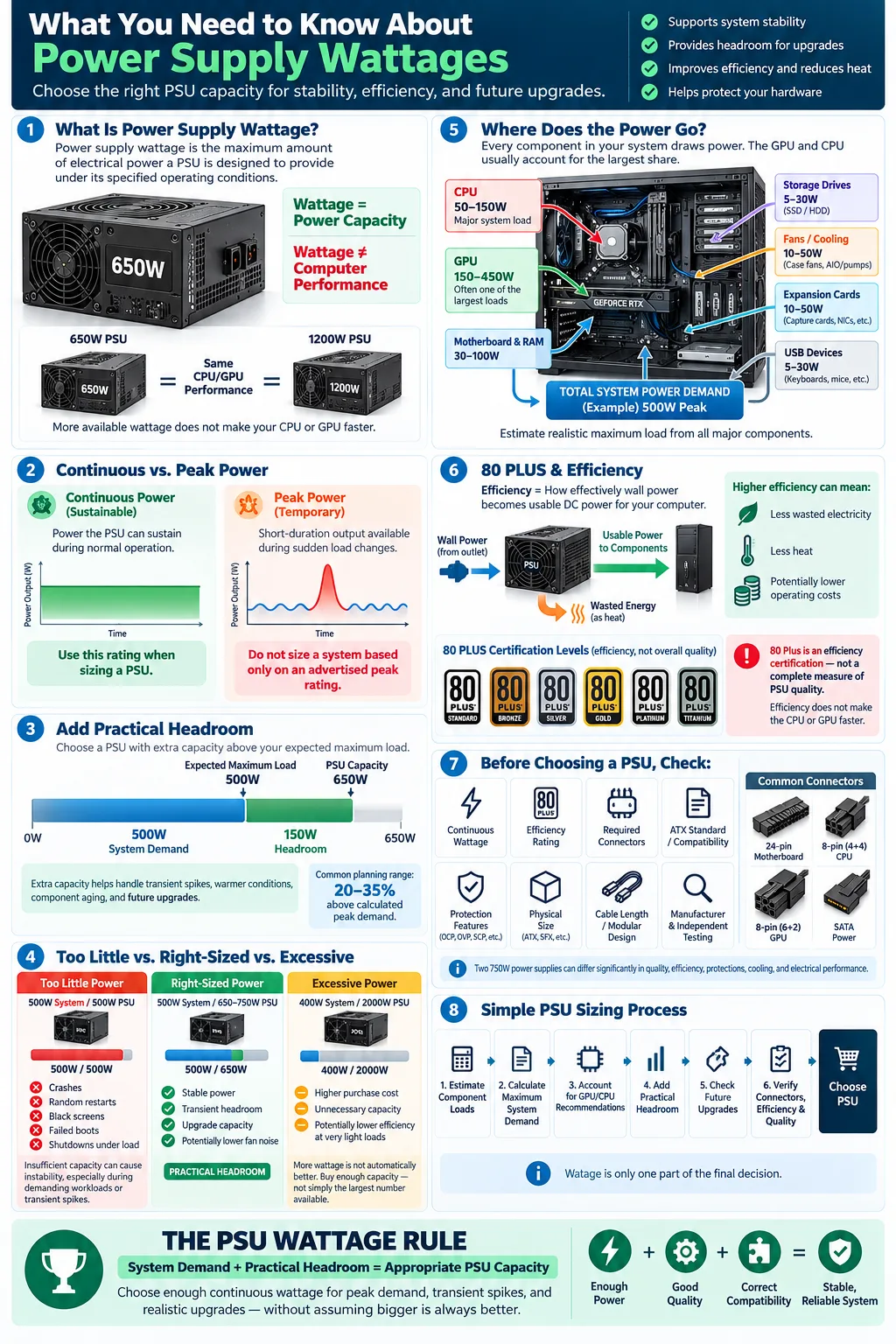
The correct power supply wattage supports system stability and helps prevent hardware damage.
-
Choose wattage above peak consumption to provide headroom for upgrades and overclocking.
-
80 Plus certification can reduce wasted energy, heat output, and electricity costs.
Choosing a power supply is not simply a matter of picking the largest number on the shelf. The right unit must deliver enough power for your processor, graphics card, drives, cooling, and other devices while remaining reliable under demanding loads. Your choice also affects efficiency, heat, noise, upgrade flexibility, and protection against electrical problems. Understanding power supply wattages helps you avoid random shutdowns, failed upgrades, and unnecessary spending. Whether you are building a gaming PC, upgrading an office computer, or replacing an aging unit, the wattage label is an important starting point, not the only specification that matters.
What Is Power Supply Wattage?
Definition and Importance
Power supply wattage is the maximum amount of electrical power a power supply unit (PSU) is designed to provide to a computer. A unit labeled 650 watts can supply up to 650 watts under its specified operating conditions. This output is distributed through different voltage rails, with the 12 volt rail handling much of the demand from modern processors and graphics cards.
The wattage rating helps you compare a PSU with your computer's needs, but it does not measure quality by itself. Two 750 watt units can differ substantially in voltage regulation, component quality, cooling, protection features, and efficiency. A reputable PSU that follows the appropriate ATX standard is generally a safer choice than a cheaper model with an impressive label.
Difference Between Peak and Continuous Wattage
Continuous power is the output a PSU can sustain during normal operation. Peak power is a short burst the unit may provide during sudden load changes. For planning purposes, use the continuous rating, not the peak figure. Some low quality products emphasize a brief peak number that does not represent dependable long term output.
Your computer's real demand changes constantly. Browsing may use little power, while gaming, rendering, or compiling can increase the power draw sharply. A reliable PSU should meet that sustained demand without operating at its limit.
How to Determine the Right Wattage for Your System
Calculating Total Power Consumption
Start by estimating the power consumption of every major device. The processor and graphics card usually account for the largest share, but include the motherboard, memory, storage drives, fans, pumps, USB devices, and expansion cards. Manufacturer specifications, independent reviews, and reputable online PSU calculators can provide useful estimates. Use realistic maximum loads rather than idle figures.
Add the estimated demands together, then choose a PSU with additional reserve. For example, if your system could reach 500 watts, a quality 650 watt or 750 watt unit may be more appropriate than a 550 watt model. The exact choice depends on the hardware, expected workload, and the unit's quality.
Considering System Components and Upgrades
Review all system components, including parts you may install later. A more powerful graphics card can raise your requirements significantly, and additional drives, cooling hardware, or expansion cards also add load. Check the manufacturer's stated power requirements for your graphics card and processor, while remembering that those figures may include recommended system reserve.
Heavy workloads and overclocking can increase demand beyond stock specifications. If you plan to tune voltage or clock speeds, allow more reserve and verify that the PSU has suitable cables. Avoid choosing a wattage based only on today's parts if you expect to keep the unit through several upgrade cycles.
Why Does Wattage Matter for Computer Stability?
Impact of Insufficient Wattage
A PSU that cannot reliably meet demand may cause crashes, sudden restarts, screen blackouts, failed boots, or shutdowns during demanding tasks. In severe cases, unstable power can stress components or trigger protection circuits. These symptoms can also result from overheating, defective memory, driver issues, or a failing motherboard, so insufficient wattage is not always the only possible cause.
Modern graphics cards can create brief load spikes that are higher than their average consumption. If the PSU has little reserve or weak transient response, the system may become unstable even when the advertised average load appears acceptable. This is why quality and design matter alongside the wattage number.
Benefits of Having Headroom
Headroom is the extra capacity between your system's expected maximum demand and the PSU's continuous rating. A sensible reserve helps the unit handle transient spikes, aging, warmer operating conditions, and future component changes. It can also allow the PSU fan to run more slowly at moderate loads, reducing noise.
Headroom does not mean buying the biggest unit available. A 2,000 watt PSU for a 400 watt computer may cost more and operate less efficiently at very light loads. Select a reliable model that leaves a practical reserve, commonly around 20 to 35 percent above calculated peak demand, while following the recommendations for your specific graphics card.
Understanding Power Supply Efficiency Ratings
What Is 80 Plus Certification?
An efficiency rating describes how effectively a PSU converts electricity from the wall into usable power for your computer. The 80 Plus certification program identifies units that meet minimum efficiency requirements at defined load levels. Certification levels include Standard, Bronze, Silver, Gold, Platinum, and Titanium, with higher levels generally requiring greater efficiency.
Certification is useful, but it is not a complete quality score. It does not guarantee the best voltage regulation, fan acoustics, internal components, or warranty. Use it alongside independent testing, manufacturer reputation, protections, and the correct output capacity.
How Efficiency Affects Power Usage and Heat
A less efficient PSU must draw more electricity from the wall to deliver the same power to your hardware. The unused energy becomes heat inside the unit. A more efficient model can reduce waste, lower heat output, and potentially reduce electricity costs over time, especially in a computer that runs many hours each day.
Efficiency changes with load, so a certification label does not mean the PSU delivers its top efficiency at every operating point. Choose a capacity that keeps your usual workload within a sensible range. Also remember that efficiency does not increase the performance of your processor or graphics card. It mainly affects electrical waste, heat, and operating cost.
Additional Factors to Consider When Choosing a Power Supply
Power Connectors and Compatibility
Check the power connectors before buying. Your motherboard may need a 24 pin main connector and a 4 or 8 pin CPU connector. A graphics card may require one or more 6 pin, 8 pin, or newer high power connectors. Confirm that the PSU includes the correct native cables rather than relying on questionable adapters.
Modular, semi modular, and fixed cable designs offer different installation experiences. Modular units let you remove unused cables, while fixed cable models can cost less. Confirm physical dimensions, mounting support, cable length, and compatibility with your case. For a new build, a PSU that supports the relevant ATX standard and newer graphics card connector requirements can make future upgrades easier.
Surge Protection and Safety Features
Surge protection helps guard against sudden increases in electrical voltage, while other protections can respond to overvoltage, undervoltage, overcurrent, short circuits, overheating, and excessive power. Look for clearly documented protection features from a reputable manufacturer.
A PSU is only one part of your electrical safety setup. A quality surge protector or uninterruptible power supply can provide additional protection, particularly in areas with unreliable power. Never open a PSU unless you are trained to work with high voltage electronics. Capacitors can retain dangerous charge even after the computer is unplugged.
Common Myths About Power Supply Wattage
Bigger Wattage Means Better Performance?
A higher wattage does not make your processor or graphics card run faster. The power supply capacity only describes how much power the unit can provide. If your hardware needs 450 watts, moving from a good 650 watt PSU to a 1,200 watt model will not increase frame rates or application performance.
A larger unit can be useful when it provides needed headroom, supports a future graphics card, or offers better build quality and connectors. However, compare efficiency, voltage regulation, protections, noise, warranty, and independent reviews instead of treating wattage as a performance score.
Is Overestimating Wattage Always Safe?
Moderately overestimating capacity is usually safe when the PSU is well designed and compatible with your system. It does not force extra power into the computer. Components draw what they need, while the PSU supplies power according to the system's demand.
Excessive overestimation can waste money, create cable and installation problems, and place your normal workload at an unnecessarily light load where efficiency may be lower. It can also distract you from more important checks, such as connector compatibility and product quality. Choose enough capacity for peak demand, practical headroom, and realistic upgrades rather than selecting the largest number you can find.
To choose confidently, estimate your computer's maximum realistic load, check the graphics card and processor recommendations, and add practical reserve for spikes and future upgrades. Then compare reputable PSUs by continuous output, efficiency, connectors, protections, warranty, and independent testing. A correctly sized unit gives you stable operation without unnecessary cost. Treat wattage as one part of the decision, and you will be better prepared to build or upgrade a computer that runs safely, quietly, and reliably.
How many watts should a gaming PC power supply have?
The correct wattage depends on your processor, graphics card, drives, cooling, and planned upgrades. Estimate maximum system demand, then choose a quality PSU with roughly 20 to 35 percent reserve, while following the graphics card manufacturer's guidance.
Is a higher wattage PSU better for a computer?
Not automatically. A higher wattage PSU only provides more available capacity. It does not improve performance unless your current unit is inadequate, and quality, efficiency, protections, connectors, and voltage regulation remain important.
What is the difference between peak and continuous wattage?
Continuous wattage is the output a PSU can sustain during normal operation. Peak wattage describes a short burst, so use the continuous rating when matching a power supply to your system.
What does 80 Plus certification mean?
80 Plus certification indicates that a PSU meets defined efficiency requirements at specified load levels. Higher certification tiers generally waste less energy, but certification alone does not guarantee overall product quality.
Can a power supply be too powerful for a PC?
A PSU with more capacity than your system needs is generally safe if it is compatible and high quality. However, an excessively large unit may cost more and can be less efficient during very light workloads.
What happens if a PSU does not have enough wattage?
The computer may crash, restart, shut down, fail to boot, or show instability during demanding tasks. These symptoms can have other causes, but insufficient capacity or poor transient handling is a common possibility.




