

What Is Hard Drive Spindle Speed and Why It Matters
Understand RPM, drive performance, and choosing the right storage for your needs
-
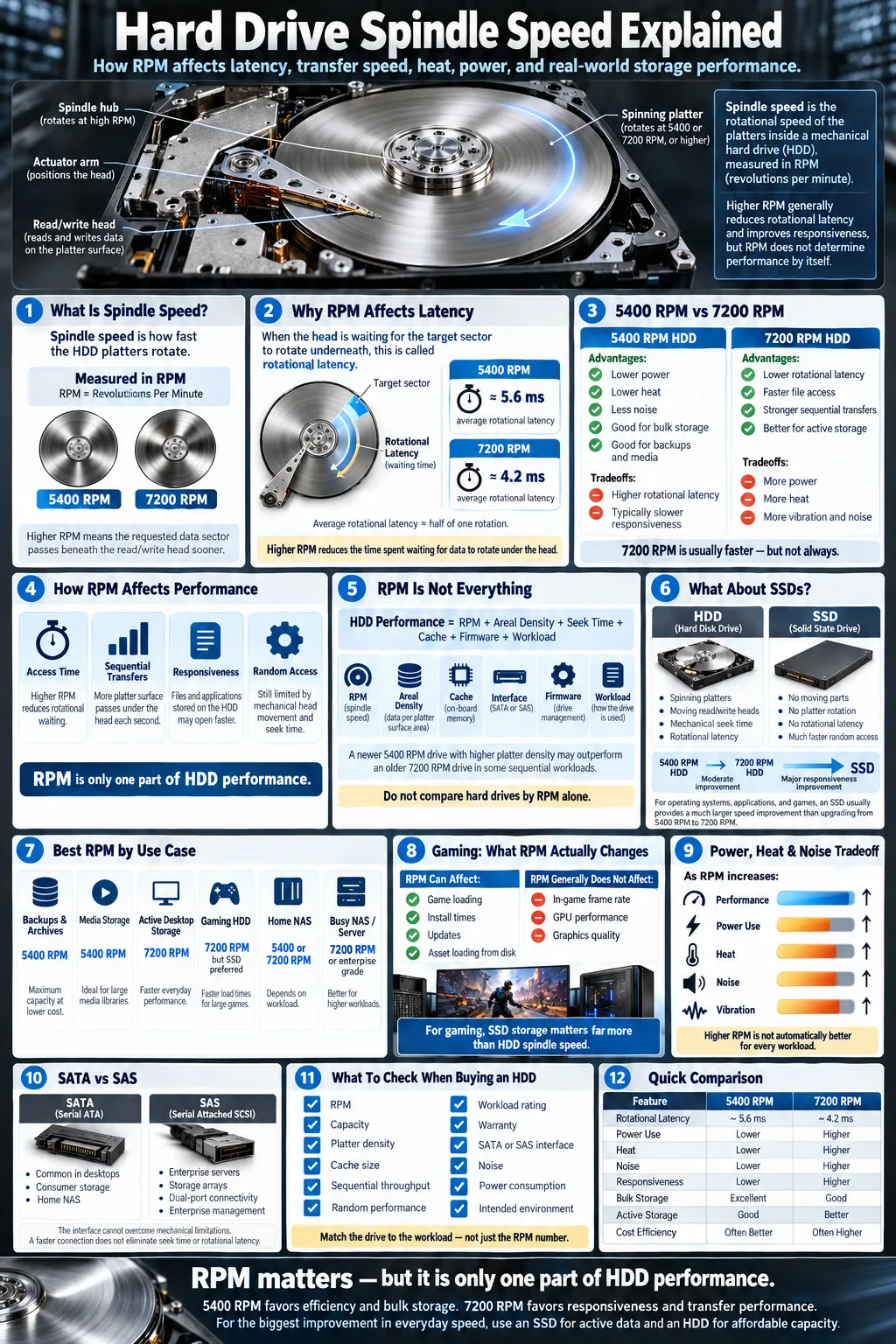
Hard drive spindle speed, measured in RPM, controls platter rotation and affects transfer rates and access times.
-
7200 RPM drives usually outperform 5400 RPM models, although the difference depends on your workload, from gaming to NAS and server use.
-
HDDs remain affordable for high-capacity storage, especially when combined with an SSD for faster boot and application loading.
Hard drive spindle speed describes how quickly the internal platters of a traditional hard drive rotate. Manufacturers measure this rotational speed in RPM (revolutions per minute), with 5400 RPM and 7200 RPM being common choices. A faster spindle can reduce waiting during file access and increase sustained transfer speeds, but it is not the only specification that matters. Capacity, cache, interface, workload, and the difference between mechanical storage and flash storage all affect what you experience. Understanding spindle speed helps you compare drives realistically instead of choosing based on one number alone.
What Is Hard Drive Spindle Speed?
Definition of spindle speed and RPM
Spindle speed is the rate at which a drive's circular platters rotate. It is expressed in RPM, or revolutions per minute. A 7200 RPM disk completes more rotations in the same period than a 5400 RPM disk, allowing the drive to position requested sectors under its heads sooner. This specification applies to a hard disk drive (HDD), a mechanical storage device that stores data magnetically rather than on flash memory.
Role of the spindle motor in HDD operation
The spindle motor starts and maintains platter rotation at a tightly controlled speed. It must keep the platters stable while the drive operates, because even small changes can affect tracking accuracy. Higher rotational speeds usually require more power and can create additional heat, vibration, and noise. Modern drives use precise motor control and balancing to manage those effects.
How platters and read/write heads work together
Inside an HDD, platters are coated with a magnetic surface divided into tiny data regions. The read/write heads move across the platter surface without touching it. As a platter spins, the correct data sector passes beneath a head, which reads the magnetic pattern or changes it during a write operation. Faster rotation brings requested sectors around more quickly, although head movement and the drive's firmware also influence total response time.
Why Is Spindle Speed Important for Hard Drive Performance?
Impact on data transfer rates
Spindle speed influences the sustained data transfer rate because more platter surface passes beneath the heads each second. A 7200 RPM drive can often read and write sequential files faster than a comparable 5400 RPM model. The actual result also depends on areal density. A newer 5400 RPM drive with tightly packed platters may approach or exceed an older 7200 RPM drive in sequential throughput.
Effect on average access time and latency
Access time includes the time needed to move the heads to the right track and wait for the desired sector to rotate into position. That rotational waiting period is called rotational latency. Average rotational latency is roughly half of one rotation. A 5400 RPM drive averages about 5.6 milliseconds of rotational wait, while a 7200 RPM drive averages about 4.2 milliseconds, before seek time and other delays are added.
Comparison of 5400 RPM vs 7200 RPM drives
5400 RPM drives typically use less power, generate less heat, and produce less noise. They suit bulk storage, laptops, media libraries, and many backup tasks. 7200 RPM drives generally deliver stronger responsiveness and sequential throughput, making them better for demanding desktop workloads, games stored on the HDD, and frequent file transfers. The improvement is noticeable, but it will not make an HDD feel as responsive as an SSD.
How Does Spindle Speed Affect Different Use Cases?
Gaming and everyday computing
For everyday computing, a 7200 RPM drive can make application launches, file searches, and large installations feel quicker than a 5400 RPM model. In gaming, spindle speed mainly affects loading screens and updates. It does not significantly increase frame rates once a game is running. If your operating system and games are on an SSD, the HDD's RPM matters less. A 5400 RPM drive remains practical for photos, videos, documents, and secondary game storage.
Network Attached Storage (NAS) and RAID configurations
In a NAS, workload matters more than the label alone. A 5400 RPM model may be appropriate for home backups and media streaming, especially when low noise and power use are priorities. A 7200 RPM NAS drive can better handle multiple users, frequent synchronization, and random file activity. In RAID, spindle speed affects each disk's individual response, but the array's controller, network connection, rebuild behavior, and RAID level also shape results. Use drives designed for continuous NAS operation rather than ordinary desktop models when possible.
Server and high-throughput environments
Servers handling databases, virtualization, transaction logs, or many simultaneous users benefit from faster HDDs and enterprise interfaces. A 7200 RPM disk is a common baseline, while some enterprise drives run at higher speeds. Server workloads also demand consistent response, error recovery behavior, endurance, and strong queue handling. A drive from Western Digital, including a legacy performance line such as Caviar Black, may suit a desktop, but enterprise NAS or server products are a better match for sustained multi-user operation.
Hard Drive Spindle Speed vs SSD Speed: What Matters More?
Differences between HDD and SSD technologies
An HDD relies on rotating platters and moving heads, so its response depends on seek time and rotational latency. A solid state drive (SSD) stores data in flash memory and has no spindle, platter, or moving head. That lets an SSD access many small files far more quickly. SSDs also use less power, operate silently, and handle random workloads much better. HDDs still offer more capacity per dollar and remain useful for large archives.
When to choose higher RPM HDDs vs SSDs
Choose a higher RPM HDD when you need affordable capacity and regularly move large files, but do not require instant application response. Choose an SSD for the operating system, productivity software, games where loading time matters, creative applications, and databases. For most new computers, an SSD provides a larger improvement in perceived performance than moving from 5400 RPM to 7200 RPM. If budget allows only one upgrade, prioritize an SSD for active data.
Hybrid storage solutions
A hybrid setup assigns each device a clear job. Put the operating system, applications, and frequently used projects on an SSD. Use a larger HDD for media, backups, completed projects, and other files that do not need instant access. Some systems use an SSHD or automated caching, but a separate SSD and HDD often provide easier control and replacement. This approach combines flash storage responsiveness with economical mechanical capacity.
Other Factors Influencing Hard Drive Performance
Drive capacity and cache size
Capacity and platter density affect sequential speed because newer high-density platters can place more data under the heads during each rotation. A drive's cache, often measured in megabytes, temporarily holds frequently accessed or recently written data. More cache can help certain burst workloads, but it does not eliminate mechanical seek delays or turn an HDD into an SSD. Compare independent benchmarks for the workload you actually run.
Interface types (SATA, SAS)
SATA is common in consumer desktops, laptops, and many home NAS systems. Its interface can support the throughput of typical HDDs without becoming a major limitation. SAS is common in enterprise servers and storage arrays because it supports features such as dual-port connectivity, stronger command handling, and enterprise device management. Neither interface automatically makes a drive faster than its mechanics allow. A faster connection cannot compensate for slow seeks or platter rotation.
Mechanical reliability and lifespan
Higher rotational speed can increase motor activity, heat, and vibration, although a well-designed 7200 RPM drive can be highly reliable. Lifespan depends on operating temperature, workload, power cycles, vibration, manufacturing quality, and handling. Look for workload ratings, warranty length, and a model suited to your environment. Keep airflow around the drive, avoid impacts while it is running, and never treat a single drive as a backup.
How to Choose the Right Hard Drive Spindle Speed for Your Needs
Assessing your performance requirements
Start by identifying how you use storage. If you mostly archive videos, photos, installers, or backups, capacity and price usually matter more than RPM. If you frequently edit large files, run virtual machines, compile software, or transfer data between disks, a 7200 RPM model can reduce waiting. For an operating system, applications, and active games, an SSD is usually the better first choice.
Balancing cost, speed, and storage capacity
Compare total value rather than spindle speed alone. A newer high-capacity drive may offer strong sequential throughput at 5400 RPM, while a smaller 7200 RPM drive may respond better to mixed activity. Check independent sequential and random benchmarks, noise measurements, power requirements, warranty coverage, and workload ratings. Also confirm that your computer supports the drive's physical size, connectors, and capacity. A cheaper drive is not a bargain if it lacks sufficient endurance or warranty support.
Recommendations for desktop, laptop, and server users
For a desktop, use an SSD for the system and choose a 7200 RPM HDD for active bulk storage when noise and power are acceptable. For a laptop, a 5400 RPM HDD can maximize capacity and battery efficiency, but an SSD is usually the best replacement. For a server or busy NAS, select purpose-built drives with appropriate endurance, firmware, and error recovery behavior. Choose 7200 RPM or faster storage when the workload involves many users or sustained transfers, and plan redundancy separately from backup.
Maintaining Hard Drives with Different Spindle Speeds
Best practices for prolonging HDD lifespan
Keep the computer or NAS well ventilated and maintain a stable operating temperature. Secure internal drives firmly to reduce vibration, but do not overtighten mounting screws. Avoid moving a system while its HDD is active. Allow the operating system to manage power settings unless frequent spin-up and spin-down cycles are causing a specific problem. Keep reasonable free space so the drive and its file system can manage data efficiently.
Monitoring tools and failure prevention
Use SMART monitoring to check temperature, reallocated sectors, pending sectors, uncorrectable errors, and overall health indicators. Tools from the drive manufacturer or operating system can alert you to changes before a complete failure. Unusual clicking, repeated spin-up attempts, disappearing volumes, and rapidly increasing error counts deserve immediate attention. Monitoring predicts some failures, not all of them, so it should support a backup plan rather than replace one.
Handling data backups and recovery
Maintain at least one current backup that is separate from the computer or NAS. For important files, follow a three-copy approach with different storage locations, including an offline or cloud copy. RAID can keep a system available after a disk failure, but RAID is not a backup because accidental deletion, malware, and fire can affect the whole array. If a failing drive contains valuable data, stop unnecessary use and consult a professional recovery service instead of repeatedly testing it.
Spindle speed gives you a useful starting point when comparing HDDs, but it should not be your only deciding factor. Choose 5400 RPM for quiet, economical bulk storage and 7200 RPM when you need stronger transfers or more responsive mechanical storage. For the biggest improvement in everyday computing, place your operating system and active applications on an SSD. Then protect every drive with good airflow, health monitoring, and independent backups. Match the drive to the workload, and you will get better value than choosing by RPM alone.
What does hard drive spindle speed mean?
Hard drive spindle speed is the rate at which a drive's platters rotate, measured in RPM. Common speeds include 5400 RPM and 7200 RPM.
Is a 7200 RPM hard drive always faster than a 5400 RPM drive?
Usually, a 7200 RPM drive offers lower rotational latency and stronger performance. However, platter density, firmware, cache, interface, and drive age can allow a newer 5400 RPM model to match or exceed an older 7200 RPM drive in some sequential tasks.
Does spindle speed affect gaming performance?
It mainly affects game loading times and installation or update speeds, not in-game frame rates. An SSD generally provides a larger improvement in loading responsiveness than upgrading from 5400 RPM to 7200 RPM.
Is 5400 RPM suitable for a NAS?
Yes. A 5400 RPM NAS drive can work well for backups, media streaming, and light home workloads. Choose a faster, purpose-built NAS drive when several users create frequent random access or sustained transfers.
What is the difference between SATA and SAS hard drives?
SATA is common in consumer computers and many home NAS systems. SAS is designed mainly for enterprise environments and offers features such as dual-port connectivity and stronger storage management.
Should you buy an SSD instead of a high RPM HDD?
Choose an SSD for operating systems, applications, games, and other active data when responsiveness matters. Choose an HDD when you need large, affordable capacity for archives, media, and backups.




