

What Goes Into a Network Rack Cabinet?
Explore the components, design choices, and accessories inside an organized network rack
-
Network rack cabinets are standardized enclosures that house and organize IT equipment securely and efficiently.
-
Proper ventilation and cable management help maintain equipment performance and prevent overheating.
-
Lockable doors and grounding protect sensitive hardware and support safe electrical operation.
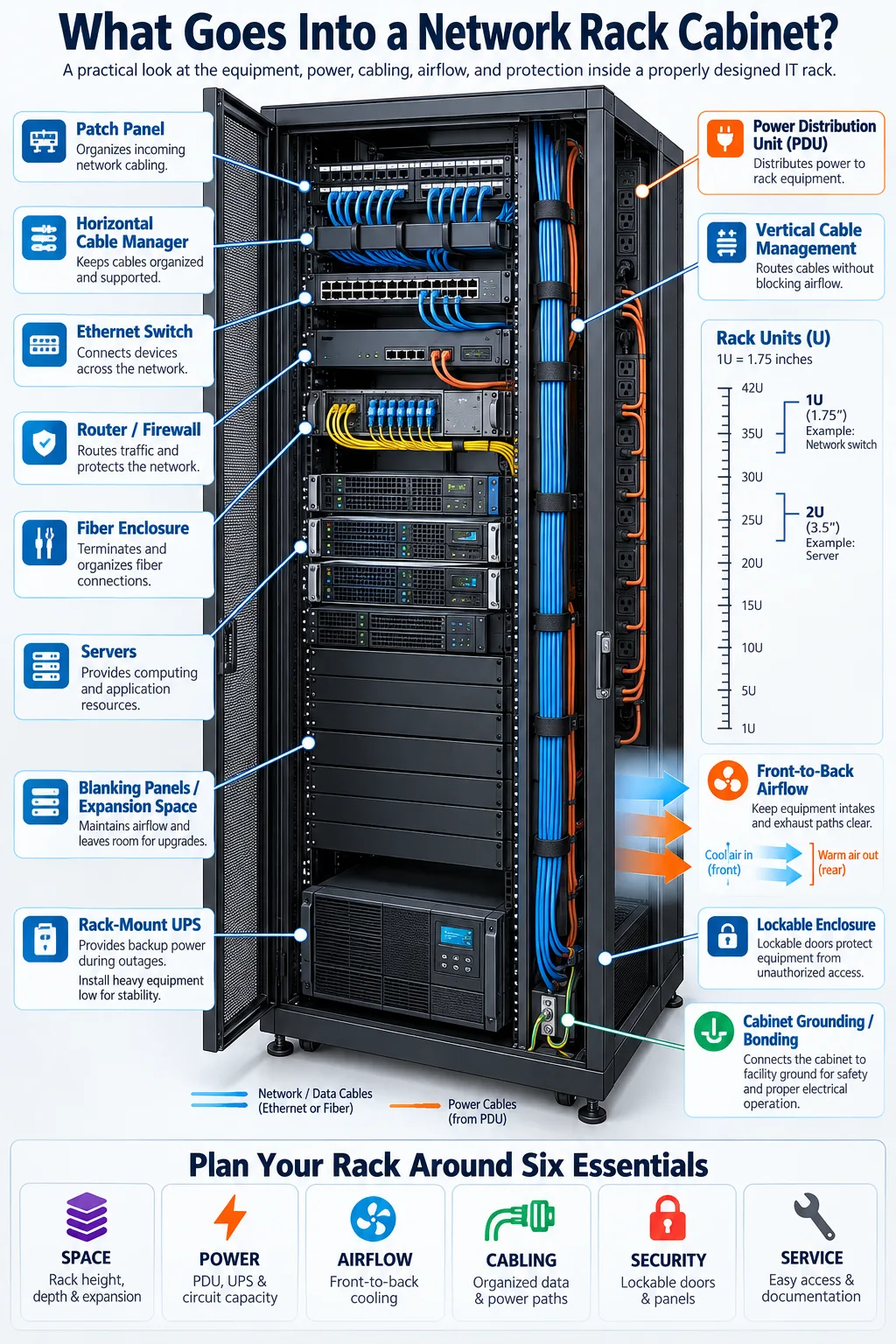
A network rack cabinet is more than a metal box for servers and switches. It is a planned environment that supports power delivery, airflow, cable routing, physical security, and future upgrades. Inside, you may find Ethernet switches, patch panels, routers, firewalls, servers, fiber equipment, backup power, and monitoring hardware. The cabinet must match the size and weight of that equipment while leaving enough room for maintenance and expansion. Understanding what goes into the cabinet helps you choose the right enclosure, avoid blocked airflow, simplify troubleshooting, and build a network that remains dependable as your business grows.
What is a Network Rack Cabinet?
Definition and Purpose
A network rack cabinet is a freestanding or wall-mounted enclosure built to hold standardized IT and telecommunications equipment. Most cabinets follow the EIA-310 standard, which defines the 19-inch mounting width used by equipment from manufacturers such as Cisco, Ubiquiti, Netgear, and APC. The cabinet protects hardware from accidental contact, dust, unauthorized access, and cable damage while giving you a structured way to arrange equipment.
Cabinets are measured by rack height, depth, and usable internal space. Their doors, side panels, rails, fans, and cable openings work together to create a controlled installation. A cabinet also makes equipment identification and replacement easier because each device has a predictable position.
Common Uses in IT Infrastructure
You may find a rack cabinet in a server room, office network closet, school, retail site, data center, security control room, or industrial facility. A small cabinet can hold a router, patch panel, switch, and UPS. A larger cabinet may contain servers, storage arrays, fiber enclosures, power distribution, and environmental sensors.
Brands such as Panduit and Middle Atlantic offer cabinet and infrastructure products for different environments. The main goal is consistent organization. By grouping related equipment and routing cables in a planned path, you make network changes safer and troubleshooting faster.
Key Components Inside a Network Rack Cabinet
Mounting Rails and Rack Units (U)
Rack units (U) describe vertical equipment height. One U equals 1.75 inches, so a 42U cabinet provides 73.5 inches of nominal mounting space. Adjustable mounting rails hold equipment in place with rack screws or cage nuts. Check both the cabinet depth and the device depth before buying, especially for servers, UPS units, and rear cable connectors.
Power Distribution Units (PDU)
A power distribution unit (PDU) distributes electricity from a wall circuit or UPS to equipment in the cabinet. Basic PDUs provide multiple outlets, while metered or switched models show power use and may let you control outlets remotely. APC is widely known for rack power products. Match the PDU plug, voltage, amperage, outlet type, and circuit rating to your facility and equipment. Never exceed the circuit or PDU load.
Cable Management Systems
Cable management keeps copper and fiber connections supported, labeled, and separated from obstructed airflow. Common components include horizontal managers, vertical channels, brush panels, ladder bars, patch panels, and hook-and-loop straps. Avoid tightly bending fiber or crushing Ethernet cables with zip ties. Leave service loops where appropriate, label both ends, and route power separately from data when practical. A clean layout reduces accidental disconnections and makes future moves much easier.
Design Considerations for Network Rack Cabinets
Ventilation and Cooling Solutions
Ventilation determines whether equipment can shed the heat it generates. Use perforated doors, open side clearances, roof fans, and a front-to-back airflow path that matches the equipment. Do not place a solid panel directly in front of server intakes. In a dense installation, active cooling solutions may include fan trays, cabinet air conditioners, or a room-level cooling system. Monitor temperature at the rack, not only at the thermostat.
Weight Capacity and Equipment Compatibility
Review the cabinet's weight capacity before installing servers, batteries, storage systems, or heavy UPS equipment. Put the heaviest devices low in the cabinet to improve stability. Confirm equipment compatibility by checking rack width, mounting depth, rail type, connector clearance, voltage, and airflow direction. A short-depth network switch may fit a wall cabinet, while a deep server may require a floor cabinet with reinforced rails.
Accessibility and Maintenance
Accessibility affects how quickly you can replace a failed component or trace a connection. Rear doors, removable side panels, sliding rails, and adequate clearance around the cabinet all reduce service time. Reserve empty rack space for expansion, and keep a simple diagram showing device positions, power connections, and cable destinations. If the cabinet sits in a public area, balance service access with the need for locked doors and protected panels.
Security Features in Network Rack Cabinets
Locking Mechanisms
Physical security features help prevent unauthorized users from disconnecting equipment, removing storage media, or accessing network controls. Enclosed cabinets commonly use keyed, combination, or electronic locks on the front and rear doors. Some support access logs or integration with an access control system. Choose a lock that allows authorized technicians to work quickly while keeping casual users away from switches, patch panels, and servers.
Side panels should also lock or use tamper-resistant fasteners when the cabinet is in an uncontrolled location. Wall-mounted cabinets may need a secure mounting method because the entire enclosure could otherwise be removed. Locking the cabinet does not replace account security, encryption, or network segmentation, but it adds an important physical protection layer.
Grounding and Electrical Safety
Grounding connects the cabinet frame, doors, and compatible equipment to a safe grounding path. Use the manufacturer's bonding points, grounding conductors, and approved hardware. Grounding helps reduce shock risk and gives fault current a controlled route, but it must be installed according to local electrical codes by a qualified professional when required.
Keep power cables intact, avoid overloaded outlets, and use properly rated PDUs and surge protection. Do not defeat protective earth connections or rely on a painted surface to provide continuity. Document the electrical layout so technicians can identify circuits before servicing equipment.
Types of Network Rack Cabinets
Open Frame vs Enclosed Cabinets
The main enclosure types are open-frame racks and enclosed cabinets. An open-frame rack has two or four posts and provides excellent access, airflow, and low cost. It works well in a restricted server room where physical access is already controlled. It offers less protection from dust, impact, and unauthorized handling.
An enclosed cabinet has doors and side panels, often with perforations for airflow. It provides better physical protection and can contain sound, but it costs more and may require careful heat management. Choose an enclosed model for offices, retail spaces, classrooms, and other locations where equipment needs protection. Select the cabinet height and depth based on current equipment plus planned additions.
Wall-Mount vs Floor-Mount Cabinets
Wall-mount cabinets save floor space and suit small switches, patch panels, routers, and fiber termination equipment. Confirm that the wall structure can support the loaded cabinet, and allow enough room to open the door and work behind it. A swing-out design can improve rear access.
Floor-mount cabinets support more equipment, larger batteries, deeper servers, and higher cable volumes. They are typically more stable and may include casters, leveling feet, removable panels, and wider vertical cable channels. When comparing models from Panduit, Middle Atlantic, or other manufacturers, verify usable depth rather than relying only on the external dimensions.
Installation and Accessories
Tools Needed for Installation
Basic installation tools include a tape measure, level, screwdriver set, cage-nut tool, socket driver, drill, appropriate wall anchors, cable tester, label printer, and flashlight. You may also need a torque driver, grounding meter, fiber cleaning supplies, and lifting help for heavy equipment. Check the cabinet instructions before drilling or attaching rails, since mounting hardware and hole patterns vary.
Measure the equipment, door clearance, pathway, power circuit, and service space before delivery. Anchor a floor cabinet, secure a wall cabinet to structural framing, and keep heavy devices low. Install rails and the PDU before adding delicate networking equipment. Label each cable as you connect it, then test links and power loads systematically.
Common Rack Accessories
Useful rack accessories include blanking panels, shelves, patch panels, brush strips, vertical cable managers, horizontal cable rings, fan kits, grounding kits, rack lights, KVM switches, temperature sensors, and UPS systems. Blanking panels close unused front spaces and help maintain the intended airflow path. Shelves support non-rack equipment, but confirm their load rating.
A rack diagram, port map, asset labels, and spare mounting hardware are just as valuable as physical accessories. Keep a small maintenance kit nearby, but avoid storing loose items inside the cabinet. A planned accessory set keeps the installation tidy without blocking ventilation or making equipment difficult to remove.
Plan the cabinet around the equipment you have today and the upgrades you expect tomorrow. Confirm rack height, depth, power requirements, airflow direction, load rating, physical security, and service clearance before you buy. Install the heaviest devices low, label every connection, and document the final layout. A well-designed cabinet protects your hardware while making everyday changes faster and safer. If you are unsure about electrical work, grounding, or structural mounting, use a qualified technician and follow local code requirements.
What equipment usually goes inside a network rack cabinet?
Common equipment includes Ethernet switches, routers, firewalls, patch panels, servers, storage devices, fiber enclosures, UPS systems, PDUs, and cable management hardware. The exact combination depends on the size and purpose of the network.
How many rack units do I need?
Add the height of your current equipment in U, then reserve extra space for cable management, airflow, and future upgrades. Many small networks use a wall cabinet under 18U, while server rooms often use 42U floor cabinets.
Why is airflow important in a network rack?
Network equipment converts electrical power into heat, and excessive heat can shorten component life or cause failures. Maintain a clear front-to-back airflow path, use perforated doors when appropriate, and add fans or room cooling for dense installations.
What is the difference between a rack and a rack cabinet?
An open rack has posts and exposed equipment, while a rack cabinet encloses equipment behind doors and side panels. Cabinets provide more physical protection and cable containment, while open racks usually offer easier access and airflow.
Do network rack cabinets need to be grounded?
Metal cabinets should be bonded to an appropriate grounding system according to manufacturer instructions and local electrical code. A qualified electrician can verify the grounding path and ensure the installation is safe.
Should I choose a wall-mount or floor-mount cabinet?
Choose a wall-mount cabinet for lightweight equipment and limited space. Choose a floor-mount cabinet when you need room for servers, batteries, deep equipment, high cable volume, or future expansion.




