

What Does ECC Server Memory Mean for Reliability?
Understand how error correction protects servers from silent memory corruption
-
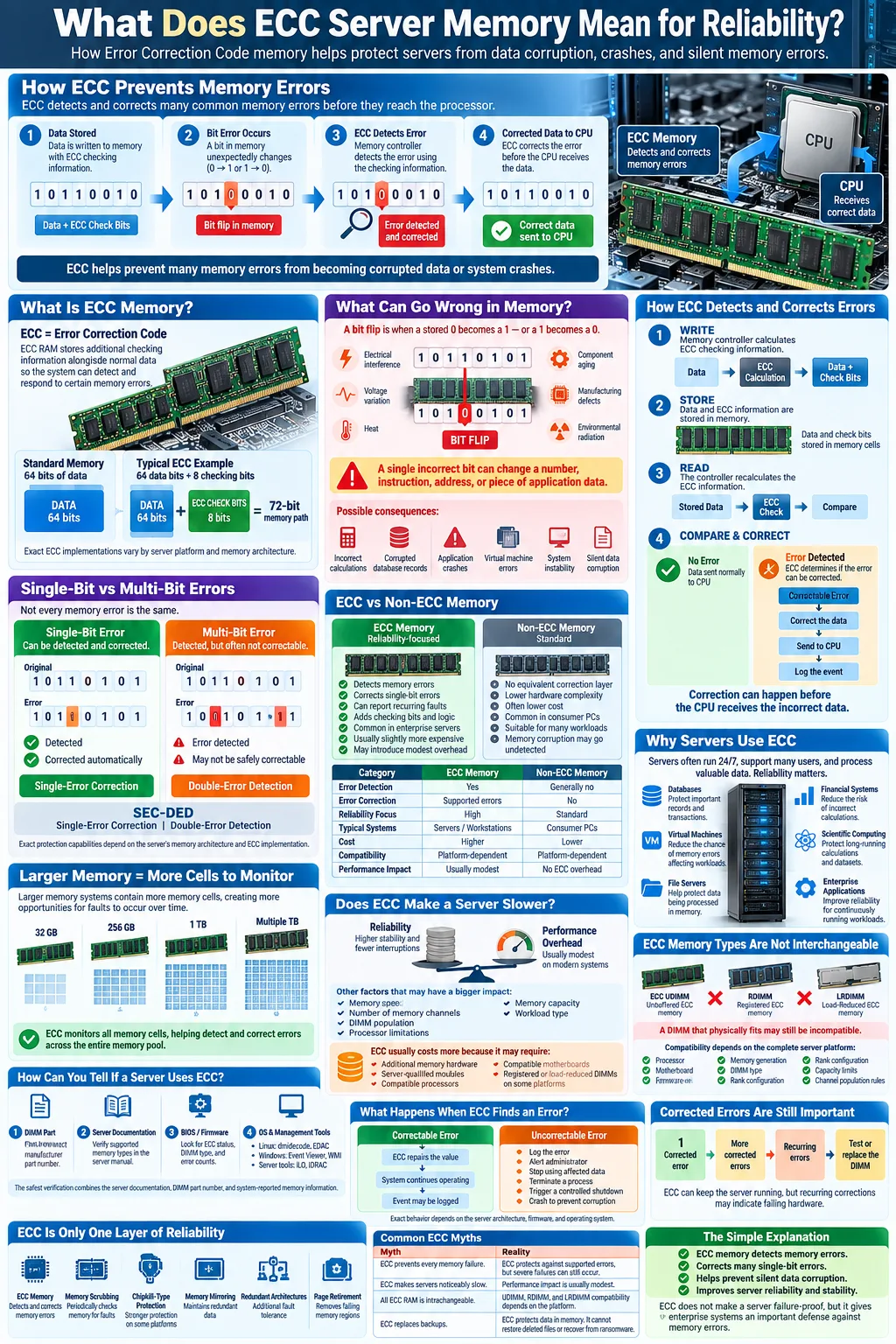
ECC memory detects and corrects single-bit errors, helping prevent data corruption and crashes.
-
Servers use ECC RAM for the reliability and stability required by data centers and enterprise workloads.
-
ECC adds a small amount of overhead but greatly lowers the risk of undetected memory errors.
When a server specification says its memory is ECC, it means the RAM includes Error Correction Code capabilities that help detect and respond to certain data errors. That feature matters because servers often run continuously, process valuable information, and support many users or applications at once. A brief electrical disturbance, manufacturing defect, or aging component can cause a bit flip in memory. Without protection, the error may corrupt data or crash software silently. ECC server memory adds monitoring and correction logic so your system can handle many common memory faults more safely.
What is ECC Memory?
Definition of Error Correction Code
ECC memory is RAM that stores extra information alongside normal data. This additional information is generated using Error Correction Code algorithms. When the server later reads the data, it compares the stored code with the data bits to determine whether a problem occurred.
Most server ECC designs can correct a one-bit error in a data word automatically. They can also identify certain larger errors, depending on the memory standard and module design. The correction happens as the memory is read, so the operating system or application usually continues running without seeing the original fault.
How ECC differs from standard RAM
Standard RAM, often called non-ECC memory, stores and returns data without an equivalent error-checking layer. It can be fast and affordable, but it generally cannot tell you whether a returned value changed while stored. ECC memory uses extra storage capacity and logic, often adding an additional chip or data width to each DIMM.
For example, a common server module may use 72 bits to carry 64 bits of ordinary data plus 8 checking bits. The exact design varies, but the principle is consistent: ECC RAM spends a small amount of capacity and hardware complexity to improve reliability.
How Does ECC Memory Work?
Error detection and correction mechanisms
ECC creates mathematical values from each group of stored data bits. These values are commonly called parity bits, although modern ECC systems use more advanced code structures than simple parity checking. When data is written, the memory controller calculates and stores the checking information. When data is read, it recalculates the values and compares them with the originals.
If the values do not match, the system knows that a data change occurred. The memory controller then determines whether the error is correctable. With supported ECC RAM, the correction can occur before the CPU receives the data. The server may also record a corrected error in firmware or an operating system log, giving an administrator an opportunity to replace a failing module.
Single-bit error correction vs multi-bit error detection
Single-bit error correction means the system can identify which one data bit changed and restore it to the expected value. A single bit represents a zero or one, so changing one bit can alter a number, instruction, address, or piece of application data.
Multi-bit error detection means the system can recognize that a larger fault occurred, even when it cannot safely reconstruct the original data. Many server memory configurations support single-error correction and double-error detection, commonly abbreviated as SEC-DED. If a multi-bit fault is detected, the server can report the event, stop using the affected data, or trigger a controlled response instead of silently passing corrupted information to an application.
Why is ECC Important for Servers?
Impact of memory errors on data integrity
Memory errors can occur because of electrical interference, cosmic radiation, voltage variation, heat, physical defects, or gradual component aging. These events can create bit flips while data is stored in DRAM. A changed bit might produce an incorrect calculation, damage a database record, alter a virtual machine, or cause an application to fail.
ECC improves data integrity by detecting many of these changes and correcting supported errors before they affect the processor. It does not make a server immune to every failure. A severely damaged module, an incompatible configuration, or an error pattern outside the ECC design can still cause problems. However, ECC substantially reduces the chance that an isolated memory fault will remain invisible.
Benefits for system stability and uptime
Servers often operate around the clock, and a single unexpected crash can interrupt websites, business applications, storage services, or virtual machines. ECC supports system stability by correcting routine single-bit faults and reporting recurring problems for maintenance.
This protection contributes to better hardware reliability, especially when a server contains large amounts of memory. More installed memory means more individual cells and more opportunities for an error to appear over time. Features such as memory scrubbing can periodically scan stored data, identify correctable faults, and rewrite corrected values. Enterprise server hardware may also support chipkill protection, mirrored memory, or redundant memory channels for stronger fault tolerance.
ECC Memory vs Non-ECC Memory
Performance considerations
ECC memory can have a small performance and latency cost because the memory controller calculates and checks additional information. On current server platforms, that difference is usually modest, and the effect depends on the processor, memory generation, workload, and configuration. Capacity, memory speed, channel population, and CPU limits often matter more than ECC itself.
Cost differences
ECC modules usually cost more than comparable non-ECC modules because they include extra chips, validation, and support for server-grade features. The total cost also depends on the platform. A server motherboard and processor must support ECC, and some systems require registered or load-reduced DIMMs rather than ordinary unbuffered modules.
Use cases for each type
ECC is the normal choice for database servers, virtualization hosts, file servers, scientific workloads, financial systems, and any machine where an undetected error could create a serious operational or financial problem. ECC is particularly valuable when the server runs continuously or uses a large memory capacity.
Non-ECC memory can be suitable for home computers, gaming systems, office desktops, and low-cost devices where the workload is less critical and price or maximum consumer performance matters most. Do not assume that ECC modules can be installed in any computer. The CPU, motherboard, firmware, and memory modules must support the same memory type. Registered ECC and unbuffered ECC are also not interchangeable in every system.
How to Identify if Your Server Memory is ECC
Checking hardware specifications
Start with the server model, processor family, motherboard documentation, or the label on each DIMM. Look for terms such as ECC, unbuffered ECC, registered ECC, RDIMM, load-reduced DIMM, or LRDIMM. A specification that lists a 72-bit memory interface instead of a 64-bit interface may also indicate ECC, although you should confirm this with the manufacturer.
Check the exact part number rather than relying only on the physical appearance of the module. ECC and non-ECC DIMMs can look nearly identical. The server manual should state which types are supported and whether modules must be installed in matched sets.
Using system tools and BIOS settings
Enter the system firmware or BIOS and look for a memory information page. Some systems explicitly display ECC status, corrected error counts, memory mode, or installed DIMM type. Others show only capacity and speed, so the absence of an ECC label does not prove that the memory is non-ECC.
Operating system tools can provide further evidence. On Linux, commands such as dmidecode may show the memory type, while EDAC or hardware monitoring tools can report corrected and uncorrected events. On Windows Server, Event Viewer, Windows Management Instrumentation, vendor utilities, and out-of-band management tools such as Dell iDRAC or HPE iLO may expose ECC alerts. A reliable check combines system reports with the server manual and the DIMM part number. If logs show repeated corrected errors, replace or test the affected module rather than ignoring the warnings.
Common Myths and Misconceptions about ECC Memory
One common myth is that ECC prevents every memory failure. ECC is a protection method, not a guarantee. It corrects supported error patterns and reports others, but a failed memory controller, incompatible DIMM, severe electrical fault, or multiple simultaneous errors can still bring down a server.
Another misconception is that ECC always makes a computer noticeably slower. ECC adds checking work and may introduce a small latency difference, but modern server processors and memory controllers handle this efficiently. In many real workloads, the reliability benefit is more important than the small performance variation.
Some people also believe that all ECC memory is interchangeable. It is not. A platform may require unbuffered ECC, registered ECC, or load-reduced DIMMs. Memory generation, voltage, rank layout, supported capacity, and firmware settings also matter. Installing a module that fits physically can still produce boot failures or unreliable operation.
Finally, ECC does not replace backups, redundant storage, monitoring, or tested recovery procedures. It helps protect data while it is in memory, but it cannot restore a deleted file, repair a failing disk, or recover from ransomware. Treat ECC as one layer in a broader reliability strategy that includes diagnostics, temperature control, firmware updates, and regular backups.
Future of ECC Memory in Computing
ECC is becoming more important as servers use larger memory capacities, denser DRAM, and more demanding workloads. The more memory a system contains, the greater the total number of cells exposed to electrical and environmental faults. Cloud platforms, artificial intelligence systems, analytics clusters, and virtualization hosts all depend on large memory pools, making error monitoring increasingly valuable.
Future server platforms are likely to expand beyond traditional DIMM-level correction. Advanced memory controllers can support stronger correction schemes, memory mirroring, patrol scrubbing, and page retirement. Some systems can identify a repeatedly failing region and remove it from service before it causes an uncorrectable event.
New memory technologies will also bring different reliability designs. DDR5 server memory, persistent memory, high-bandwidth memory, and memory attached through newer interconnects may use their own error detection and correction layers. The terminology and implementation can differ, but the goal remains the same: detect faults, correct what is safe to correct, and provide clear warnings when hardware needs attention.
For you as a buyer or administrator, the practical trend is straightforward. Check ECC support as part of the complete server platform, not just the DIMM specification. Confirm processor, motherboard, firmware, memory type, capacity, and monitoring compatibility before deployment.
If your server handles important applications, databases, virtual machines, or customer data, ECC memory is usually worth the additional cost. Confirm that the processor and motherboard support the exact ECC format you plan to install, then monitor corrected error logs after deployment. ECC will not replace backups or good maintenance, but it gives your server a valuable defense against silent corruption and unexpected downtime. For noncritical personal systems, non-ECC RAM may be a reasonable budget choice. For continuous, high-value workloads, ECC is the safer foundation.
What does ECC mean in server memory?
ECC means Error Correction Code. ECC server memory stores additional checking information so the system can detect and usually correct certain memory errors, especially single-bit errors.
Is ECC memory better than regular RAM?
ECC memory is generally better for servers and other critical systems because it reduces the risk of undetected corruption. Regular non-ECC RAM can be suitable for consumer computers where cost and maximum compatibility are more important.
Does ECC RAM slow down a server?
ECC RAM can add a small amount of checking overhead, but the performance difference is usually modest on modern server hardware. Workload, memory speed, capacity, and channel configuration often have a larger effect.
Can I use ECC memory in any computer?
No. The processor, motherboard, firmware, and memory type must support ECC. Registered ECC, load-reduced ECC, and unbuffered ECC modules may have different compatibility requirements.
How can I tell whether my server uses ECC memory?
Check the server documentation, DIMM part number, BIOS or firmware memory page, and operating system hardware tools. Vendor management utilities and error logs may also show ECC status and corrected memory events.
What happens when ECC detects an uncorrectable error?
The server may log the event, notify an administrator, terminate an affected process, or crash to prevent corrupted data from spreading. The exact response depends on the memory architecture, operating system, and server firmware.




