

What Is a Self Encrypting Drive and How Does It Work?
Learn how SED hardware encryption protects files, locks stolen drives, and simplifies secure data erasure.
-
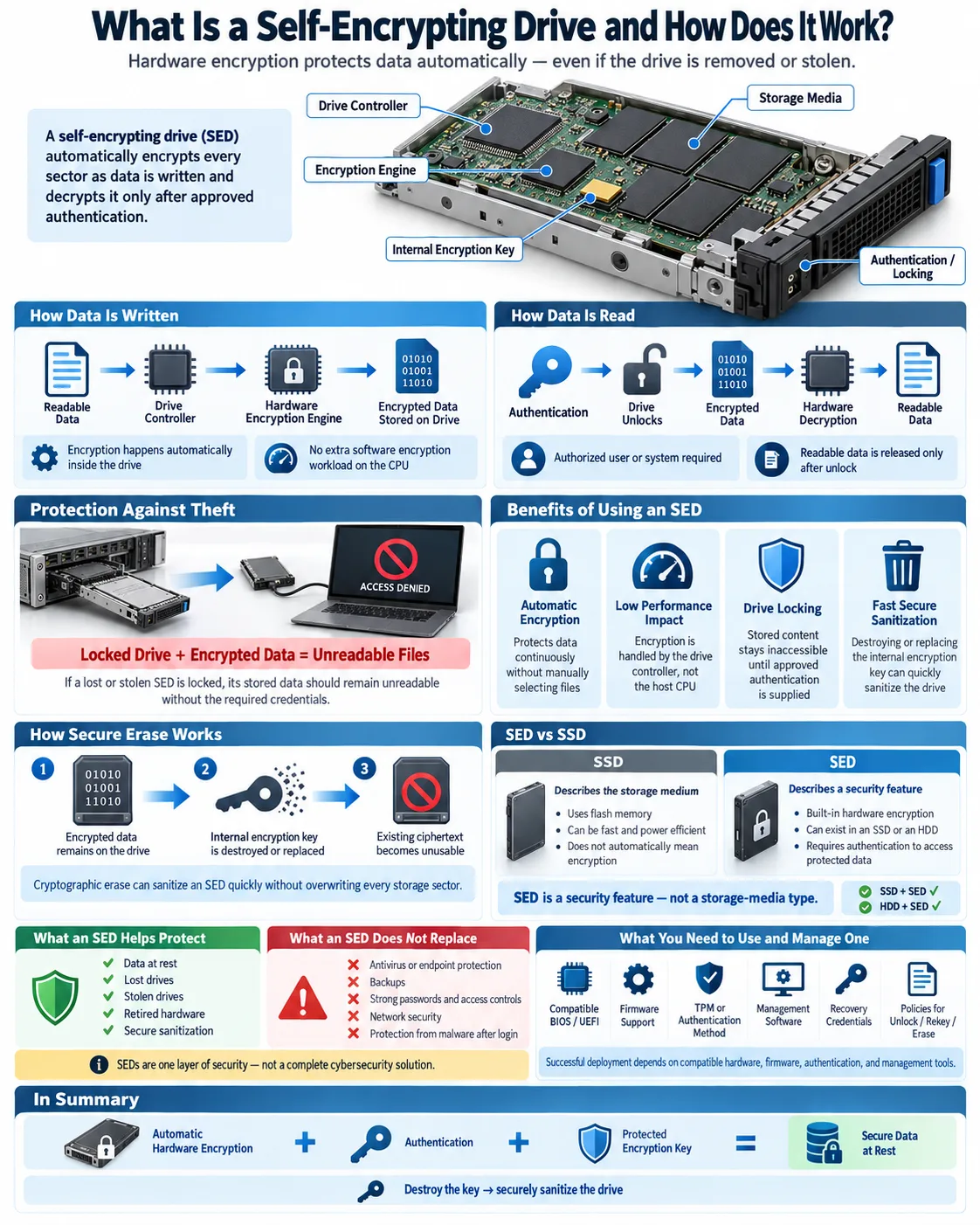
Self-encrypting drives encrypt and decrypt data automatically through built-in hardware, without extra software or CPU resources.
-
A hardware-stored encryption key protects data, making it inaccessible when the drive is lost or stolen.
-
Deleting the encryption key lets you sanitize an SED quickly and securely.
A self-encrypting drive, commonly called an SED, is a hard disk drive or solid state drive that encrypts stored data through built-in hardware. Unlike software encryption, the process runs inside the storage device rather than through the host computer's operating system. The drive continuously protects data while it is stored, then makes it readable only after an approved authentication process. SEDs are used in laptops, servers, enterprise storage systems, and regulated environments where lost or stolen hardware could expose sensitive information. Understanding how SEDs work helps you choose the right security controls and avoid confusing encryption with a complete cybersecurity solution.
What Is a Self-Encrypting Drive (SED)?
Definition and Basic Functionality
A self-encrypting drive is a storage device that encrypts every sector as data is written and decrypts it as authorized data is read. This process happens transparently, so applications and the host operating system normally see ordinary files and folders. The drive does not wait for an application to request encryption. Its security processor handles the operation continuously inside the device.
Most SEDs include a protected internal key and a separate authentication mechanism. When the drive is unlocked, an authorized user, system, or management platform allows normal access. When it is locked, the stored content remains unintelligible even if someone connects the drive to another computer.
How Hardware-Based Encryption Works
Hardware-based encryption uses encryption circuitry integrated into the storage device. A drive controller manages the flash memory or magnetic media, applies the encryption operation, and verifies whether the device is authorized to release readable data. Because the work occurs within the drive, the computer does not need to process every encryption operation itself.
SED standards are commonly associated with the Trusted Computing Group's Opal specifications and related storage security practices. Organizations such as the Drive Trust Alliance promote guidance and tools for trusted storage security. The exact features vary by model, firmware, and management software, so checking the manufacturer's documentation remains essential.
How Does a Self-Encrypting Drive Protect Your Data?
Role of the Data Encryption Key
The data encryption key is the secret value used to transform readable data into ciphertext and back again. In an SED, this key is usually generated and stored within protected drive hardware. It is not normally exposed to the operating system or copied into ordinary files. Authentication credentials unlock the drive or release access to the key, depending on the device design.
Encryption Algorithms Used in SEDs
SEDs commonly use established encryption algorithms such as AES with a 128 bit or 256 bit key length. Some products use AES in a storage specific mode designed to encrypt disk sectors while preserving their size and location. The algorithm alone does not guarantee security. Strong authentication, secure firmware, correct configuration, and good key management are equally important.
Protection Against Unauthorized Access and Physical Theft
Unauthorized access is blocked when a locked drive refuses to decrypt its contents. If a thief removes an SED from a laptop or server and attaches it to another system, the data should remain unreadable without the required credentials. This provides important physical theft protection for lost laptops, retired servers, and removable storage.
SED protection primarily covers data at rest. It does not stop malware from reading files after a legitimate user has unlocked the system, and it does not protect data while it travels across a network. Products such as those using Seagate Secure Technology still require proper operating system security, access controls, backups, and endpoint protection.
Benefits of Using a Self-Encrypting Drive
Automatic Encryption Without Performance Impact
One major advantage is automatic encryption and decryption. Once the SED is configured, it protects data without requiring you to select individual files or maintain a software encryption process. Since the storage controller performs the work, SEDs can provide strong CPU resource efficiency. Users typically experience little or no measurable performance loss, although results depend on the drive, workload, interface, and authentication setup.
Simplified Data Sanitization and Drive Locking
SEDs make data sanitization faster because an administrator can destroy or rotate the internal encryption key instead of overwriting every sector. Once the original key is gone, the remaining ciphertext cannot be practically recovered through normal access. This is useful when disposing of drives, repurposing equipment, or responding to a security incident. Secure erasure commands and firmware behavior should still be verified before relying on this process.
Drive locking also allows an organization to control when stored content becomes accessible. A locked SED can remain physically installed while denying access until an approved credential or management policy is supplied.
Compliance and Security Advantages
Encryption can support privacy and regulatory requirements involving personal, financial, medical, or intellectual property data. It may also reduce the impact of a lost device because the stored information remains protected. However, compliance depends on the full control environment, including authentication, audit records, key recovery, user access, and documented disposal procedures.
SED vs SSD: What’s the Difference?
Understanding Solid State Drives (SSD)
A solid state drive, or SSD, stores data in flash memory and has no spinning platters. It usually delivers faster random access, lower power use, and better resistance to movement than a traditional hard disk drive. SSD describes the storage medium and performance design. It does not automatically mean the drive encrypts data.
An SSD can be a standard model with no built-in encryption, an SED with hardware encryption, or a product that supports both hardware and software security features. Before purchasing, check the specification for SED support, security standards, authentication options, and management compatibility.
How SED Technology Integrates with SSDs and HDDs
SED is a security feature that can be built into both SSDs and HDDs. In either type, the storage controller encrypts data before placing it on the underlying media and decrypts it after authentication. The difference is the medium, not the basic security concept.
For example, an enterprise flash drive may support Trusted Computing Group Opal management, while an encrypted hard drive may use a vendor specific security platform. The Quantum F-Series, including the Quantum F-Series F2200, illustrates why you should review the exact product documentation rather than assume every drive in a product family has identical security capabilities. Firmware, interface, supported commands, and management tools can differ between models.
Also distinguish SED capability from full device encryption enabled by the operating system. Both can protect data, but they place encryption and key management in different parts of the technology stack. Some organizations use hardware encryption with centralized management, while others choose software encryption for broader policy control.
How to Use and Manage a Self-Encrypting Drive
Configuring Encryption and Locking Features
Start by confirming that the drive supports the security standard and management method you plan to use. You may configure authentication through a BIOS, a trusted platform module, an operating system tool, or enterprise software. Set the drive to require authentication before it releases readable data, and test both normal access and recovery procedures before storing important files.
Some systems require a compatible BIOS or firmware release. For example, a deployment that specifies an ATP2.02.09 BIOS version may depend on that version for drive authentication or storage compatibility. Follow the exact vendor instructions rather than changing firmware during a production deployment.
Software and Hardware Requirements
An SED needs compatible hardware, firmware, and management support. The computer must recognize the drive, the controller must support the relevant security commands, and the management tool must understand the drive's protocol. A modern operating system alone does not guarantee that SED features are enabled. You may also need a TPM, UEFI settings, an enterprise key server, or a vendor utility.
Best Practices for Password and Key Management
Use a strong encryption password or authentication credential, keep recovery information in a protected system, and limit administrative access. Never store the only recovery credential on the drive itself. Document who can unlock, rekey, sanitize, or disable the device. Test recovery with a spare system before deployment.
Keep firmware updated through approved procedures, but verify compatibility first. A secure drive can still be compromised by weak credentials, malicious firmware, poor access controls, or an unlocked computer. Treat SED management as one layer of a broader security program.
Common Questions About Self-Encrypting Drives
Can You Unencrypt a Hard Drive?
You generally cannot convert existing encrypted ciphertext back into permanently unencrypted stored data without changing how the drive is configured or copying the data to another device. When an SED is unlocked, it transparently decrypts data for authorized reads, so it may appear unencrypted to the operating system. If you disable the security feature, follow the manufacturer's process and understand that doing so removes protection for data at rest.
Is Special Software Needed for SEDs?
Basic SED encryption can operate without a separate encryption application because the drive performs the cryptographic work internally. However, you may need software or firmware tools to enroll users, configure locking, manage credentials, monitor status, rotate keys, or perform secure erasure. Compatibility between the drive, BIOS, operating system, and management platform is critical.
Can SEDs Replace Antivirus Software?
No. An SED protects stored data when the device is locked or physically disconnected. It does not detect malware, block phishing, stop ransomware from changing files after login, or protect data transmitted over a network. Continue using antivirus or endpoint detection, patch management, firewalls, access controls, backups, and user security training.
SEDs also do not eliminate the need for secure authentication. If an attacker obtains valid credentials and uses an unlocked computer, the drive will usually provide normal access by design.
A self-encrypting drive protects stored information by moving encryption into the drive's own hardware. It can reduce processor overhead, simplify device locking, and make secure data sanitization nearly immediate when managed correctly. Before you buy one, verify its standards, firmware, authentication method, management compatibility, and recovery process. Then combine the SED with strong passwords, endpoint protection, backups, and access controls. Used as one layer in a complete security plan, an SED can significantly reduce the risk created by lost, stolen, or retired storage devices.
What does SED mean on a hard drive?
SED means self-encrypting drive. It is a hard drive or SSD that encrypts stored data through built-in hardware and requires authentication before protected data can be accessed.
Are self-encrypting drives secure?
SEDs can provide strong protection against data exposure from lost or stolen drives when properly configured. They do not replace secure passwords, firmware updates, endpoint protection, backups, or other security controls.
Does an SED slow down a computer?
Usually, an SED has little noticeable performance impact because encryption is handled by the drive controller. Actual results depend on the drive design, interface, workload, and management configuration.
What happens if an SED is stolen?
If the drive is locked and authentication is configured correctly, its stored data should remain unreadable to someone who removes it and connects it to another computer. Data may still be exposed if the system was stolen while unlocked or if credentials were compromised.
How do you erase an SED securely?
A supported secure erase or cryptographic erase process can destroy or replace the internal encryption key. This makes the existing ciphertext unusable without overwriting every storage sector, but you should verify the result with the manufacturer's tools.
Is an SED the same as an encrypted SSD?
No. SSD describes the flash storage medium, while SED describes built-in hardware encryption. An SSD can be a self-encrypting model, but not every SSD includes that feature.




