

What Does Sanitize Instant Erase Mean for a Hard Drive?
Understand SIE, how it works, and when to use it safely
-
Sanitize Instant Erase is a hardware-based method that quickly removes drive data and prevents practical recovery.
-
SIE can support strict data sanitization standards, including relevant NIST guidance for secure, verifiable disposal.
-
Unlike software wiping, SIE works through drive firmware and can provide fast, reliable sanitization for SSDs and HDDs.
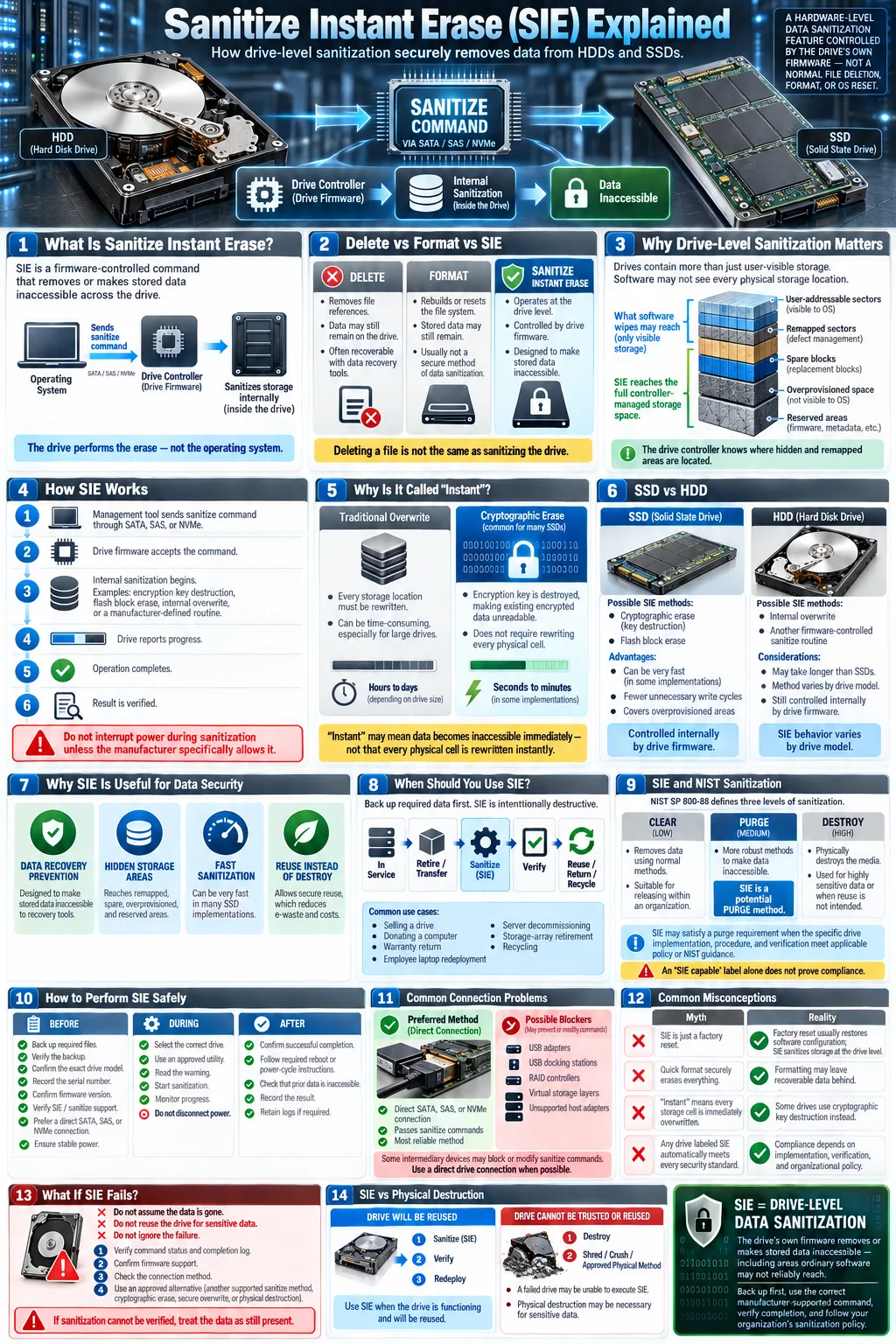
If a drive is labeled Sanitize Instant Erase, it supports a firmware-controlled method for removing stored information. The term usually refers to a storage device feature rather than a brand name or a simple factory reset. When activated, the drive's own controller performs the operation, instead of relying on an operating system to overwrite every visible file. This matters because modern storage devices can hide data in remapped sectors, spare cells, or overprovisioned space. SIE is designed to address the drive as a whole, but you must verify the manufacturer's implementation, supported commands, and completion status before treating the device as safely sanitized.
What Is Sanitize Instant Erase (SIE)?
Definition and Purpose
Sanitize Instant Erase, commonly shortened to SIE, is a drive-level data erasure function that tells storage hardware to remove user information through its internal firmware. Its purpose is to prepare a drive for reuse, redeployment, return, or disposal without manually deleting individual files. The command normally targets the entire device, including areas an operating system may not expose.
A hard drive marked as SIE capable may use cryptographic key removal, internal block erasure, or another manufacturer-defined process. The exact method depends on the device. The word “instant” often describes the time needed to make existing data inaccessible, not the time required for every physical memory cell to be overwritten.
How SIE Differs from Other Erasure Methods
Traditional software wiping writes patterns across addressable sectors. That can work well for some magnetic disks, but it may miss hidden areas and can be inefficient on flash storage. A secure erase command also operates at the device level, although terminology varies between standards and manufacturers. SIE is a specific implementation or feature label, so you should consult the drive documentation.
Deletion, formatting, and a normal operating system reset are different. They usually remove file references while leaving recoverable content behind. SIE is intended to perform broader data sanitization through the drive controller.
How Does Sanitize Instant Erase Work?
Hardware-Level Data Erasure
SIE uses a hardware-based erase process controlled by the storage device's firmware. A management tool sends a supported sanitize command through an interface such as SATA, SAS, or NVMe. The controller then performs its approved operation without needing the computer to read and rewrite every sector. Depending on the drive, that operation may erase encryption keys, clear flash blocks, or overwrite magnetic media internally.
Because the controller manages remapped sectors and reserved areas, this approach can reach locations that software cannot reliably address. The drive may become temporarily unavailable, report a busy state, or require a power cycle. Never interrupt the process unless the manufacturer's instructions specifically permit it.
Process for SSDs vs HDDs
For a solid state drive (SSD), SIE commonly uses a cryptographic erase or flash block erase. Cryptographic erase destroys the key needed to interpret encrypted data, making the remaining cells effectively unreadable. It avoids unnecessary rewriting, which is useful because flash memory has finite write endurance.
A magnetic hard drive, also called a Hard Disk Drive (HDD), may use an internal overwrite or another approved sanitize routine. Its operation can take longer than an SSD process because platters may need to be addressed. Results vary by model, so check the completion log and manufacturer's technical documentation rather than assuming every SIE command works identically.
Why Is SIE Important for Data Security?
Preventing Data Recovery
Data security depends on controlling information after a device leaves your possession. Deleting files does not necessarily remove their contents, and formatting can leave substantial data available to forensic tools. SIE is designed for data recovery prevention by making the drive's stored information inaccessible through a controller-managed operation.
It can also reduce the risk of data remanence, which is the residual information left after ordinary deletion or incomplete wiping. No method should be called universally impossible to defeat without considering the drive design, encryption state, firmware behavior, and verification evidence. For highly sensitive information, use an approved procedure and document the result.
Compliance with Data Sanitization Standards
Organizations often need more than a practical wipe. They need a repeatable process, a record of who performed it, and evidence that the method matched policy. Relevant drive sanitization standards and NIST guidelines, including NIST SP 800-88, distinguish between clearing, purging, and destroying media. The correct method depends on data sensitivity and the device.
SIE may qualify as a purge method when the implementation and verification meet the applicable standard. That does not happen automatically because a drive displays an SIE label. Confirm the supported sanitize command, record the device serial number, retain the result, and follow your organization's rules for data destruction when the drive cannot be trusted or verified.
When Should You Use Sanitize Instant Erase?
Use Cases in Enterprise and Personal Settings
Use SIE before selling, donating, returning, recycling, or redeploying a drive that has stored confidential information. In an enterprise, it can support decommissioning laptops, servers, storage arrays, and failed drives that are still operational. IT teams can combine the process with asset tracking, a written authorization, and a certificate or log showing the result.
For personal equipment, SIE is useful before you hand a computer to another person or send a drive for warranty service. Back up anything you need first, because the operation is intentionally destructive. If the device contains regulated records, customer information, financial data, or health information, follow the applicable retention and disposal policy instead of relying on an informal wipe.
Limitations and Considerations
SIE is not a substitute for a backup, and it cannot recover files that you erase accidentally. The drive must support the command, the tool must communicate with it correctly, and firmware must complete the operation without errors. Some USB adapters, docking stations, RAID controllers, and virtual storage layers may block or alter sanitize commands.
A failed drive may not be able to execute SIE. If you cannot establish that the operation completed, use a qualified destruction service or physically destroy the media according to policy. Also consider hidden copies on backups, cloud accounts, snapshots, and other devices. Sanitizing one drive does not remove those duplicates.
How to Perform a Sanitize Instant Erase on Your Hard Drive
Tools and Firmware Support
Start with the drive manufacturer's documentation. Look for support for Sanitize, Instant Erase, crypto erase, secure erase, or an equivalent command. Vendor utilities, enterprise storage management platforms, BIOS tools, and trusted bootable utilities may expose the feature. The exact wording is not standardized across every product.
Confirm the drive model, firmware version, connection type, and command support. Prefer a direct SATA, SAS, or NVMe connection instead of a USB bridge when possible. If the drive is encrypted, determine whether the tool uses cryptographic key destruction and whether your policy accepts that method. Save any required logs before beginning.
Step-by-Step Instructions
First, back up required files and verify the backup. Second, record the drive serial number and confirm that you selected the correct device. Third, boot into the vendor utility or approved management environment, then choose the SIE or sanitize function. Read the warning carefully and authorize the operation.
Allow the process to finish without disconnecting power. When the tool reports success, reboot or power cycle only as instructed. Check that the drive appears uninitialized or contains no accessible prior data, and retain the completion record. If the result is an error, do not reuse the drive for sensitive data until an approved alternative method has been completed and documented.
Common Misconceptions About SIE
Is SIE the Same as a Factory Reset?
No. A factory reset normally restores an operating system or device configuration. It may delete user accounts and visible files, but it does not always sanitize every storage location. SIE operates below the operating system through the drive controller and is intended to address the storage medium itself.
Even so, a factory reset can be appropriate for basic consumer cleanup when no sensitive information is involved. It should not be treated as equivalent to SIE, a verified purge, or physical data destruction. If you are transferring a device that held confidential data, use the manufacturer's sanitize function or a documented method that meets your policy.
Does SIE Affect Drive Lifespan?
Usually, SIE is less demanding on an SSD than a full software overwrite because it may destroy an encryption key or use the controller's internal flash erase process. It can therefore avoid many unnecessary program cycles. On an HDD, the internal operation may involve substantial platter activity, but one properly performed sanitize cycle is not normally expected to cause meaningful wear during ordinary lifecycle management.
These are general expectations, not guarantees. Firmware quality, drive age, temperature, power stability, and the specific sanitize method all matter. SIE also does not repair failing hardware. If the drive reports errors or cannot complete the command, replace it or send it to an approved recovery or destruction provider.
Sanitize Instant Erase is best understood as a firmware-level drive sanitization feature, not a synonym for deleting files or resetting a computer. Before using it, back up your data, verify the exact device and command, and confirm the result in the manufacturer's tool. For business or regulated information, align the process with NIST guidance, keep an audit record, and use physical destruction when the drive cannot be verified. Those steps give you a faster, safer way to retire SSDs and HDDs while reducing the risk of data exposure.
What does SIE mean on a hard drive?
SIE means Sanitize Instant Erase. It is a drive firmware feature that removes or makes inaccessible stored data through a hardware-controlled sanitize command.
Is Sanitize Instant Erase safe to use?
It is safe for the drive when performed with a supported tool and stable power, but it permanently removes data. Back up and verify the selected drive before starting.
Can data be recovered after SIE?
A properly implemented and successfully completed SIE operation is designed to prevent practical recovery. The result depends on the drive, firmware, command, and verification, so follow the manufacturer's documentation and applicable standards.
Is SIE better than formatting a drive?
Yes, for secure disposal. Formatting usually removes file system information, while SIE works at the drive level and is intended to address data that ordinary formatting can leave behind.
Does SIE work on both SSDs and HDDs?
Many SIE implementations support both solid state drives and magnetic hard disk drives. The internal process differs, so confirm compatibility and the supported sanitize method for your exact model.
Does Sanitize Instant Erase meet NIST requirements?
It may meet a NIST-aligned purge requirement when the specific implementation, procedure, and verification satisfy the applicable NIST guidance. The SIE label alone is not proof of compliance.




