

What Helium-Filled Hard Drives Mean and Why They Matter
Learn how helium improves capacity, efficiency, performance, and storage reliability
-
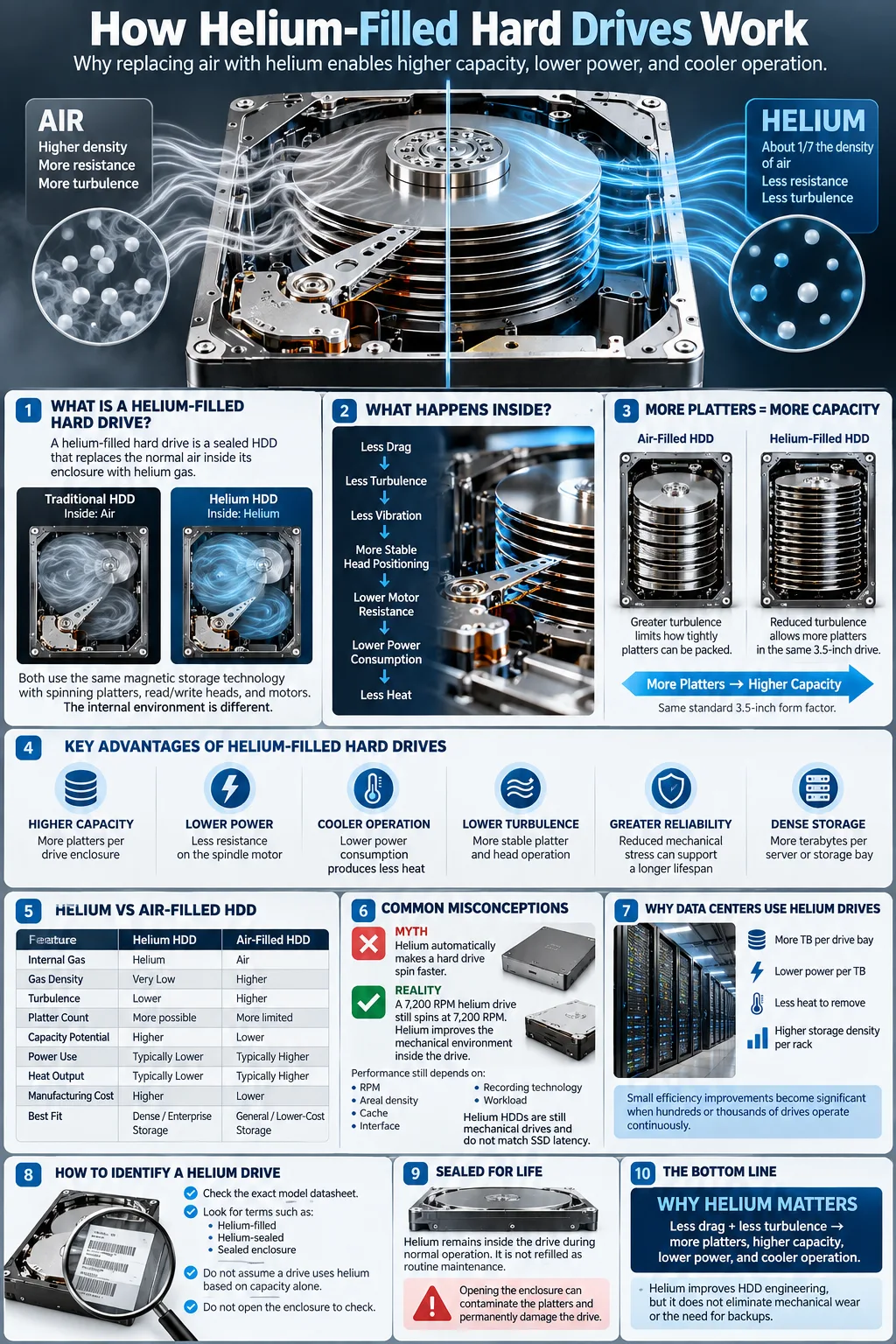
Helium is seven times less dense than air, so it greatly reduces internal friction and turbulence.
-
Helium drives can fit more platters into the enclosure, raising capacity and improving transfer speeds.
-
Lower friction and turbulence support cooler operation, lower energy use, better reliability, and longer lifespan.
A helium-filled hard drive is a sealed magnetic storage device that replaces the ordinary air inside its enclosure with helium gas. The change may sound minor, but it affects nearly every moving part inside the drive. Helium creates less resistance as the platters spin, allowing manufacturers to use more platters in a compact enclosure while reducing power consumption and heat. This design is especially common in high-capacity enterprise drives used by data centers, cloud providers, and backup systems. Understanding the technology helps you decide whether a helium model offers a meaningful advantage for your storage needs or simply adds cost you do not require.
What Is a Helium-Filled Hard Drive?
Definition and Basic Concept
A helium-filled hard drive is a sealed hard disk drive (HDD) manufactured with helium inside instead of normal atmospheric air. It still stores data magnetically on spinning platters and uses read and write heads, motors, and actuator arms. The main difference is the controlled internal environment. Manufacturers remove air, fill the enclosure with helium, and seal it before the drive reaches the customer.
Helium is useful because its density is about one-seventh that of air. That lower density creates less drag around spinning components. The result is not a completely different storage technology, but a refined mechanical design that supports higher capacities and lower operating costs.
How Helium Is Used Inside the Drive
The helium remains inside the drive during normal operation. It does not circulate through a data center, and you do not refill it as part of routine maintenance. A factory-applied seal keeps the gas contained while protecting the platters and heads from outside contaminants. Because the enclosure is sealed, opening the drive in a normal room can compromise its cleanliness and may cause permanent damage.
Helium models still use conventional magnetic recording methods, such as perpendicular magnetic recording or newer shingled recording designs. Helium supports those technologies by making the internal mechanical environment easier to control.
Why Use Helium Instead of Air in Hard Drives?
Physical Properties of Helium vs. Air
Helium is a chemically inert gas with far lower density than air. It is also less viscous under the conditions found inside a spinning drive. Those properties reduce the force that the motor must overcome as the platters rotate. Helium does not make the magnetic surface itself faster, but it gives engineers more freedom when arranging internal components.
Impact on Friction and Turbulence
The largest benefit is friction reduction caused by lower gas resistance. Spinning platters create air movement inside a conventional drive. That movement produces turbulence, vibration, and drag, especially when several platters rotate close together. Helium reduces these effects, helping the motor maintain a stable rotational speed with less effort.
Lower turbulence also reduces unwanted movement around the read and write heads. Head positioning remains precise when the actuator faces less turbulent airflow, which is important as data tracks become narrower.
Benefits for Mechanical Components
Reduced resistance puts less stress on the spindle motor, bearings, actuator, and head positioning system. The motor can use less power, while the enclosure can accommodate components with tighter spacing. These gains do not eliminate mechanical wear, but they can reduce operating stress over many hours of use. For large storage fleets, even a small power saving per drive can produce significant reductions in cooling and electricity costs.
Advantages of Helium-Filled Hard Drives
Increased Storage Density with More Platters
Helium makes it practical to install more platters in one standard-height enclosure. In an air-filled design, the spinning disks generate more drag and turbulence as they are stacked closer together. Helium reduces that problem, allowing manufacturers to increase data storage density without making the drive physically larger. More platters can raise total capacity while preserving the familiar 3.5-inch form factor.
Improved Cooling and Energy Efficiency
Helium drives generally support cooler operation because the motor performs less work against internal gas resistance. They also offer better energy efficiency, particularly when several drives operate continuously in a server rack. Lower power draw produces less heat, reducing the burden on the data center cooling system. Actual results depend on capacity, workload, recording technology, and firmware, so you should compare published operating power rather than assume every helium model performs identically.
Enhanced Performance and Speed
Helium does not automatically increase spindle speed. A 7,200 RPM helium drive still spins at 7,200 RPM. However, reduced turbulence can help maintain consistent head positioning and stable operation. Higher-capacity models may also deliver strong sequential transfer rates because more data passes under the heads during each rotation. Random access remains limited by mechanical seek time, so a helium drive is not a direct replacement for an SSD when latency matters most.
Challenges and Considerations with Helium Drives
Sealing and Durability Issues
Helium sealing is essential because helium molecules can escape through very small gaps over time. Manufacturers use specialized welds, covers, and feedthroughs to create a long-lasting enclosure. If the seal fails, air and moisture may enter, changing the internal environment and increasing stress on the spinning assembly. A failed seal is not a problem you can safely repair at home.
Cost Implications
Helium models often cost more than comparable air-filled drives because they require specialized manufacturing, testing, and sealing. The price difference may be justified when you need maximum capacity per drive bay or operate hundreds of disks around the clock. For a basic desktop, a lower-cost air model may deliver better value. Compare cost per terabyte, warranty length, workload rating, and power use rather than looking only at the purchase price.
Compatibility and Availability
Most helium drives use standard SATA or SAS interfaces, so they work with common storage controllers and operating systems. Compatibility concerns usually involve physical height, firmware, workload ratings, and enclosure cooling rather than helium itself. Enterprise models from Western Digital, including HGST branded products and UltraStar families, may use SAS features or data center firmware that are unnecessary for a home computer. Check the exact model before buying, especially when selecting Gold, Red Pro, or Purple Pro storage lines for different workloads.
How to Identify a Helium-Filled Hard Drive
Labeling and Model Indicators
Manufacturers often identify helium models in product descriptions, datasheets, or technical presentations rather than relying on one universal label. Look for phrases such as helium-sealed, helium-filled, sealed enclosure, or high-capacity enterprise design. Product families can include both air and helium versions, so the family name alone is not enough. A Western Digital or HGST UltraStar model may clearly state its internal gas technology on the official specification page.
Do not infer helium from capacity alone. High capacity increases the likelihood that a model uses helium, but some large air-filled drives also exist. The model number and official documentation provide stronger evidence than a retailer title or online marketplace listing.
Technical Specifications to Check
Review the manufacturer datasheet for enclosure type, operating power, idle power, acoustics, temperature range, interface, workload rating, and warranty. If the document does not mention helium, contact the manufacturer or seller before purchase. A helium drive should still list normal interface standards such as SATA or SAS, so those specifications do not identify the gas by themselves.
You can sometimes find helium references in regulatory filings, repair documentation, or professional drive reviews. Do not open the enclosure to verify the contents. Opening it can contaminate the platters and destroy the clean environment required for reliable operation.
Helium Hard Drives vs. Air-Filled Hard Drives: A Comparison
Performance Differences
Both drive types use magnetic platters, so their basic behavior is similar. A helium drive may offer higher capacity, lower operating power, and more consistent airflow conditions. Its drive performance still depends on spindle speed, cache, interface, recording method, queue depth, and workload. An air model with the same RPM can feel just as responsive for ordinary desktop tasks, while a helium model may be more attractive for large sequential transfers and dense storage arrays.
Reliability and Lifespan
Helium can support lower temperatures and reduced mechanical stress, which may improve drive reliability in continuous operation. A longer drive lifespan is possible, but it is not guaranteed. Bearings, heads, media, firmware, vibration, workload, and temperature all influence failure rates. A helium drive with poor cooling or heavy write activity can fail sooner than a well-managed air drive. Always maintain backups regardless of the internal gas.
Use Cases and Suitability
Helium drives suit data centers, NAS systems, surveillance archives, backup repositories, and other environments where capacity per bay matters. Air drives can be a sensible choice for general desktops, light file storage, and budget-conscious systems. Western Digital Gold models target enterprise workloads, Red Pro models target NAS use, and Purple Pro models target surveillance workloads. Choose according to workload and warranty, not simply because one product uses helium.
Data Recovery and Maintenance for Helium Drives
Common Issues and Failure Modes
A helium drive can experience the same major failures as other mechanical storage devices, including head crashes, spindle motor problems, bad sectors, controller faults, firmware corruption, and surface degradation. Seal failure is an additional concern. A damaged enclosure can allow contaminants inside or alter the gas mixture. Clicking, repeated spin-up attempts, disappearing capacity, and rapidly increasing bad sectors are warning signs that require immediate attention.
Best Practices for Data Recovery
Stop using a failing drive as soon as possible and do not repeatedly power cycle it. If the data matters, consult a professional recovery laboratory with cleanroom facilities and experience handling sealed enterprise disks. Do not open the enclosure, replace heads, or attempt to restore helium yourself. These actions can reduce recovery chances. If the drive remains readable, create a sector-level clone to a healthy disk before attempting repairs, and work from the clone rather than the original.
Maintaining Drive Health
Use stable power, adequate airflow, vibration control, and a workload appropriate for the model. Monitor temperature, reallocated sectors, pending sectors, uncorrectable errors, and operating hours with supported health tools. Keep firmware current when the manufacturer recommends an update, and maintain tested backups using the three-two-one approach. Helium does not remove the need for redundancy, monitoring, or replacement planning. It is an engineering advantage, not a guarantee against data loss.
The Future of Helium-Filled Hard Drives
Trends in Storage Technology
Hard drive development continues to focus on higher areal density, better recording heads, improved vibration control, and lower power use. Technologies such as energy-assisted magnetic recording may increase capacity further, while helium helps manufacturers fit more mechanical components into each enclosure. Cloud storage providers and large data centers continue to value capacity per rack unit because it can reduce floor space, cabling, and cooling requirements.
Solid state drives remain dominant where low latency, high input and output operations, and shock resistance matter. Hard drives continue to offer a lower cost per terabyte for large archives, backups, and less frequently accessed data. Helium is therefore part of a broader storage strategy rather than a competitor to every SSD application.
Will Helium Drives Remain Relevant?
Helium drives are likely to remain relevant wherever high capacity, efficient continuous operation, and dense mechanical storage are priorities. Their future depends on manufacturing costs, helium supply, competing recording technologies, and the pace of SSD price reductions. The technology may become less visible in consumer products while remaining important in enterprise and cloud infrastructure.
For you, the practical question is simple: compare capacity, workload rating, power use, warranty, and total cost. If dense storage and continuous operation matter, helium can provide a clear advantage. If you need low latency or modest capacity, an SSD or air-filled drive may be the better fit.
Helium-filled drives replace ordinary air with a lower-density gas that reduces internal drag and turbulence. That change allows more platters, higher capacities, lower power use, and potentially cooler, more consistent operation. You should not treat helium as a guarantee of superior speed or failure resistance. Select a drive based on workload, interface, capacity, warranty, and operating environment. Whichever model you choose, protect important files with tested backups, monitor drive health, and replace storage before warning signs become data loss.
What does helium-filled mean on a hard drive?
It means the manufacturer removed normal air from the sealed enclosure and replaced it with helium. The lower-density gas reduces internal drag and turbulence around the spinning platters.
Are helium hard drives better than air-filled drives?
They can be better for high-capacity, continuous-use storage because they often use less power and support more platters. An air-filled drive may still offer better value for basic desktop or light storage needs.
Can helium escape from a hard drive?
Helium can gradually escape if the enclosure seal is imperfect or damaged. Modern drives use specialized sealing to keep the gas contained for the expected service life, but you should never open the enclosure yourself.
Do helium drives run faster than regular hard drives?
Not necessarily. Helium reduces drag and can support stable operation, but speed still depends mainly on spindle RPM, recording technology, cache, interface, and workload.
Are helium hard drives more reliable?
Reduced heat and mechanical resistance may support reliability, especially in dense data center use. However, all hard drives can fail, so helium models still require monitoring, redundancy, and regular backups.
How can you tell whether a hard drive uses helium?
Check the exact model datasheet or manufacturer product page for terms such as helium-filled, helium-sealed, or sealed enclosure. Capacity and product family names alone do not prove that a drive contains helium.
Can a helium hard drive be repaired at home?
You should not open or refill one at home. Opening the enclosure can contaminate the platters and reduce the chance of successful repair or professional data recovery.




