

What Does It Mean If a Hard Drive Is Digitally Signed?
Understand firmware authenticity, secure boot, verification, and storage security
-
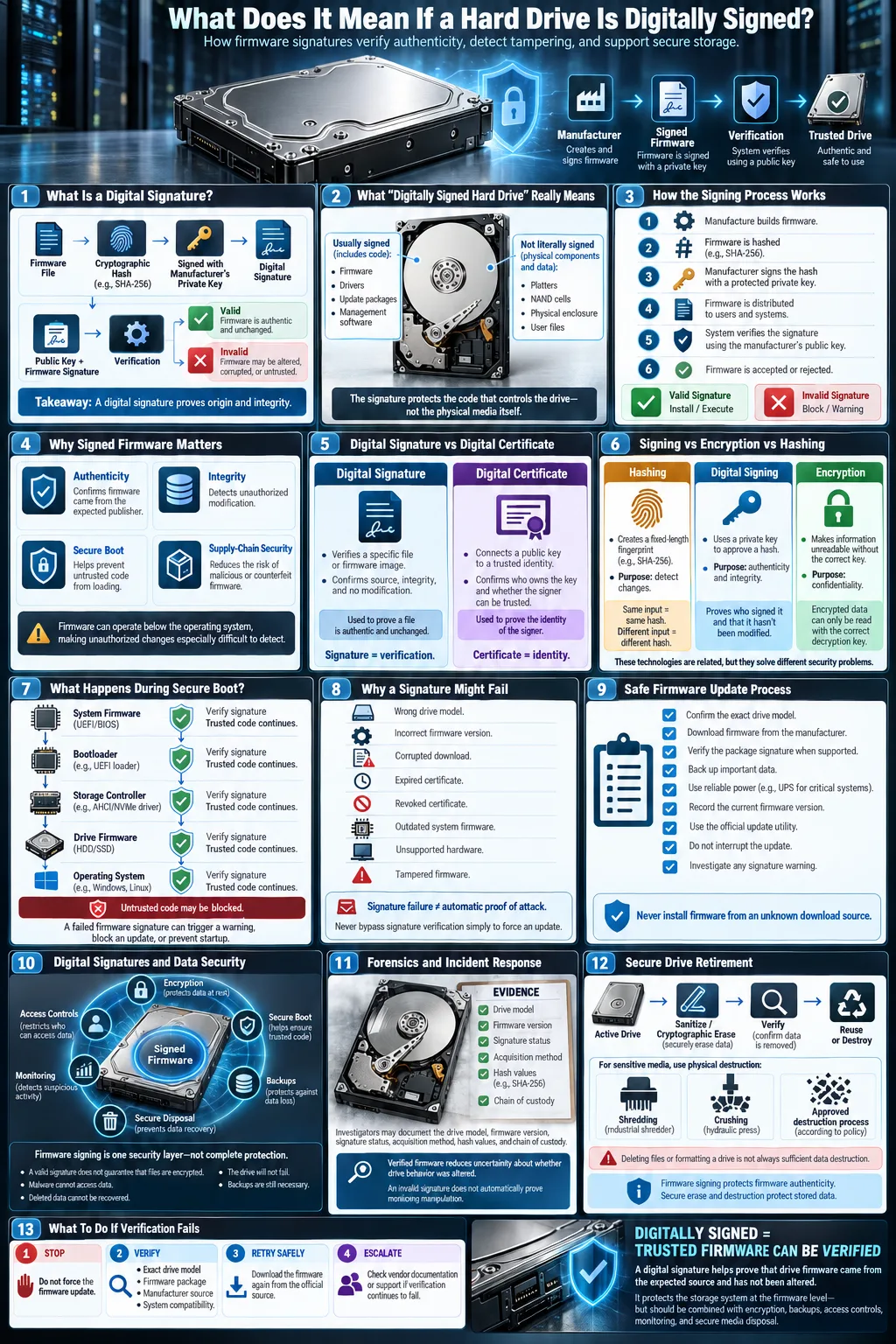
A digital signature helps confirm that a drive's firmware or related data is authentic and has not been altered.
-
Correct signing and secure hard drive destruction help protect sensitive information and reduce breach costs, which average $4.45 million globally per incident.
-
A digital signature verifies data, while a digital certificate establishes identity and supports encrypted communication.
When you see that a hard drive is digitally signed, it usually means that its firmware, driver, or management software carries a cryptographic approval from a trusted manufacturer or authority. The physical storage mechanism is not literally stamped with a signature. Instead, your computer checks signed code before allowing it to run or update the device. This process helps detect counterfeit firmware, unauthorized changes, and malicious code. It is especially important in business systems, encrypted laptops, servers, and devices that use secure boot. Understanding the term helps you distinguish a genuine security feature from a licensing or activation message.
What Is a Digital Signature?
Definition and Purpose
A digital signature is a cryptographic value attached to software, firmware, a document, or another digital object. It proves two important things: the content came from the claimed signer, and it has not changed since it was signed. Manufacturers use signatures to approve firmware images before distributing them to customers.
A signature does not mean a device is automatically safe in every respect. It means the signed content was approved by a private cryptographic key and can be checked with a corresponding public key. If an attacker modifies even a small part of the file, verification should fail.
How Digital Signatures Work
The signer creates a mathematical digest of the content, then uses a private key to sign that digest. Your computer, drive controller, or update utility uses the public key to verify the result. This process supports authentication by confirming the source and helps confirm data integrity by detecting changes.
Difference Between Digital Signature and Digital Certificate
A digital certificate is an electronic credential that connects a public key to an identity, such as a storage manufacturer or software publisher. The signature validates a particular file or message. The certificate helps you trust the key used for that validation and can support encrypted connections. For example, a firmware updater may use a certificate chain to verify that a signed update really belongs to Western Digital rather than an unknown publisher.
Why Are Digital Signatures Important for Hard Drives?
Ensuring Firmware Authenticity
Modern drives contain firmware that controls the controller, error correction, caching, power management, and communication with the operating system. Signed firmware helps ensure that only code approved by the manufacturer is installed. Without this protection, an attacker who gains administrative access might replace the firmware and create a persistent security foothold that antivirus software cannot easily see.
Protecting Data Integrity
Firmware signing supports data integrity by preventing unauthorized code from changing how a drive stores or reports information. It does not replace backups, file permissions, or encryption. Instead, it protects a lower layer of the storage system. A valid signature can show that firmware has not been modified, but it cannot guarantee that your files are accurate, available, or free from ransomware.
Role in Secure Boot Processes
Secure boot is a startup process that checks whether critical software is trusted before it runs. Depending on the system, the chain may include the computer's firmware, bootloader, storage controller firmware, and operating system components. If a hard drive presents unsigned or altered firmware, the system may block it, show a warning, or enter recovery mode. This behavior can frustrate troubleshooting, but it prevents unapproved code from loading early in the boot process.
How Is a Hard Drive Digitally Signed?
Firmware Signing Techniques
Firmware signing normally happens before a drive leaves the factory. The manufacturer compiles the firmware, tests it, calculates a cryptographic digest, and signs the approved image with a protected private key. The public verification key may be stored in the drive, the host computer's firmware, an operating system trust store, or an update utility. Some systems also use a certificate chain and hardware security modules to protect signing keys.
Use of Encryption and Hashing
Encryption and digital signing serve different purposes. Encryption converts information into an unreadable form for anyone without the correct key. A signature primarily proves origin and detects alteration. Hashing creates a fixed-length fingerprint of the firmware or update package. The signing process protects that fingerprint, allowing the device to compare the approved version with the file it receives. If the hashes do not match, the update should be rejected.
Verification During System Boot
During startup, the host or drive controller checks the signature before executing firmware. It may compare the signing certificate with a trusted list, validate the certificate chain, check a revocation list, and confirm that the version is permitted. Some enterprise systems record these results in logs for compliance. Updates delivered through a vendor utility should be downloaded from an official source, not from a random forum or a file offered through an untrusted browser download. Microsoft Edge may warn about a suspicious download, but that warning is not a substitute for the manufacturer's signature check.
Common Issues Related to Digital Signatures on Hard Drives
Activation Errors and License Transfers
Not every message about a signed drive refers to firmware security. Storage cloning tools, encryption platforms, and recovery products may connect a device identifier to a digital license. If you move the drive to another computer, replace a motherboard, or restore an image, the software may request activation again. An error does not necessarily mean the drive is counterfeit. Check the product account, license terms, and vendor support documentation before changing firmware.
Windows users may encounter guidance involving an Activation Troubleshooter when a related operating system license appears invalid after a hardware change. That tool addresses Windows activation, not the cryptographic signature on a drive's firmware, so do not treat the two processes as interchangeable.
Firmware Update Challenges
A signed update may fail if it is for the wrong model, region, capacity, controller revision, or interface. Power loss during installation can also leave a drive unusable. Back up important files, verify the exact model number, close other applications, and use the vendor's update utility. Never bypass a signature warning simply to force an installation.
Compatibility and Verification Problems
Older computers may lack the trusted keys or boot features required by a newer drive. A certificate can also expire or be revoked even when the firmware itself is legitimate. A failed check may result from outdated system firmware, a damaged update file, unsupported hardware, or a real security problem. Record the exact error, check vendor advisories, and test the drive in a supported system before assuming the data is lost.
Implications for Data Security and Forensics
Data Recovery and Forensic Analysis
Data security depends on more than a signed firmware image. Investigators must consider encryption keys, access logs, deleted files, operating system artifacts, and the condition of the controller. During forensic analysis, a verified firmware state can make findings more defensible because it reduces uncertainty about whether the device behavior was altered. Investigators should document the drive model, firmware version, signature status, acquisition method, and every action taken.
Data recovery specialists may need to work around failed controllers, damaged metadata, or encrypted volumes. A valid signature does not make deleted data recoverable, and an invalid signature does not prove that files were intentionally manipulated. Preserve the original device, create a verified forensic image when possible, and avoid running repair tools on the evidence before assessment.
Impact of Digital Signatures on SSD Data Deletion
An SSD handles deletion differently from a traditional magnetic disk because of flash translation layers, wear leveling, garbage collection, and overprovisioned cells. A signed firmware update can prevent unauthorized changes to these functions, but it does not guarantee complete erasure. Secure erase, cryptographic erase, and vendor-specific sanitize commands must be evaluated against the drive model and the sensitivity of the information.
Risks of Improper Data Destruction
Simply deleting files, formatting a volume, or breaking a device's external casing may leave recoverable data. Improper data destruction can expose credentials, health records, intellectual property, or customer information. It can also create legal and regulatory problems when an organization cannot prove that retired media was handled correctly.
Best Practices for Managing Digitally Signed Hard Drives
Ensuring Secure Firmware Updates
Use firmware packages downloaded from the manufacturer's official support page or approved enterprise channel. Match the exact model and revision, verify the package signature when the vendor provides a method, and keep a tested backup before updating. Connect the computer to reliable power, document the current firmware version, and do not interrupt the process. Maintain a recovery plan for systems that fail to boot after an update.
Using Trusted Certificates and Signatures
Keep operating system, motherboard, storage controller, and management software trust stores current. In an organization, restrict firmware updates to authorized administrators and log the signer, version, date, device identifier, and verification result. Security teams should monitor certificate changes and investigate unexpected unsigned code. These controls apply to products from vendors such as SanDisk, Western Digital, IBM, and other storage providers, although each vendor uses its own update and verification process.
Proper Hard Drive and Media Destruction Methods
When retiring storage, first determine whether a verified software sanitize command or cryptographic erase meets your policy. For highly sensitive data, use a qualified destruction provider that can document chain of custody and issue a certificate of destruction. A NAID AAA Certified provider follows independently audited information destruction practices. Specialized services and equipment, including solutions such as TITAN®, may support controlled shredding or crushing, but confirm that the method is appropriate for the media and your legal requirements.
Keep serial numbers, destruction dates, witness details, and certificates in your asset records. If a drive is being reused rather than destroyed, verify the erase result and inspect it for hidden partitions or inaccessible areas before redeployment.
Examples and Use Cases of Digital Signatures in Storage Devices
SanDisk and Western Digital Drives
Consumer and enterprise drives from SanDisk and Western Digital may use signed firmware packages, trusted update utilities, and device-specific validation. The exact behavior depends on the model. One drive may reject altered firmware silently, while another may display a diagnostic code or require a supported vendor tool. Always use the model's official documentation rather than assuming that every product in a brand family follows the same process.
Digital Licensing and Activation
Storage software can also use signing and licensing together. A cloning application might verify that its installer is signed, then use a device identifier or account to control activation. An encryption platform may validate its boot components and separately check a subscription or enterprise entitlement. These are related trust mechanisms, but a valid software license does not prove that a drive's firmware is authentic, and a valid firmware signature does not grant permission to use licensed software.
Enterprise Data Protection Solutions
Large organizations use signed firmware as one part of a broader storage security program. IBM and other enterprise technology providers may combine trusted boot, hardware-backed keys, centralized updates, encryption, access controls, and audit logs. Administrators can require approved firmware versions and alert when a device reports an unexpected state. In a data center, this helps protect servers from supply chain attacks and reduces the chance that an attacker will persist below the operating system. The strongest programs also include tested backups, incident response procedures, and documented media disposal.
If a hard drive is digitally signed, the most likely meaning is that its firmware or related software can be checked against a trusted cryptographic identity. That check helps prevent tampering, but it is only one layer of protection. Keep firmware current through official channels, investigate verification errors instead of bypassing them, maintain reliable backups, and use documented erasure or destruction methods when retiring media. Treat licensing messages separately from firmware warnings. These practical steps protect both your storage devices and the information they contain.
Does a digitally signed hard drive mean the physical drive is certified?
Usually, no. The term normally refers to signed firmware, drivers, or management software associated with the drive. The signature confirms the source and detects changes to that digital content.
Can a digital signature prevent all hard drive hacking?
No. It helps block unauthorized firmware and tampered updates, but it does not prevent every attack. You still need access controls, encryption, patched systems, monitoring, backups, and secure disposal.
What should you do if a firmware signature verification fails?
Stop the update, record the exact error, confirm the drive model, and download the update again from the manufacturer's official site. Do not disable verification or force the update unless the vendor provides a documented recovery procedure.
Is a digital signature the same as a digital certificate?
No. A digital signature verifies that specific content came from the claimed signer and was not changed. A digital certificate links a public key to an identity and helps establish trust in the signature.
Does signing make deleted files impossible to recover from an SSD?
No. Signing protects firmware authenticity, not the contents of deleted storage cells. SSD recovery and erasure depend on flash translation, garbage collection, encryption, and the drive's supported sanitize features.
How should you destroy a digitally signed hard drive?
Choose verified sanitization, cryptographic erase, or physical destruction based on the media type and data sensitivity. For regulated or highly confidential information, use a documented provider such as a NAID AAA Certified service and retain the destruction record.




