

What Does 512e Mean on a Hard Drive?
Understand emulated sectors, Advanced Format, compatibility, and performance before choosing a drive
-
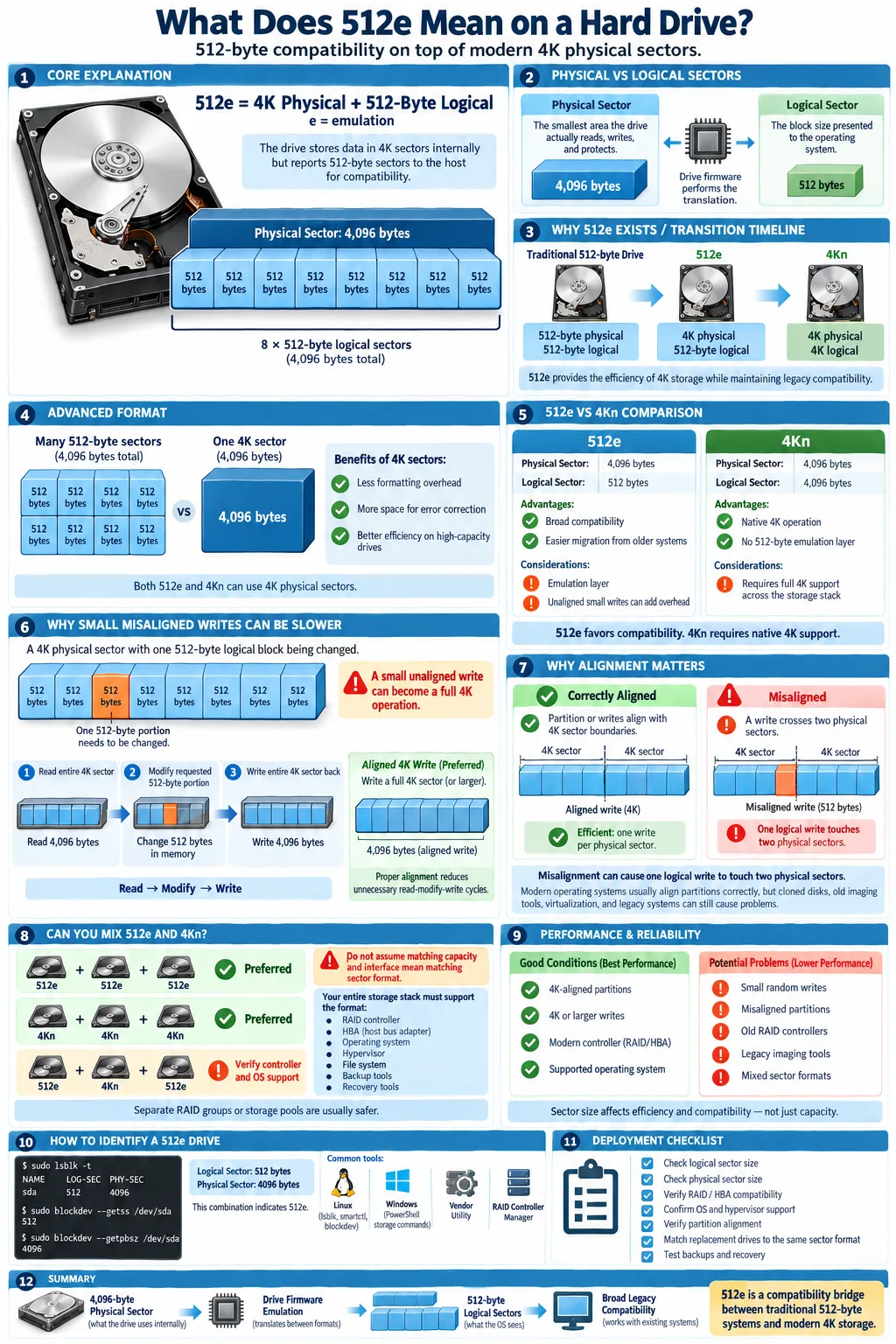
512e drives use 4,096-byte physical sectors but emulate 512-byte logical sectors for legacy compatibility.
-
Mixing 512e and 4Kn drives in one RAID group can create performance and data integrity problems without full controller and OS support.
-
Advanced Format 4K sectors improve efficiency and error correction, but require careful sector alignment and write handling.
If a hard drive has a sector size of 512e, it uses modern 4,096-byte sectors internally while presenting 512-byte sectors to the computer. The format was created to support older operating systems, applications, and storage controllers that expect the traditional 512-byte layout. For most desktop users, a 512e drive works like any other SATA hard drive. The distinction becomes important when you build RAID arrays, use virtualization, manage large disks, or troubleshoot slow writes and compatibility problems. Understanding how the drive reports and writes sectors helps you choose compatible hardware and protect data integrity.
What Does 512e Mean in Hard Drive Sector Sizes?
Definition of 512e
512e means 512-byte emulation. The drive has a 4,096-byte physical sector internally, but it reports a 512-byte sector to the host computer. The letter e indicates that the 512-byte format is emulated rather than native. This design lets newer high-capacity drives work with software that was written for older disks.
A 512e drive is not the same as a drive with native 512-byte sectors. It stores data in larger internal units, even when the computer requests smaller 512-byte blocks. Manufacturers such as Western Digital use this format extensively in hard drives designed for broad compatibility.
Difference Between Physical and Logical Sectors
The physical sector is the smallest data area the drive actually reads, writes, and protects with error correction. The logical sector is the unit the host system sees through the drive interface. On a 512e disk, the physical sector is 4,096 bytes, while the logical sector is 512 bytes.
That difference is normally hidden by the drive firmware. Problems can occur when software writes only part of a physical sector or assumes that logical and physical boundaries are identical.
Why 512e Was Introduced
Drive capacity grew faster than the older 512-byte design could efficiently support. The International Disk Drive Equipment and Materials Association, or IDEMA, helped establish the industry transition toward larger sectors. A 512e design offered the efficiency of 4K storage without immediately abandoning older systems, boot tools, partition utilities, and storage controllers.
Understanding Advanced Format and Its Impact
What is Advanced Format?
Advanced Format is the storage industry term for drives that use larger sectors, usually 4,096 bytes, instead of traditional 512-byte physical sectors. Many 512e hard drives are Advanced Format drives. The drive exposes 512-byte logical sectors for compatibility while using larger internal sectors for storage and error correction.
Advanced Format can also describe drives that expose 4K sectors directly. Those drives are commonly called 4Kn, meaning 4K native. Always check both the logical and physical sector values rather than relying on the general Advanced Format label.
Benefits of 4K Physical Sectors
A 4K physical sector can store more user data relative to the space consumed by sector headers, gaps, and error correction metadata. This improves formatting efficiency, especially on high-capacity disks. Larger sectors also provide more room for stronger error correction codes, which can help the drive detect and correct media errors.
The benefits matter most as hard drives become denser. A large disk using 512-byte physical sectors would spend more of its surface area on overhead. Moving to 4K physical sectors reduces that overhead and supports higher capacity without requiring the host computer to understand every internal detail.
Challenges with 512-Byte Legacy Systems
Older software may write in patterns that do not match the drive's 4K boundaries. When that happens, the drive may need to read an entire 4K sector, change part of it, and write the full sector back. This additional work can reduce random write performance.
Legacy partitioning tools can also create misaligned partitions. Modern installers usually align partitions correctly, but old imaging tools, boot environments, and virtualization software deserve extra attention. Linux utilities such as fdisk and lsblk can help you inspect the layout before placing a 512e drive into production.
512e vs 4Kn: What Are the Key Differences?
Logical Sector Size Emulation
The main difference is the reported logical sector size. A 512e drive has 4,096-byte physical sectors but reports 512-byte logical sectors. A 4Kn drive reports and uses 4,096-byte sectors for both its logical and physical format. With 4Kn, the host must understand 4K sectors throughout the storage stack.
512e therefore provides a compatibility layer. 4Kn removes that layer and gives the operating system direct access to the drive's native sector format. Neither format is automatically faster in every workload.
Performance Implications
When writes are aligned to 4K boundaries and issued in 4K or larger units, both formats can perform well. A 512e drive may lose performance when it receives small, unaligned writes because the firmware must perform a read-modify-write cycle. A 4Kn drive avoids that particular emulation step, but incompatible software may fail to initialize it or may handle it inefficiently.
Sequential workloads, media storage, and large backups often hide the difference. Random write workloads, virtual machine disks, and busy databases expose it more clearly. A Jellyfin media server usually performs well with either format when its partitions and file system are correctly aligned.
Compatibility Considerations
512e usually works with a wider range of operating systems, backup tools, boot firmware, and hardware RAID controllers. 4Kn needs verified operating system support, storage drivers, partition tools, and application support. Current Linux distributions generally support 4Kn, but an older appliance, bootloader, or proprietary utility may not.
Before buying 4Kn, check the complete path from drive to application. Confirm the drive, HBA, RAID controller, operating system, hypervisor, and backup software all document support for 4K logical sectors.
Can You Mix 512e and 4Kn Drives?
Controller and OS Support Requirements
You can sometimes use 512e and 4Kn drives in the same server, but using them in the same array is a separate question. The storage controller must understand both formats and expose a consistent block size to the operating system. The OS, file system, monitoring tools, and recovery utilities must also work with that presentation.
Check the controller manual for supported sector formats, not just supported drive capacities. A modern HBA in a Linux server may handle separate pools successfully, while an older hardware RAID controller may reject a 4Kn disk or report misleading capacity information.
Risks of Mixing in RAID Arrays
RAID compatibility depends on more than matching interface and capacity. RAID members normally need compatible logical sector sizes, usable capacity, and geometry. If a controller cannot normalize the formats, it may refuse the array, force an unexpected block size, or create inefficient writes.
Even when an array builds successfully, mixed formats can complicate rebuilds. A replacement disk with a different sector presentation may not be accepted, or a rebuild may produce poor performance. A sector mismatch can also make recovery software misinterpret stripe boundaries, increasing the risk of corrupted files.
Best Practices for Mixed Environments
Use 512e drives together and 4Kn drives together whenever possible. Keep separate RAID groups or storage pools for each format, label the format in your inventory, and test a complete rebuild with a spare drive. Confirm firmware versions, controller drivers, and backup restoration procedures before deploying the array.
For platforms such as TrueNAS, follow the release documentation for supported sector formats and HBAs. Do not assume that a drive accepted by the operating system is suitable for every pool configuration. Keep a tested replacement drive with the same logical sector format as the original array members.
How Does Sector Size Affect Storage Performance and Reliability?
Read-Modify-Write (RMW) Overhead
Read-modify-write (RMW) occurs when the host changes only part of a 4K physical sector. The drive must read the complete sector, modify the requested portion in memory, and write the complete sector back. This adds latency and can amplify write activity. A stream of small, aligned writes is much easier for a 512e drive than scattered writes that cross 4K boundaries.
File systems and applications that issue 4K-aligned writes reduce this overhead. Virtual machine workloads deserve special testing because guest, virtual disk, host file system, and drive boundaries can all affect alignment.
Sector Alignment and Its Importance
Sector alignment means that partitions, file system structures, RAID stripes, and application writes begin on boundaries that match the drive's physical sectors. A misaligned partition can cause nearly every logical write to touch two physical sectors. That creates unnecessary reads and writes, especially under random workloads.
Modern operating systems usually align partitions at 1 MiB boundaries, which is safely divisible by 4K. Verify alignment after cloning an old disk or restoring an image. An aligned partition cannot fix every workload issue, but it removes one common source of avoidable overhead.
Impact on SSDs and HDDs
Sector formats affect SSDs as well as HDDs, although SSDs use flash pages and erase blocks internally rather than magnetic sectors. The logical block format still influences alignment, translation layers, and write amplification. HDDs show the effect through mechanical seek and rotational latency, so poorly aligned small writes can be especially noticeable.
Correct alignment improves responsiveness and reduces unnecessary write activity. It does not prevent media failure, so maintain backups and monitor drive health through SMART data and storage alerts.
How to Identify and Configure Sector Sizes on Your Drives
Checking Drive Sector Size in Different Operating Systems
On Linux, run lsblk -o NAME,PHY-SEC,LOG-SEC,ALIGNMENT to view physical and logical sector values. The smartctl utility can provide additional identification details when the controller passes them through. A 512e drive commonly shows 4096 for the physical sector and 512 for the logical sector.
Windows PowerShell can show disk properties with commands such as Get-Disk and Get-PhysicalDisk, although the exact sector fields depend on the Windows version and driver. Manufacturer utilities and controller management software may show the same information more clearly.
Changing Sector Size Settings
Most 512e drives do not let you convert their native physical format. Some enterprise drives support a format or sector-size command, but changing it can erase all data and may require a supported HBA or vendor utility. Do not attempt a format change without a verified backup and a documented recovery plan.
What you can usually configure is the partition layout, file system block size, RAID stripe size, and virtual disk format. These settings should be selected together. For example, a virtual machine platform such as Hyper-V needs storage that is aligned and supported by both the host and guest operating systems.
Tools for Sector Size Verification
Useful tools include Linux lsblk, blockdev, and smartctl, Windows PowerShell storage commands, vendor diagnostic tools, and RAID controller management interfaces. Check the drive directly when possible. A RAID virtual disk may report the controller's logical presentation instead of the underlying disk format.
Record the logical sector size, physical sector size, partition start offset, RAID stripe size, and file system before troubleshooting performance. These details can explain why two drives with identical capacity behave differently.
Common Issues Related to 512e Drives and How to Avoid Them
Bad Sectors and Sector Size Mismatch
A bad sector is a media area the drive can no longer read or reliably write. On a 512e drive, the affected physical sector contains multiple 512-byte logical sectors. A single physical defect can therefore affect several logical blocks. Monitor reallocated, pending, and uncorrectable sector counts, and replace a drive when health indicators or error logs deteriorate.
A sector size mismatch can also confuse cloning and recovery tools. Always identify both the logical and physical formats before copying a failing disk. Do not repeatedly power-cycle a failing drive if the data is important.
Compatibility with Older Software and Hardware
Most modern systems handle 512e without special configuration, but older BIOS tools, disk imagers, RAID controllers, and file systems may create misaligned partitions or misreport capacity. Test old boot media and recovery utilities before relying on them. If a system cannot boot after a drive replacement, inspect both the partition alignment and the controller's sector presentation.
Hyper-V, Linux, and current server operating systems generally work well with 512e when the storage stack is configured correctly. Still, application documentation matters. A database, backup program, or appliance may impose stricter requirements than the OS.
Data Recovery Considerations
Data integrity depends on preserving the original logical and physical layout during recovery. A professional recovery service needs to know whether the source is 512e, 4Kn, encrypted, or behind a RAID controller. Imaging a failing disk with a tool that understands read errors is safer than copying files through the normal file system.
Keep backups that do not depend on the original drive format. Test restoration to different hardware, document RAID stripe and sector settings, and preserve controller metadata. A 512e drive is compatible by design, but compatibility does not replace a tested backup strategy.
512e is best understood as a compatibility bridge. The drive uses efficient 4K physical sectors while presenting familiar 512-byte logical sectors to the host. For most systems, that works transparently. The important exceptions involve unaligned writes, older tools, RAID arrays, virtualization, and mixed 512e and 4Kn environments. Before deploying a drive, verify its logical and physical sector values, confirm controller and OS support, and check partition alignment. If the data matters, keep tested backups and a recovery plan that records the drive format.
Is a 512e hard drive the same as a 512-byte drive?
No. A 512e drive uses 4,096-byte physical sectors but emulates 512-byte logical sectors for compatibility. A true 512-byte drive uses 512-byte sectors natively.
Is 512e better than 4Kn?
Neither is universally better. 512e supports more older hardware and software, while 4Kn removes emulation and can be more efficient when the entire storage stack supports 4K logical sectors.
Can Windows use a 512e hard drive?
Yes. Modern Windows versions generally support 512e drives without special configuration. Correct partition alignment and compatible storage drivers still matter.
Can you use 512e and 4Kn drives in the same RAID array?
Only if the RAID controller, operating system, and management tools fully support both formats and present a consistent logical sector size. Separate arrays or pools are usually safer.
Does 512e reduce hard drive performance?
It can reduce random write performance when writes are small or unaligned because the drive may need a read-modify-write cycle. Proper partition and file system alignment minimizes this overhead.
How can you check whether a drive is 512e?
Check the drive's reported logical and physical sector sizes with tools such as Linux lsblk and smartctl, Windows storage commands, vendor utilities, or RAID controller management software. A common 512e report is 512-byte logical sectors and 4,096-byte physical sectors.




