

What Does a 4K Sector Size Mean on a Hard Drive?
Learn how 4K sectors affect storage, compatibility, alignment, and drive performance
-
A 4K hard drive uses 4,096-byte sectors instead of traditional 512-byte sectors, improving storage efficiency and error correction.
-
Advanced Format drives can improve disk performance, but incorrect sector alignment may reduce speeds.
-
Many drives use 512e technology for compatibility, while native 4K drives offer stronger long-term support in modern systems.
When a hard drive lists a 4K sector size, it means the drive organizes its usable storage in blocks of 4,096 bytes. That is eight times larger than the traditional 512-byte sector used by older storage devices. This change helps modern drives store more data efficiently and use stronger error correction, which is increasingly important as capacities grow. However, 4K sectors can affect formatting, partition alignment, operating system support, and compatibility with older hardware. The practical impact depends on whether the drive is a 512e model that emulates smaller sectors or a native 4K device that exposes 4,096-byte sectors directly.
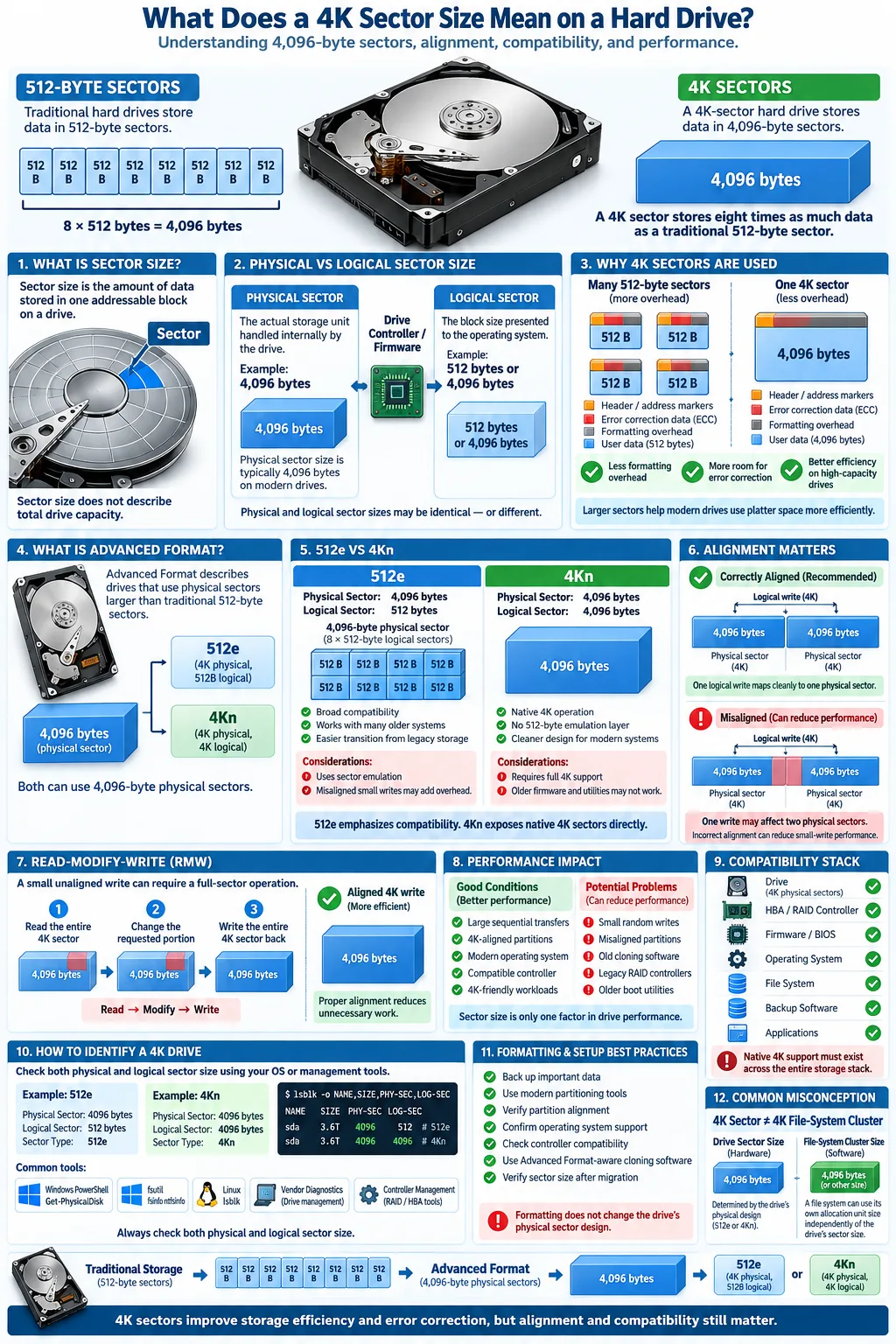
What Is Sector Size in Hard Drives?
Definition of Sector Size
Sector size is the amount of information stored in one addressable block on a storage device. A sector is the basic unit that a drive reads, writes, and identifies. Older hard disk drives commonly used 512-byte sectors, while newer devices often use 4,096-byte sectors. The sector size does not describe the total capacity of the drive. Instead, it describes how that capacity is divided into individually addressable blocks.
For example, a 1 TB hard disk drive may contain hundreds of millions of sectors. The operating system uses sector addresses to locate file data, partition information, boot records, and file system metadata. Larger sectors can reduce the amount of space consumed by addressing and error correction information, although they can also make small writes less efficient in certain situations.
Physical vs Logical Sector Size
The physical sector size is the actual amount of magnetic or flash storage handled as one physical unit by the drive. The logical sector size is the size the operating system sees when it communicates with the device. These values may be identical, or they may differ.
A 4Kn drive has 4,096-byte physical and logical sectors. A 512e drive has 4,096-byte physical sectors but presents 512-byte logical sectors to older software. This distinction explains why two drives may both use Advanced Format internally while reporting different sector sizes to Windows, Linux, or disk utilities.
What Does a 4K Sector Size Mean?
Understanding 4K Sectors
A 4K sector contains 4,096 bytes, commonly described as 4 KiB in technical documentation. Compared with a 512-byte sector, it holds eight times as much user data. The drive also needs fewer sector headers, address markers, and error correction structures for the same amount of stored information.
This design improves storage efficiency because less physical space is consumed by control information. It also gives the drive more room to apply error correction codes. Stronger correction is valuable for high-capacity hard disk drives because storing data reliably becomes more demanding as areal density increases.
Difference Between 512-Byte and 4K Sectors
With 512-byte sectors, a small read or write can target a relatively small block. With 4K sectors, the drive handles a larger block at once. That can be beneficial when files are written in naturally aligned 4K chunks, but a small unaligned write may require the drive to read an entire physical sector, modify part of it, and write it back.
For everyday use, you usually will not notice the sector size directly. The operating system, partition table, and file system handle most details automatically. Problems tend to appear with older utilities, outdated backup software, legacy hardware, or partitions created with incorrect alignment.
Why Are 4K Sector Sizes Used?
Benefits of 4K Sector Size
The move to 4K sectors supports larger capacities and more reliable data storage. A 4K sector can carry more user data relative to its overhead than a 512-byte sector. It also supports more effective error correction, helping the drive detect and recover from small read errors.
Fewer, larger sectors can reduce the amount of space used for sector identification and correction data. This lets manufacturers make better use of the platter surface in a hard disk drive. The advantage is less dramatic on a solid-state drive, where flash memory is managed through pages and erase blocks, but SSDs may still expose 4K logical sectors for operating system and file system efficiency.
Advanced Format Technology
Advanced Format is the storage industry term for drives that use physical sectors larger than the traditional 512 bytes, usually 4,096 bytes. Advanced Format includes both 512e models and 4Kn models. The technology is especially common in modern high-capacity HDDs.
The main tradeoff is compatibility. Older systems were designed around 512-byte sectors and may not understand a 4K logical sector correctly. Manufacturers therefore introduced 512e drives, which preserve the older interface while using 4K physical sectors internally. Modern operating systems and current disk utilities generally handle Advanced Format correctly, provided partitions are created with proper alignment.
How Does 4K Sector Size Affect Hard Drive Performance?
Impact on Data Transfer Speeds
A 4K layout can improve disk performance during large, sequential transfers because the drive processes more user data with less overhead. This can help when you copy large videos, create backups, or work with virtual machine images. The actual speed still depends on rotational speed, cache, interface, workload, and the drive's firmware.
Small random writes can behave differently. If software writes only part of a 4K physical sector, a 512e drive may need to read the full sector, merge the new data, and write the complete sector. This read-modify-write process can increase latency, especially during heavy workloads with many small, scattered writes.
Sector Alignment and Its Importance
Sector alignment describes whether partition and file system boundaries begin at locations that match the drive's physical sectors. A properly aligned partition lets a 4K physical sector correspond cleanly with operating system blocks. An incorrectly aligned partition may cause one logical block to span two physical sectors, forcing extra operations for many writes.
Modern Windows, macOS, and Linux installation tools normally align new partitions correctly. Performance problems are more likely when an older operating system, cloning program, partition editor, or manually created partition is used. If a drive performs unusually slowly after cloning, check alignment before replacing hardware.
What Is 512e and How Does It Relate to 4K Sectors?
512e Emulation Explained
512e drives use 4,096-byte physical sectors but emulate 512-byte logical sectors. The "e" means emulation. To the operating system, the device appears to use the older sector format, while the drive internally reads and writes 4K physical blocks.
This design allowed manufacturers to introduce higher-capacity Advanced Format HDDs without immediately breaking older computers, storage controllers, and applications. The drive translates requests between the 512-byte logical interface and its 4K physical media. That translation is called sector emulation.
Compatibility Considerations
512e improves compatibility, but it is not identical to having a true 512-byte physical sector. Unaligned writes can trigger read-modify-write operations, and software that does not understand the drive's physical layout may reduce performance. Proper partition alignment and current storage drivers minimize these issues.
Native 4K drives, also called 4Kn drives, expose 4,096-byte logical and physical sectors without 512-byte translation. They can provide a cleaner design for modern systems, but they require compatible operating systems, firmware, controllers, backup tools, and partition utilities. Before buying one, confirm that your computer can boot from and manage a 4Kn device. For general consumer use, 512e remains more widely compatible.
How to Check and Format Drives with 4K Sector Size
Detecting Sector Size on Your Drive
You can check a drive's logical and physical sector information with built-in tools. In Windows, PowerShell commands such as Get-PhysicalDisk can identify storage devices, while the Windows command line utility fsutil fsinfo sectorinfo can show sector details for a volume. In Linux, lsblk -o NAME,PHY-SEC,LOG-SEC displays physical and logical sector sizes. Drive manufacturer utilities may also identify whether a model is 512e or 4Kn.
Do not rely only on the sector size shown by a partitioning application. A 512e drive may report 512-byte logical sectors even though its physical sectors are 4,096 bytes. Look for separate logical and physical values whenever the tool provides them.
Best Practices for Formatting
Hard drive formatting prepares a volume with a file system and does not change the drive's physical sector design. Before formatting, back up important data and confirm that you have selected the correct device. Use current Windows, macOS, or Linux installation and partition tools so new partitions receive proper alignment.
When creating a new volume, choose a file system supported by your operating system and workload. Avoid very old disk utilities that assume every device uses 512-byte physical sectors. If you clone a disk, use software that recognizes Advanced Format drives and verify alignment after the clone. Formatting cannot repair a failing drive or convert a 512e device into a native 4K device.
Compatibility and Software Considerations for 4K Sector Drives
Operating System Support
Current versions of Windows, Linux distributions, and macOS generally support 4K physical sectors and correctly align newly created partitions. Support is more complicated with older operating systems, legacy BIOS firmware, storage area network equipment, RAID controllers, and specialized applications. A system may recognize a 4K drive for data storage but still be unable to boot from it.
Check support at every layer: motherboard firmware, host bus adapter, RAID controller, operating system, backup software, and partition manager. This is especially important with native 4K drives, which do not offer the 512-byte logical interface used by older software.
File System Compatibility
File system compatibility determines whether a volume can be created, mounted, and used correctly on a particular system. NTFS, exFAT, ext4, XFS, APFS, and other modern file systems can work with 4K-sector devices when supported by the operating system. However, older utilities may assume 512-byte sectors or use alignment rules that create inefficient layouts.
File systems also have their own block or cluster sizes, which are separate from the drive's physical sector size. A 4K cluster can align naturally with a 4K physical sector, but cluster size alone does not guarantee correct partition alignment. If you use a disk for backups, dual-booting, removable storage, or a NAS, verify support for both the drive's reported sector format and the selected file system.
A 4K sector size is a normal design choice for modern storage, not a sign that a drive is defective. It improves overhead efficiency and error correction, while 512e technology preserves compatibility with older systems. For the best results, use current partitioning tools, keep partitions aligned, and confirm that your operating system and backup software support the drive type. If you are choosing new hardware, a 512e drive offers broad compatibility, while a native 4K model makes sense when every part of your storage system supports it.
Is a 4K sector size better than 512 bytes?
A 4K sector can improve storage efficiency and error correction, especially on high-capacity drives. It may require correct alignment and compatible software, while 512-byte sectors remain easier for older systems to handle.
Does a 4K sector size mean the drive has 4K clusters?
No. Sector size describes the drive's physical or logical storage blocks. A file system has its own cluster or allocation unit size, which may be 4K or another value.
What is the difference between 512e and 4Kn?
A 512e drive uses 4,096-byte physical sectors but presents 512-byte logical sectors. A 4Kn, or native 4K, drive uses 4,096-byte physical and logical sectors and therefore requires stronger compatibility from the system.
Can a 4K hard drive work with an older computer?
Many 512e drives work with older computers because they emulate 512-byte sectors. Native 4K drives may not boot or operate correctly with older firmware, controllers, operating systems, or disk utilities.
How do I check whether my drive uses 4K sectors?
Use a drive manufacturer's utility or operating system tools that show both logical and physical sector sizes. Windows and Linux provide built-in commands that can report these values.
Can incorrect alignment slow down a 4K drive?
Yes. An unaligned partition can cause logical blocks to cross physical sector boundaries. The drive may then perform extra read-modify-write operations, reducing performance during small writes.




