

Understanding NAND Flash Memory Types in SSDs
Compare SLC, MLC, TLC, and QLC to choose the right SSD
-
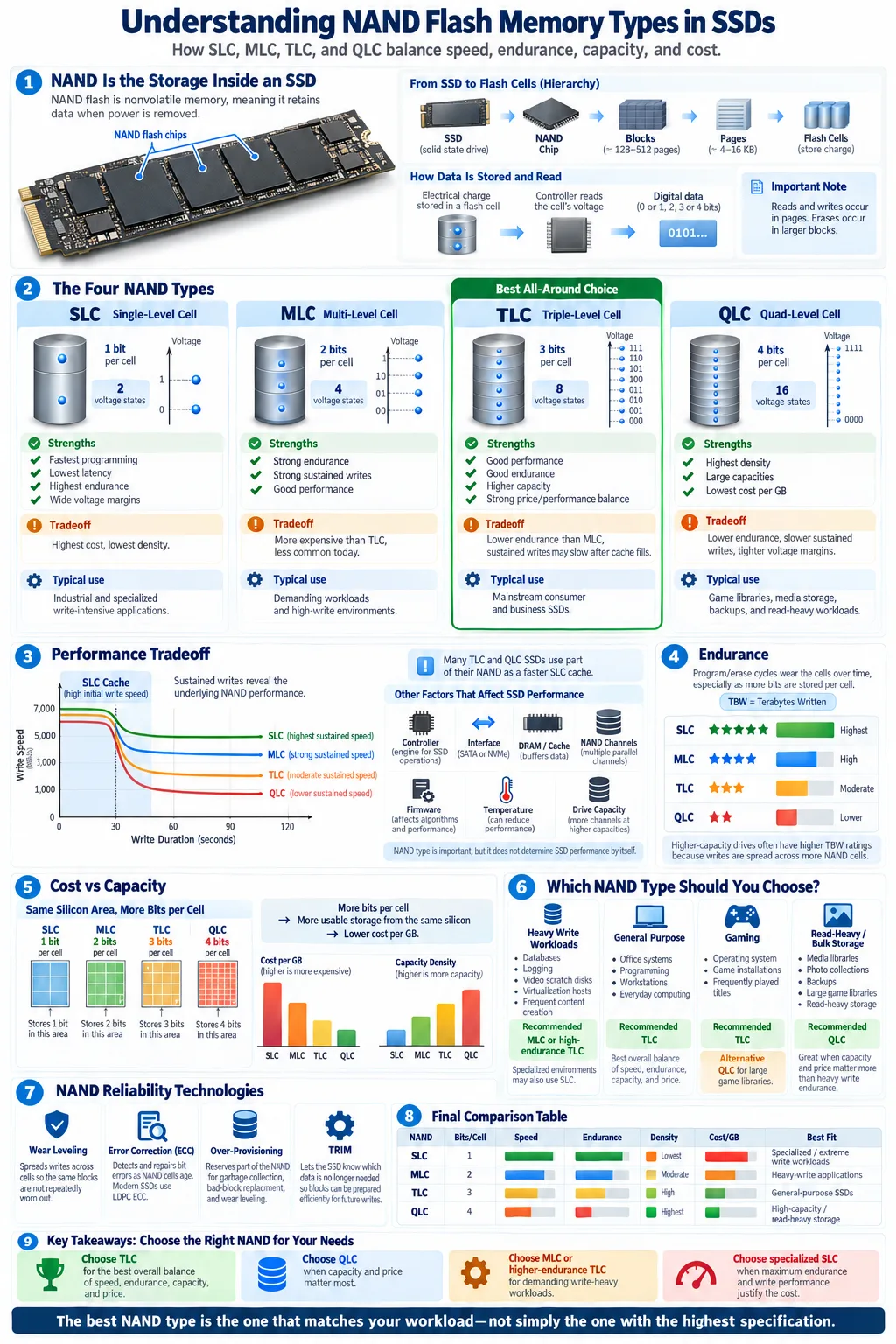
SLC, MLC, TLC, and QLC store different numbers of bits per cell, which affects speed, endurance, and price.
-
SLC delivers the best performance and durability at a premium, while QLC offers more capacity at a lower cost with a shorter lifespan.
-
Choose SLC or MLC for heavy write workloads, and consider TLC or QLC for archival, everyday, or read-heavy storage.
NAND flash memory is the storage technology behind nearly every modern Solid State Drive. Unlike a hard disk drive, an SSD stores data electronically instead of on spinning platters. The type of NAND used inside the drive affects how quickly it handles data, how many writes it can tolerate, how much space it provides, and what you pay for it. SLC, MLC, TLC, and QLC describe how many bits each flash cell stores. Understanding that difference helps you compare SSD types beyond headline read and write speeds, especially when you need dependable storage for work, gaming, servers, or long term data retention.
What is NAND Flash Memory?
Basic Structure and Function
NAND flash is a nonvolatile memory technology, which means it retains data after power is removed. It stores information by changing the electrical charge of microscopic transistors called cells. Each flash cell represents one or more bits, depending on the NAND design. A controller reads the voltage level in each cell and translates it into digital data.
Cells are arranged into pages, and pages are grouped into blocks. SSDs normally read and write data in pages, but they erase data at the larger block level. This structure makes NAND efficient for compact storage, although it also means that updating small amounts of data can require background management. NAND chips may use a planar design or a newer 3D arrangement, where layers of cells are stacked vertically to increase density.
Role in SSDs
In a Solid State Drive, NAND provides the persistent storage while the controller manages data placement, translation, caching, and error handling. Firmware also spreads writes across the available cells and reserves spare space for maintenance. The result is much faster access than a mechanical drive, with no moving parts.
NAND type is only one part of an SSD's design. The controller, interface, cache, temperature, firmware, and drive capacity also influence real world results. Still, the number of bits stored in each cell is a useful starting point because it directly affects density, operating margins, and durability.
Different Types of NAND Flash Memory
Single-Level Cell (SLC)
SLC, or Single-Level Cell, stores one bit per cell. Because it uses only two voltage states, the controller can read and program it quickly and with a wide margin for error. SLC generally delivers the highest speed and endurance, but it requires more physical cells for the same capacity. That makes it expensive for consumer storage. It is common in specialized industrial, enterprise, and write intensive applications.
Multi-Level Cell (MLC)
MLC, or Multi-Level Cell, stores two bits per cell. It provides a useful balance between capacity, speed, and durability. Genuine two-bit MLC is now less common in mainstream consumer SSDs because manufacturers can produce more affordable TLC drives. It remains valuable in demanding workloads where frequent writes and consistent performance matter.
Triple-Level Cell (TLC)
TLC, or Triple-Level Cell, stores three bits per cell. It offers a strong combination of capacity, price, and practical durability, which makes it the most common choice for quality consumer SSDs. Many TLC drives use a portion of faster NAND as a temporary cache. After that cache fills, sustained write speed may fall, so specifications should be checked beyond the peak benchmark.
Quad-Level Cell (QLC)
QLC, or Quad-Level Cell, stores four bits per cell. Its higher density lowers manufacturing costs and enables large drives at attractive prices. However, the narrower voltage margins make QLC slower and less durable than TLC, particularly during long sustained writes. QLC can work very well for game libraries, media collections, backups, and read heavy systems when the drive has adequate cache and capacity.
How NAND Types Affect SSD Performance
Speed and Latency
Performance depends on the NAND cells, controller, interface, cache, and workload. SLC needs fewer voltage states, so it usually offers lower latency and faster programming. MLC also performs strongly, while TLC and QLC need more precise voltage management. In everyday use, a good TLC or QLC SSD can still feel very fast because the controller uses an SLC cache and parallel NAND channels. Sustained transfers that exceed the cache reveal larger differences.
Endurance and Write Cycles
Endurance describes how much data an SSD can write before its NAND begins to wear beyond the manufacturer's rated limit. Each program and erase operation contributes to the cell's wear. SLC generally supports the most write cycles, followed by MLC, TLC, and QLC. Manufacturers often express endurance as terabytes written, or TBW, which is more useful than a simple cell rating. A high capacity drive may have a higher TBW rating because more cells share the workload.
Data Retention
Data retention is the period data remains readable without power. As cells wear, their voltage states become harder to distinguish, and retention can decline. Higher density NAND has tighter voltage margins, so QLC typically needs more careful management than SLC. For powered-on consumer systems, controller refresh operations help maintain data. For offline archives, use backups and periodically verify important files rather than relying on one SSD indefinitely.
Cost Implications of NAND Flash Types
Price per Gigabyte
Cost per gigabyte falls as each cell stores more bits because manufacturers can create more usable capacity from a similar silicon area. SLC therefore costs the most, while QLC usually costs the least. MLC sits between SLC and TLC in density, and TLC often provides the best balance for consumer products. Pricing also depends on the controller, DRAM, warranty, interface, brand, and market conditions, so NAND type should not be the only factor in a comparison.
A low price does not automatically indicate poor quality. A QLC drive with a capable controller, generous spare area, and a clear endurance rating may be a sensible purchase for a lightly written workload. Conversely, a premium drive may be wasteful if you mainly install applications, store photos, or read media files.
Value for Different Use Cases
For a database, video editing scratch disk, virtualization host, or engineering workstation, paying more for MLC or high endurance TLC can reduce performance drops and replacement risk. For a gaming PC, TLC is often the practical sweet spot, while QLC can provide economical space for a large game library. QLC also suits home media servers and backup targets when most activity involves reading data.
Compare the drive's warranty, TBW rating, sustained write behavior, and capacity alongside its purchase price. A larger drive can also deliver better longevity because it has more cells available for the same workload.
Choosing the Right NAND Flash for Your Needs
Use Case Scenarios
Start with the amount and type of data you write. A server handling databases, virtual machines, logging, or frequent content creation benefits from enterprise SLC caching, high endurance TLC, or MLC where available. These workloads create repeated random writes and long sustained transfers, which expose weaker NAND designs quickly.
For office work, programming, web use, and gaming, a reputable TLC SSD is usually the safest all around choice. It provides responsive system performance without the cost of specialized enterprise media. QLC is a reasonable option for secondary storage, large game libraries, photo collections, backups, and media files that are read more often than they are rewritten. It may be less suitable as the only drive for constant video capture or heavy scratch work.
Balancing Performance, Capacity, and Cost
When comparing drives, check the advertised sequential and random speeds, but also look for sustained write information and the TBW rating. A large SLC cache can make short transfers look fast, while performance may decrease after the cache fills. Reviews that test long writes are more useful for demanding workloads.
Choose enough capacity to leave free space available. An SSD that is nearly full has less room for background management and may slow down. For most buyers, TLC offers the best balance. Choose QLC when capacity and price matter most, and choose higher endurance storage when your workload writes large amounts of data every day.
Technologies Enhancing NAND Flash Reliability
Wear Leveling
Wear leveling distributes program and erase operations across the NAND instead of repeatedly using the same cells. Dynamic wear leveling moves new data to less used blocks, while static wear leveling may relocate older data so rarely changed blocks also participate. This process extends the useful life of the drive and works with spare blocks reserved by the controller.
Error Correction Codes (ECC)
Error correction uses mathematical codes to detect and repair bit errors as NAND cells age. Modern SSDs commonly use powerful low density parity check, or LDPC, algorithms. The controller may perform several read attempts and use surrounding information to recover data. As NAND stores more bits per cell, ECC becomes increasingly important because the voltage levels are closer together and more difficult to distinguish.
Over-Provisioning
Over-provisioning reserves part of the NAND capacity for controller tasks rather than making every cell available to the user. This spare area supports garbage collection, bad block replacement, wear leveling, and steady write performance. Some of it is built into the drive, while some can be created by leaving unallocated space.
TRIM also helps by telling the SSD which blocks no longer contain useful data, allowing the controller to prepare them efficiently. These technologies improve reliability, but they cannot eliminate wear. Keep current backups, install firmware updates from the manufacturer when appropriate, and replace a drive when its health indicators or error counts show concern.
The best NAND type is the one that matches your workload, not necessarily the one with the highest specification. Choose TLC for a dependable general purpose SSD, QLC for affordable high capacity and read heavy storage, and MLC or specialized SLC solutions when write intensity and endurance justify the extra cost. Check sustained performance, TBW, warranty coverage, controller design, and available capacity before buying. Leave free space, maintain backups, and use the manufacturer's health tools. With those checks, you can choose storage that remains fast, reliable, and cost effective for years.
Which NAND type is best for an SSD?
TLC is usually the best overall choice for consumer SSDs because it balances speed, endurance, capacity, and price. MLC or SLC can be better for unusually heavy write workloads, while QLC suits affordable, read heavy storage.
Is QLC NAND bad for gaming?
No. QLC works well for storing and loading games, especially when the drive has enough free space and a capable controller. It is less ideal if you constantly install, uninstall, record, and move very large files.
Does SLC last longer than TLC and QLC?
Generally, yes. SLC stores one bit per cell and uses wider voltage margins, so it normally tolerates more program and erase cycles. Actual SSD life also depends on capacity, controller management, workload, temperature, and the manufacturer's TBW rating.
What is the difference between MLC and TLC NAND?
MLC stores two bits per cell, while TLC stores three. MLC usually provides higher endurance and stronger sustained write performance, but TLC offers greater density and a lower price per gigabyte.
How can you tell what NAND an SSD uses?
Check the manufacturer's specification page, technical review, or detailed product documentation. Some retail listings do not clearly identify the NAND type, so independent reviews may be needed to confirm whether a model uses TLC, QLC, or another design.
Does NAND type affect SSD speed all the time?
It affects the drive's underlying behavior, but you may not notice a major difference during short everyday tasks. Differences become clearer during sustained writes, heavy multitasking, random workloads, or when the drive's SLC cache is full.




