

ProLiant DL360 Gen10 vs Gen11: Which Server Should You Choose?
Compare processors, memory, storage, security, pricing, and real world performance
-
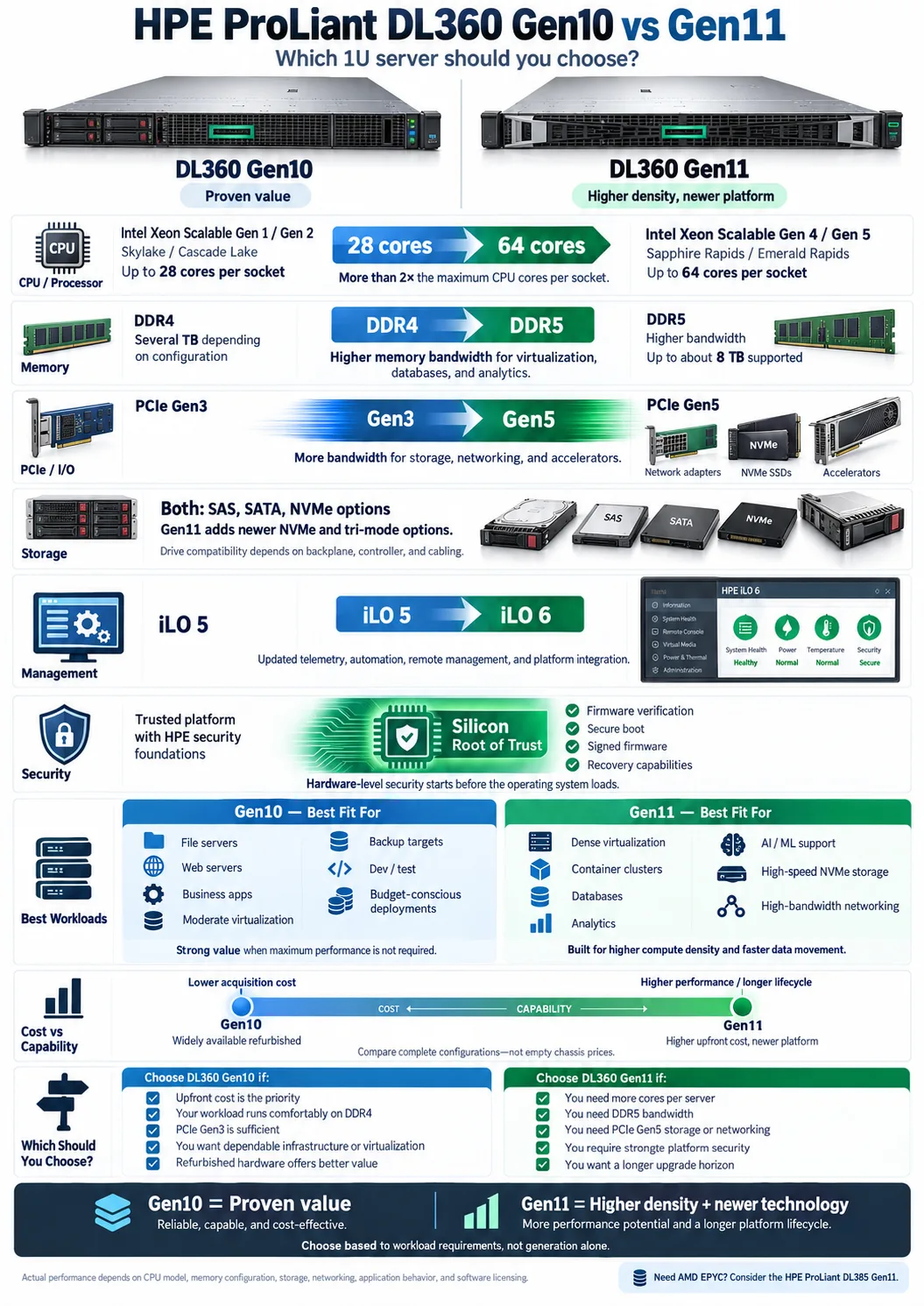
Gen11 supports more than twice the CPU cores, reaching 64 cores per socket versus 28 cores in Gen10.
-
Gen11 replaces DDR4 with DDR5 and PCIe Gen3 with PCIe Gen5 for substantially more memory and I/O bandwidth.
-
Gen11 adds iLO 6 and silicon root of trust, strengthening remote management and hardware level security.
Choosing between the HPE ProLiant DL360 Gen10 and Gen11 comes down to more than purchase price. These compact servers use the same basic 1U rack format, but the newer generation changes the processor platform, memory technology, PCIe connectivity, security architecture, and management experience. Gen10 remains a capable option for virtualization, business applications, and general infrastructure, especially when you find a well configured refurbished unit. Gen11 is designed for higher density, faster data movement, newer accelerators, and longer-term support. This comparison explains the practical differences so you can match each server to your workload, budget, and upgrade plans.
Overview: What Are the ProLiant DL360 Gen10 and Gen11 Servers?
Introduction to HPE ProLiant DL360 series
The HPE ProLiant DL360 Gen10 and HPE ProLiant DL360 Gen11 are single-socket or dual-socket 1U servers from HPE. They are built for data centers where rack space matters, but you still need enterprise features such as redundant power supplies, hot-plug drives, remote administration, and extensive hardware monitoring. Common deployments include virtualization hosts, databases, web applications, container platforms, and infrastructure services.
Key generational differences at a glance
Gen10 is based on Intel Xeon Scalable platforms from the Skylake and Cascade Lake eras. It uses DDR4 memory, PCIe Gen3 connectivity, and iLO 5 management. Gen11 moves to newer Intel Xeon Scalable platforms, including Sapphire Rapids and Emerald Rapids, with DDR5 memory, PCIe Gen5, and iLO 6. The result is substantially higher memory bandwidth, more CPU cores, faster expansion devices, and stronger platform security.
The chassis concept remains familiar, so administrators experienced with HPE servers will find the layout and service procedures recognizable. The major difference is the amount of compute and I/O performance available inside that same compact footprint.
Processor Comparison: How Do Gen10 and Gen11 CPUs Differ?
Supported Intel Xeon Scalable processor generations
Gen10 supports first and second generation Intel Xeon Scalable processors, including Skylake and Cascade Lake families. Depending on the exact model, these CPUs offer different frequencies, cache sizes, and core configurations. Gen11 supports fourth and fifth generation Intel Xeon Scalable processors, led by Sapphire Rapids and Emerald Rapids. These newer processors add more cores, newer instruction features, improved accelerators, and greater memory bandwidth.
Core counts and performance impact
The most visible difference is core count. Gen10 can support processors with up to 28 cores per socket, while Gen11 can reach 64 cores per socket with the appropriate fifth generation processor. More cores improve consolidation density for virtual machines, containers, parallel analytics, and heavily threaded applications. They do not automatically make every application faster. Software licensing, clock speed, storage latency, and workload parallelism still matter.
AMD processor support overview
Neither the DL360 Gen10 nor the DL360 Gen11 is an AMD-based platform. Both are designed around Intel processors. If you specifically need AMD EPYC, look at the HPE ProLiant DL385 family, including the DL385 Gen11. This distinction matters because processor architecture, memory population rules, firmware, and virtualization features differ between Intel and AMD systems.
When comparing configurations, evaluate the exact CPU model rather than relying only on the server generation. A high frequency Gen10 chip may suit lightly threaded applications, while a high core count Gen11 chip is usually better for consolidation and parallel workloads.
Memory and Storage: DDR4 vs DDR5 and Expansion Capabilities
Memory type and maximum capacity
Gen10 uses DDR4 memory, while Gen11 uses DDR5 memory. DDR5 provides higher transfer rates and greater bandwidth per memory channel, which helps virtual machines, databases, analytics, and other workloads that frequently access memory. Depending on the selected DIMMs and configuration, Gen10 can reach several terabytes of RAM, while Gen11 supports substantially more, with supported configurations reaching up to about 8 TB.
Your real limit is not only the published maximum memory capacity. DIMM type, processor selection, population order, firmware, and the number of installed CPUs all affect the usable configuration. Balanced DIMM population is important because filling memory channels evenly usually delivers better bandwidth than installing a few very large modules.
Storage options and compatibility
Both generations support enterprise drive choices such as SAS, SATA, and NVMe, although the available bays depend on the chassis and storage controller configuration. Gen11 offers newer NVMe and tri-mode options that can reduce latency and improve throughput. Existing Gen10 drives may not be the best choice for a Gen11 build, so verify drive backplanes, controllers, cabling, and HPE support before reusing components.
PCIe generation and I/O improvements
Gen10 primarily provides PCIe Gen3, while Gen11 introduces PCIe Gen5. PCIe Gen5 delivers far more bandwidth for each lane, benefiting high speed network adapters, NVMe storage, GPUs, and other accelerators. The improvement is most valuable when the device itself supports the newer standard and the workload can use its bandwidth.
Management and Security Enhancements in Gen11
iLO 5 versus iLO 6 features
Gen10 uses iLO 5, while Gen11 uses iLO 6, the newer generation of HPE's iLO (Integrated Lights-Out) platform. Both provide remote console access, hardware health monitoring, virtual media, firmware controls, and power management. iLO 6 adds a refreshed interface, updated automation capabilities, improved telemetry, and support for newer security and platform features.
Silicon root of trust and zero trust security
Gen11 strengthens the hardware security model with a silicon root of trust. This establishes a trusted foundation in the server's silicon and helps verify firmware before the system runs it. The approach supports a broader zero trust strategy by making firmware integrity part of the security process, rather than relying only on network controls or operating system protection. Secure boot, signed firmware, configuration safeguards, and recovery capabilities add further protection.
Cloud integration and GreenLake support
Both servers can be monitored and managed through HPE tools, but Gen11 is better aligned with modern cloud connected operations. HPE GreenLake can provide consumption based infrastructure services, centralized visibility, and lifecycle management options when your organization uses that model. The value depends on your tooling and processes. A small standalone environment may need only local iLO administration, while a distributed data center can benefit from standardized fleet monitoring and automation.
In practical terms, Gen11 improves server management most when you operate many systems, need stronger firmware assurance, or want to integrate hardware operations with centralized automation.
Performance in Real-World Workloads
Use cases best suited for Gen10
Gen10 remains a sensible choice for file services, web servers, business applications, moderate virtualization, backup targets, and development environments. It is especially attractive when your software does not need extreme core density and you can buy a tested refurbished configuration at a substantial discount. DDR4 memory and PCIe Gen3 are still adequate for many conventional workloads.
Use cases best suited for Gen11
Gen11 is better suited to dense virtualization, container clusters, real-time analytics, AI and machine learning support, high speed storage, and heavily threaded databases. Its newer CPUs can provide more than twice the available cores per socket, while DDR5 and PCIe Gen5 reduce bottlenecks between processors, memory, storage, and add-in devices. These advantages are most noticeable when several demanding workloads share one host.
Comparative benchmarks and efficiency
Benchmark results depend on the exact processor, DIMM layout, drive type, controller, and software version. A Gen11 system with a 64 core Emerald Rapids CPU will outperform a Gen10 system with a 28 core Cascade Lake CPU in highly parallel testing, but a lower end Gen11 configuration may not beat every high frequency Gen10 configuration in lightly threaded work. Gen11 can also improve performance per rack unit because it consolidates more work into the same chassis space.
Measure your actual workload where possible. Track CPU utilization, memory bandwidth, storage latency, network throughput, and software licensing costs. More cores are useful only if your applications can use them and your licenses do not make the upgrade uneconomical.
Form Factor and Expansion: What Does the DL360 Offer?
1U rack server design and implications
The DL360 is a 1U rack server, so it occupies only one rack unit. That density is useful in colocation facilities, virtualization clusters, and data centers with limited floor space. The tradeoff is less internal room than a taller server, which can mean fewer drive bays, fewer expansion slots, smaller cooling margins, and more constrained cable routing. Fan noise and airflow planning also matter in dense deployments.
Expansion slots and disk capacity
Gen10 and Gen11 can be configured with different risers, controllers, drive cages, and networking options. Depending on the chassis, you may choose SFF drive bays, NVMe support, SAS or SATA storage, and additional network or accelerator cards. Check the exact quickspecs for the riser and backplane combination before ordering. Storage expansion is configuration dependent, not a simple feature of the server name.
Comparison with DL380 and other models
The HPE ProLiant DL380 Gen10 offers a 2U chassis with more drive capacity and expansion flexibility than the DL360 Gen10. The DL380 is often the better choice for large local storage arrays, multiple accelerators, or extensive PCIe requirements. The DL385 Gen11 provides a similar larger form factor with AMD EPYC support. Choose the DL360 when rack density and compute per unit matter most. Choose a larger model when drive count, internal expansion, or cooling capacity matters more than saving one rack unit.
Cost Considerations and Availability
Pricing differences between Gen10 and Gen11
Gen11 usually costs more because it uses newer processors, DDR5 modules, PCIe Gen5 components, and updated management hardware. The total cost is not limited to the chassis. Include CPUs, memory, storage controllers, drives, network cards, rails, power supplies, support contracts, and software licenses. A lightly configured Gen11 may look affordable until you add the memory and storage needed for production.
Refurbished market availability for Gen10
Gen10 systems are widely available through refurbished equipment dealers and secondary markets. This can make them excellent value for labs, branch offices, backup environments, and workloads with stable requirements. Buy from a supplier that provides tested hardware, a clear warranty, matching components, current firmware, and a return policy. Confirm that the server includes the correct riser, drive caddies, rail kit, and power supplies instead of assuming those parts are included.
When to invest in Gen11
Gen11 is worth the premium when you need high core density, faster NVMe or networking, large memory pools, newer accelerators, stronger firmware security, or a longer useful life. It may also reduce licensing and facility costs if one Gen11 host can replace several older systems. Consider power and cooling, too. Consolidating workloads can lower infrastructure overhead, although a fully populated Gen11 server may draw more power than a modest Gen10 configuration.
Compare the cost per usable core, gigabyte of RAM, and unit of application throughput. That approach is more meaningful than comparing bare chassis prices.
Choosing the Right Server: Gen10 or Gen11?
Factors to consider based on workload and budget
Choose Gen10 when your workload is moderate, your software is well suited to its available cores, and acquisition cost is the main constraint. It is also a practical choice for nonproduction testing, backup, development, and applications that already run comfortably on DDR4 and PCIe Gen3. Choose Gen11 when you need more virtual machines per host, faster storage or networking, more RAM, or stronger hardware security.
Future-proofing and upgrade paths
Gen11 offers the longer forward-looking platform because it supports newer CPU families, DDR5, PCIe Gen5 devices, and current management features. However, future-proofing only helps if your planned upgrades fit the selected chassis. Check the number of DIMM slots, available risers, power supply capacity, drive backplane, and supported processor range before buying. Gen10 has a shorter upgrade horizon, but a properly specified system can remain useful for years.
Summary of key decision points
Prioritize Gen10 for lower upfront cost and proven capacity. Prioritize Gen11 for core density, memory bandwidth, I/O performance, security, and lifecycle value. Confirm processor model, RAM configuration, storage backplane, network adapters, warranty, and licensing before making a final decision. If AMD EPYC is a requirement, compare the DL385 Gen11 rather than either DL360 platform.
The best choice is the server that meets your measured workload requirements without paying for capacity your applications cannot use.
For many budget conscious deployments, a well configured DL360 Gen10 still delivers dependable enterprise performance. Gen11 is the stronger long-term platform when you need more cores, DDR5 bandwidth, PCIe Gen5 expansion, and enhanced security. Start with your workload measurements, then price complete configurations rather than empty chassis. Check storage, memory population, risers, support, and software licensing before ordering. That process will help you avoid both underpowered hardware and expensive capacity that your applications cannot use.
What is the main difference between the DL360 Gen10 and Gen11?
The DL360 Gen11 uses newer Intel Xeon processors, DDR5 memory, PCIe Gen5, and iLO 6. The DL360 Gen10 uses older Intel Xeon platforms, DDR4, PCIe Gen3, and iLO 5.
Is the DL360 Gen11 faster than the DL360 Gen10?
Gen11 is generally faster, especially for virtualization, analytics, databases, and other highly parallel workloads. Actual results depend on the installed processor, memory layout, storage, and application.
How much more memory can the DL360 Gen11 support?
Supported Gen11 configurations can reach about 8 TB of DDR5 memory, while Gen10 supports several terabytes of DDR4 depending on the DIMMs and processor configuration. Always confirm the exact HPE QuickSpecs for your planned build.
Can I use Gen10 DDR4 memory in a DL360 Gen11?
No. The DL360 Gen11 requires DDR5 memory, and Gen10 DDR4 DIMMs are not compatible with its memory slots.
Does the DL360 Gen11 support AMD EPYC processors?
No. The DL360 Gen11 is an Intel based server. For AMD EPYC, consider an HPE ProLiant DL385 Gen11.
Is a refurbished DL360 Gen10 still worth buying?
Yes, if your workload does not require DDR5, PCIe Gen5, or the newest security features. Buy from a reputable supplier and verify the processor, memory, storage backplane, firmware, warranty, and included accessories.




