

Latency Timing Explained: Understand CAS Latency and RAM Speed
Learn how memory timings, frequency, and nanoseconds affect RAM performance
-
CAS latency, or CL, counts clock cycles before RAM starts delivering requested data.
-
Lower CL can improve responsiveness, but total latency depends on both CL and RAM frequency.
-
SPD chips store tRCD, tRP, and other timing values that contribute to overall memory latency.
Latency timing describes how quickly your memory responds after the processor requests data. The number printed on a kit, such as CL16 or 36, is useful, but it does not tell the complete story by itself. You also need to consider the memory's transfer rate, its full timing sequence, and how those settings work with your processor and motherboard. This guide explains CAS latency, RAM timing numbers, and the formulas used to convert them into real response times. You will also learn how to compare DDR4 and DDR5 kits, check your installed settings, and choose memory that suits gaming, productivity, or general use.
What is CAS Latency?
Definition and significance
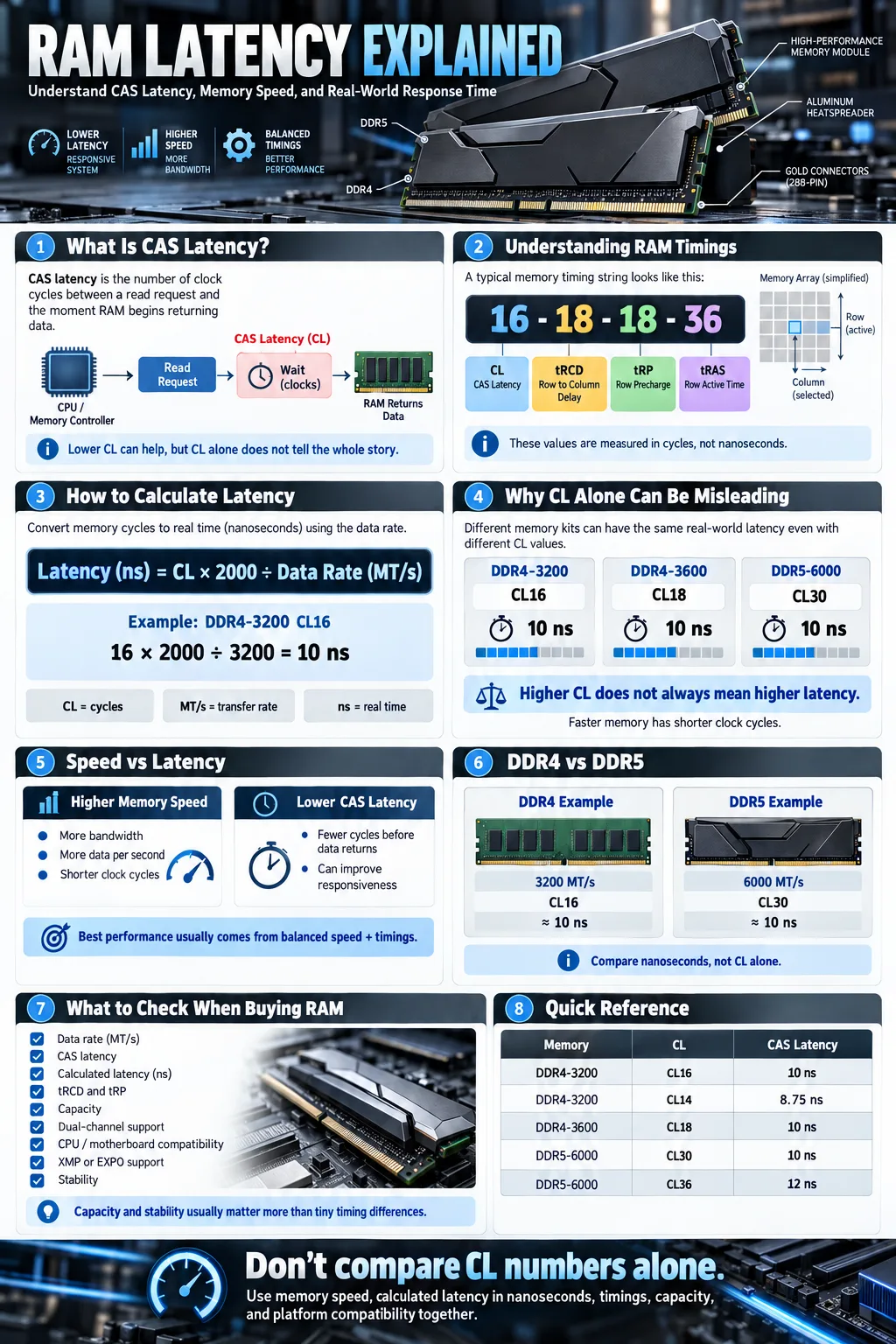
CAS latency, commonly shown as CL, is the number of clock cycles between a memory controller sending a read command and the RAM beginning to return the requested column of data. CAS stands for Column Address Strobe. A kit rated at CL16 needs 16 cycles for this part of a read operation, while CL36 needs 36 cycles at the same clock speed.
That makes a lower CL desirable in principle, but the number is not a direct measurement of time. Each cycle becomes shorter as the memory clock rises. You must therefore compare CL alongside the kit's data rate before deciding which module responds faster.
How CAS latency affects RAM performance
CAS latency influences how quickly the system can access data that is not already available in a cache or open row. It can affect application loading, minimum frame rates, compression, and some CPU limited workloads. The effect is usually modest when you compare kits with similar specifications, because modern processors hide much of the delay with caches and prefetching.
For example, a Ryzen 7 2700X system may benefit more from a compatible dual channel configuration and a stable memory speed than from chasing the lowest advertised CL number. Capacity, bandwidth, processor architecture, and motherboard support all matter too. Think of CL as one part of a response time, not a complete performance rating.
Understanding RAM and Memory Timings
Breakdown of common timing numbers (e.g., 16-18-18-36)
RAM timings, also called memory timings, describe delays for several operations. A specification such as 16-18-18-36 usually lists primary timings in this order: CL, tRCD, tRP, and tRAS. The first value is the column read delay. The second covers activating a row and accessing a column. The third is the delay needed to close one row before opening another. The final value describes the minimum time a row must remain active.
These figures are measured in cycles, not nanoseconds. A lower number is not automatically faster if it comes from memory running at a much lower frequency. A kit rated 3200 MT/s at 16-18-18-36 may have a similar first word latency to a faster kit with looser timings.
Other key timings: tRCD, tRP, and their roles
tRCD stands for Row to Column Delay. It measures the gap between opening a row and issuing a column read or write command. tRP, or Row Precharge Time, measures how long the memory needs to close the current row before another row can open. These delays matter when the requested data is in a different row from the previous request.
Manufacturers such as CORSAIR and Kingston publish primary and secondary timings on product pages, while enthusiast tools may expose many more values. Tuning them can improve performance, but unstable settings cause crashes or corrupted data. Start with the manufacturer's tested profile before attempting manual adjustments.
How to Calculate Total Memory Latency
Relationship between CAS latency and RAM frequency
Total latency depends on both the CL number and the memory's actual clock. Retail packaging usually lists DDR data rates in MT/s, while the physical clock is half that figure for standard double data rate memory. A 3200 MT/s kit normally operates at a 1600 MHz memory clock.
The basic CAS latency formula is:
Latency in nanoseconds = CL x 2000 / data rate in MT/s
This formula gives the delay for the CAS portion of a read. It does not add every timing together, because a complete access can involve row activation, precharge, command scheduling, and memory controller behavior.
Converting clock cycles to nanoseconds
To convert clock cycles into nanoseconds, first calculate the duration of one cycle. At 3200 MT/s, the physical clock is 1600 MHz, so one cycle lasts 0.625 nanoseconds. CL16 therefore equals 16 x 0.625, or 10 nanoseconds.
At 3600 MT/s, CL18 also equals 10 nanoseconds because 18 x 2000 divided by 3600 is 10. At 6000 MT/s, CL30 produces the same 10 nanoseconds for CAS latency. This comparison shows why CL30 DDR5 can respond as quickly as CL16 DDR4 for the initial CAS event, even though the number printed on the label is higher. Real access time also includes tRCD, tRP, command delays, and platform behavior.
CAS Latency vs RAM Speed: What Matters More?
Comparing latency and frequency
RAM speed is commonly advertised as a transfer rate, while CAS latency is a cycle count. Higher frequency increases available bandwidth and shortens each cycle. Lower CL reduces the number of cycles required for the CAS step. The best comparison converts both options to nanoseconds and then checks the rest of the primary timings.
For example, 3200 MT/s CL16 and 3600 MT/s CL18 both calculate to about 10 nanoseconds of CAS latency. The 3600 MT/s kit offers more bandwidth, but the advantage depends on your processor, workload, and whether the memory controller can run it reliably. A 3200 MT/s CL14 kit has approximately 8.75 nanoseconds of CAS latency and may respond faster in latency sensitive tasks.
Impact on real-world performance and gaming
In gaming, memory speed and timings can affect CPU limited frame rates, especially minimum frame rates and consistency at lower resolutions. The improvement is often smaller when your graphics card is the bottleneck. Competitive games and simulation workloads may show more benefit than graphically demanding titles running at high settings.
Bandwidth heavy tasks such as integrated graphics, video processing, and some scientific workloads often favor higher transfer rates. General desktop use usually shows little difference between well configured kits. Choose a balanced specification rather than paying a large premium for a tiny timing improvement. Stability, capacity, dual channel operation, and platform compatibility should come first.
Does CAS Latency Matter for DDR5 and Modern RAM?
Changes in latency with DDR5 technology
DDR5 latency can look high because current kits often carry CL30, CL32, CL36, or larger values. DDR5 also operates at much higher transfer rates than earlier standards, so each clock cycle is shorter. DDR5 6000 CL30 calculates to 10 nanoseconds of CAS latency, which is comparable to DDR4 3200 CL16.
DDR5 increases bandwidth and introduces architectural changes, including independent 32 bit subchannels per module and on module power management. These features can improve efficiency and scalability, but they do not make every DDR5 kit equally responsive. Primary timings, secondary timings, memory rank layout, and the processor's integrated memory controller still matter.
How to interpret latency values in newer RAM standards
Do not compare CL numbers across generations without using the data rate. Compare calculated CAS latency, full primary timings, capacity, and platform support. For many current desktop systems, a DDR5 kit around 6000 MT/s with a low CL value is a practical target, but the best setting depends on the CPU and motherboard.
For example, an MTI, or Micron Technology, Inc., based module may use different memory chips and timings from a similarly rated kit using another supplier's chips. That does not automatically make one brand better. Check reviews and validated settings for your platform. Also remember that a higher bandwidth kit can be useful even when its first word latency is similar to an older kit.
How to Check and Interpret Your RAM’s CAS Latency
Using software tools and BIOS
You can check active memory settings in your motherboard's UEFI or BIOS. Look for the memory frequency, effective data rate, and primary timings. Many boards show CL, tRCD, tRP, and tRAS on the overclocking or advanced memory page. Be careful when interpreting frequency. A displayed 1600 MHz clock generally means DDR4 3200 MT/s effective transfer rate.
In Windows, tools such as CPU-Z, HWiNFO, and Thaiphoon Burner may show current timings or module information. CPU-Z typically lists the active memory clock on its Memory tab and stored profiles on its SPD tab. The reported values can differ if XMP or EXPO is enabled, so check both the active settings and the profile you selected.
Understanding SPD data on memory modules
SPD (Serial Presence Detect) is a small data record stored on a memory module. It contains supported frequencies, voltage information, primary timings, and standard operating profiles. The motherboard reads this information during startup so it can configure a safe default.
Performance profiles such as Intel XMP or AMD EXPO may provide faster settings than the basic JEDEC profile. Enabling one changes the active frequency and timings, but it can also require a compatible processor and board. If a system becomes unstable, return to the default profile or reduce the memory setting. Never assume the advertised specification is active until software confirms it.
Choosing the Right RAM Based on Latency and Timings
What is considered good RAM timing?
There is no single good timing for every generation. For DDR4, 3200 MT/s CL16 is a sensible baseline, while 3600 MT/s CL16 or CL18 can be attractive when your platform supports it. For DDR5, 5600 to 6000 MT/s with CL28 to CL36 is often a useful range for mainstream desktops. Calculate the latency rather than judging the CL number alone.
Also check tRCD and tRP. A kit rated 6000 CL30 with 30-38-38 may behave differently from one rated 6000 CL30 with 30-40-40 in some access patterns. Differences are normally measurable rather than dramatic. Prioritize a reputable kit, adequate capacity, a tested profile, and a return policy.
Balancing CAS latency with RAM speed for different use cases
For gaming, choose a balanced kit that matches your processor's preferred memory range. Capacity matters more than a small CL improvement if you are running modern games, browsers, streaming software, or content tools together. For integrated graphics, bandwidth is especially important because the GPU shares system memory.
For office work and browsing, affordable memory at a standard speed is usually sufficient. For rendering, compression, virtual machines, and data analysis, prioritize capacity and bandwidth, then use timings as a tie breaker. Confirm motherboard support and the required profile before buying. A stable CORSAIR or Kingston kit with slightly slower timings is a better choice than an unstable premium kit that your system cannot run reliably.
Common Questions About CAS Latency
Is 30 or 36 CAS latency better?
CL30 is lower than CL36 when both kits use the same memory clock. However, frequency changes the result. DDR5 6000 CL30 has about 10 nanoseconds of CAS latency, while DDR5 6000 CL36 has about 12 nanoseconds. Compare data rate, primary timings, and price rather than the CL number alone.
Is 3200 MT/s the same as 3200 MHz?
No. 3200 MT/s describes 3,200 million transfers per second. Standard DDR memory transfers data twice per physical clock cycle, so 3200 MT/s normally uses a 1600 MHz clock. Shops and software sometimes use MHz loosely, but MT/s is the more precise description for effective data rate.
How important is CAS latency for gaming?
CAS latency can affect CPU limited gaming performance, frame time consistency, and minimum frame rates, but its impact is usually modest. Capacity, dual channel operation, processor speed, GPU limitations, and overall memory bandwidth often matter just as much or more. Use calculated latency to choose between similarly priced kits, but do not sacrifice stability or capacity for a small CL improvement.
To compare memory confidently, start with the data rate, calculate CAS latency in nanoseconds, and then review tRCD, tRP, capacity, and platform support. A lower CL is useful, but only in context. Enable the correct XMP or EXPO profile, confirm the active settings with software, and test stability after installation. Whether you are upgrading a Ryzen 7 2700X system or building a modern DDR5 PC, balanced memory that runs reliably will deliver more value than an impressive specification your system cannot sustain.
What does CAS latency mean in RAM?
CAS latency is the number of memory clock cycles between a read request and the RAM beginning to return data. It is shown as CL followed by a number, such as CL16 or CL30.
Is lower CAS latency always better?
Lower CAS latency is better when memory speed is the same, but frequency changes the duration of each cycle. Compare kits using calculated nanoseconds, full timings, bandwidth, capacity, and platform compatibility.
What is a good CAS latency for DDR5?
DDR5 kits around 5600 to 6000 MT/s with CL28 to CL36 are common choices, depending on your platform and budget. DDR5 6000 CL30, for example, has approximately 10 nanoseconds of CAS latency.
What do tRCD and tRP mean?
tRCD is the delay between activating a row and accessing a column. tRP is the time required to close one row before opening another. Both can affect access time when requested data is not already in the active row.
How can I find my RAM's current timings?
Check the memory section of your BIOS or UEFI, or use software such as CPU-Z and HWiNFO. Confirm the active frequency and timings because stored XMP or EXPO profiles may differ from the settings currently running.
Does RAM latency affect gaming performance?
It can affect CPU limited games, especially minimum frame rates and frame time consistency. The effect is usually smaller when the graphics card is the limiting factor, so capacity, bandwidth, and stable dual channel operation remain important.




