

How Long Do Solid State Drives Last? Lifespan, Signs & Tips
Discover the real-world longevity of SSDs, what affects their lifespan, and how to keep your data safe
-
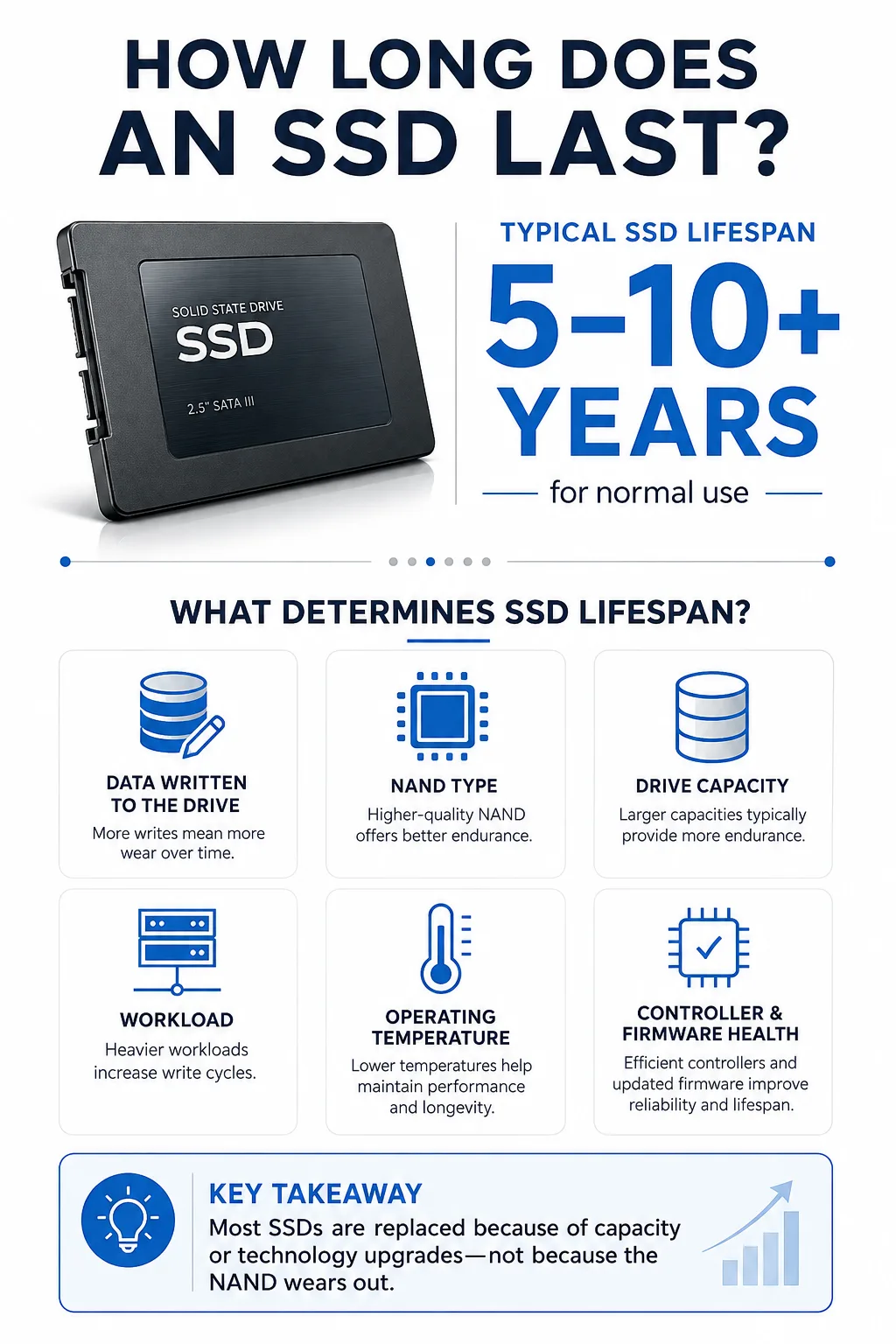
Most SSDs last 5–10 years or more, depending on usage and care.
-
SSD lifespan is measured by terabytes written (TBW) and mean time between failures (MTBF).
-
SSDs are more durable and faster than HDDs, but wear out from limited read/write cycles.
The question of how long solid state drives (SSDs) last is front and center for anyone relying on digital storage. Whether you’re storing family photos or running a business, understanding SSD lifespan helps you plan for upgrades and backups. SSDs have rapidly replaced traditional hard disk drives (HDDs) thanks to their speed and reliability, but even these advanced devices have their limits. In this guide, you’ll learn what affects SSD longevity, how to spot warning signs, and what you can do to keep your data safe for years to come.
What Is a Solid State Drive (SSD)?
How SSDs Work Compared to HDDs
A solid state drive (SSD) is a data storage device that uses NAND flash memory to store information. Unlike traditional hard disk drives (HDDs) that rely on spinning disks and moving read/write heads, SSDs have no moving parts. This design makes SSDs much faster, quieter, and more resistant to physical shock. Brands like Samsung and Sandisk are well-known for producing reliable SSDs for both consumers and businesses. The absence of mechanical components also means SSDs have a lower risk of failure from drops or bumps, a big advantage over HDDs.
Types of NAND Flash Memory: SLC, MLC, TLC, QLC
The type of NAND flash memory used in an SSD greatly affects its performance and lifespan. Single-level cell (SLC) memory stores one bit per cell, offering the best endurance and speed, but at a higher cost. Multi-level cell (MLC) stores two bits per cell, balancing cost and durability. Triple-level cell (TLC) and quad-level cell (QLC) store three and four bits per cell, respectively, making drives more affordable but with lower endurance. Most consumer SSDs use TLC or QLC due to their cost-effectiveness, while enterprise drives often use SLC or MLC for longer life in demanding environments.
How Long Do Solid State Drives Last?
Typical Lifespan Estimates
The average SSD lifespan for consumer drives is typically between 5 to 10 years under normal workloads. Some high-end models, especially those from brands like Samsung and Sandisk, can last even longer, especially if not subjected to heavy write activity. Manufacturers usually specify endurance using terabytes written (TBW) and mean time between failures (MTBF). A typical consumer SSD might be rated for 150 to 600 TBW and an MTBF of 1.5 to 2 million hours. However, real-world results often exceed these estimates, as Google’s data center research has shown SSDs can outlast their ratings in certain uses.
Factors Influencing SSD Longevity
Several factors impact how long an SSD actually lasts. The type of NAND flash (SLC, MLC, TLC, or QLC), total data written, temperature, and usage patterns all play a role. Frequent large file transfers or running an operating system on the drive can reduce lifespan compared to light, infrequent use. Regular firmware updates and good SSD maintenance can also extend the usable life of your drive. Ultimately, understanding your workload and monitoring drive health are key to maximizing SSD longevity.
What Affects SSD Lifespan?
Read/Write Cycles and Program/Erase (P/E) Cycles
The biggest limiter for SSD lifespan is the number of read/write cycles each memory cell can handle, known as program/erase (P/E) cycles. Each time data is written or erased, the NAND flash cells wear down a little. SLC cells can usually handle up to 100,000 cycles, while QLC cells might only survive a few thousand. Therefore, the more you write and erase data, the sooner those memory cells will begin to fail.
Terabytes Written (TBW) Explained
Terabytes written (TBW) is a key specification for SSDs. It tells you how much total data can be written to the drive before some cells may start to fail. For example, a 256 TBW rating means the manufacturer expects the drive can reliably handle writing 256 terabytes of data during its life. Most users never come close to reaching this limit in typical consumer use.
Impact of Usage Patterns and Storage Conditions
How you use and store your SSD also matters. Heavy workloads—like video editing or running databases—will use up read/write cycles faster. High temperatures can accelerate wear as well. On the other hand, storing your SSD in a cool, dry place and avoiding unnecessary writes helps preserve its health. Some SSDs, especially those from Samsung and Sandisk, include advanced controllers that better manage wear and extend drive life in challenging conditions.
How to Estimate Your SSD’s Remaining Life
Using Manufacturer Tools and SMART Data
To get a real sense of your SSD lifespan, check the drive’s health status using manufacturer utilities or third-party tools. Most brands, including Samsung and Sandisk, offer software that reads the drive’s SMART data (Self-Monitoring, Analysis and Reporting Technology). SMART reports can show the percentage of life remaining, total bytes written, and any warning signs of failure. Google’s data center teams rely on these tools to monitor thousands of drives at scale.
Calculating Based on Usage and TBW
You can estimate your SSD’s remaining life by comparing your actual data writes to the drive’s TBW rating. For example, if your SSD is rated for 300 TBW and you write about 10 TB per year, you’re on track for roughly 30 years of use—well beyond most upgrade cycles. Just remember, these are estimates, and unexpected issues can still arise, so regular backups are always a smart move.
Signs Your SSD Is Failing
Common Symptoms of SSD Failure
Recognizing SSD failure signs early can help you avoid data loss. Common symptoms include frequent crashes, read/write errors, files that disappear or become corrupted, and slower performance. Sometimes, the system may not detect the SSD at all. Unlike HDDs, there’s no clicking or grinding noise, so you have to watch for these digital clues instead.
How to Back Up Data Before Failure
Once you spot potential SSD failure signs, act quickly. Use backup software or simply copy important files to another drive or cloud storage. Many SSDs from Samsung, Sandisk, and others come with built-in tools for data migration. Keeping regular, automated backups is the safest way to protect your information, especially as your SSD ages.
SSD Reliability Compared to HDDs
Durability and Failure Rates
SSD reliability is one of their biggest advantages over traditional hard drives. With no moving parts, SSDs are less likely to fail due to shocks, drops, or vibration. Studies (including those by Google) show SSDs have lower failure rates, especially in portable devices. However, when SSDs reach the end of their life, they may fail suddenly, whereas HDDs often give more warning through noise or gradual performance loss.
Performance Differences
When it comes to speed, SSDs are dramatically faster than HDDs for both reading and writing data. This results in quicker boot times, file transfers, and application launches. Some users opt for a hybrid drive (SSHD), which combines SSD speed with HDD capacity, but pure SSDs from Sandisk or Samsung remain the preferred choice for performance and SSD durability.
Best Practices to Extend SSD Lifespan
Maintenance Tips
Proper SSD maintenance goes a long way in prolonging drive life. Keep your operating system and SSD firmware up to date, and regularly check drive health using manufacturer tools. Avoid filling the drive to maximum capacity, as leaving some free space helps the controller manage wear more efficiently.
Avoiding Excessive Writes
Minimize unnecessary writes by disabling features like hibernation or frequent system restore points, which can generate a lot of background activity. Store large, infrequently accessed files (like videos) on secondary drives to reduce daily write load on your SSD.
Firmware Updates and TRIM Command
Updating the SSD's firmware can fix bugs and enhance performance. Ensure that the TRIM command is enabled—this allows your SSD to efficiently erase unused data blocks, preventing slowdowns and extending lifespan. Most modern operating systems support TRIM by default, but it’s worth double-checking in your system settings.
Future of SSD Longevity and Technology Advances
The future looks bright for SSD technology, with ongoing advances in NAND flash memory and controller design. Manufacturers like Samsung and Sandisk are developing drives with higher endurance, smarter wear-leveling algorithms, and even more accurate health monitoring. As these improvements roll out, SSDs will continue to close the gap between speed, capacity, and longevity, making them an even better choice for all types of storage needs. Keeping an eye on new developments can help you make informed decisions when it’s time for your next upgrade.
Understanding SSD lifespan helps you make smart choices about data storage and protection. By monitoring your drive’s health, practicing good SSD maintenance, and keeping regular backups, you’ll enjoy the speed and durability of SSDs with peace of mind. Stay proactive, and your SSD can serve you reliably for many years—just remember, no drive lasts forever, so keep your data safe and be ready for future upgrades.
How can I check my SSD's health and lifespan?
Most SSD manufacturers offer free tools to check SMART data, which shows drive health, usage statistics, and estimated remaining life.
What happens when an SSD reaches its TBW limit?
Once the terabytes written (TBW) limit is reached, some memory cells may fail, and the drive may become read-only or stop working altogether.
Do SSDs fail suddenly or gradually?
SSDs often fail suddenly without much warning, unlike HDDs, which may fail gradually. Regular backups are essential to avoid data loss.
Is it safe to use an SSD for long-term storage?
SSDs are reliable for everyday storage, but for very long-term archival use, HDDs or cloud backups can provide extra peace of mind.
Does brand matter for SSD longevity?
Yes, established brands like Samsung and Sandisk tend to offer better quality control, endurance ratings, and support than generic brands.
Can firmware updates improve SSD lifespan?
Firmware updates can fix bugs, improve performance, and sometimes enhance lifespan, so it's smart to keep your SSD's firmware up to date.
How does a hybrid drive (SSHD) compare to a pure SSD?
A hybrid drive (SSHD) combines SSD speed with HDD capacity, but pure SSDs still offer faster performance and greater durability overall.




