

Demystifying Server Memory Specifications for Smarter Infrastructure Decisions
Understand capacity, speed, ECC, channels, and compatibility before upgrading server memory
-
ECC and registered memory protect data integrity and improve stability in enterprise systems.
-
Memory speed and latency directly affect performance in virtualization and data intensive applications.
-
The right capacity and channel configuration help prevent bottlenecks and keep workloads efficient.
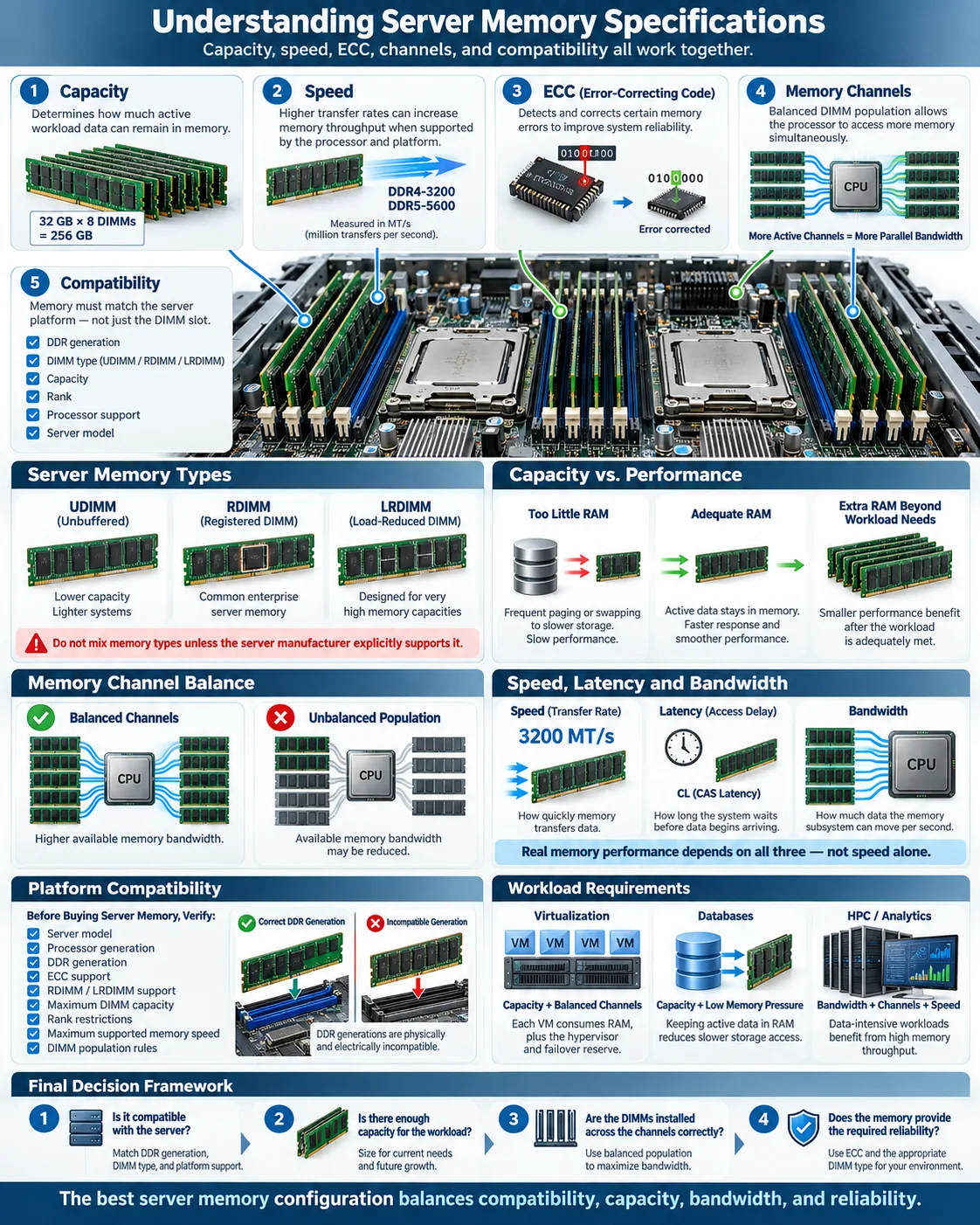
Choosing server memory can feel more complicated than choosing storage or processors because specifications often use unfamiliar terms. DDR generations, ECC, DIMMs, channels, latency, and bandwidth all describe different parts of the same performance picture. The right choice depends on your server motherboard, processor platform, operating system, and workload. A file server may need dependable capacity, while a virtualized host may need large memory reserves and balanced channels. This guide explains the most common specifications in plain language so you can compare modules confidently, avoid compatibility problems, and build a system that remains reliable under sustained demand.
What is Server Memory and Why Does it Matter?
Definition of server memory
Server memory is the temporary working space a server uses to hold data and instructions that the processor needs immediately. It is commonly called RAM, or random access memory. Unlike storage, RAM loses its contents when power is removed, but it is much faster than a hard drive or solid state drive.
Memory is installed as circuit boards called modules. Each module contains memory chips, a circuit board, and a connector that fits into a motherboard slot. Enterprise servers usually use memory designed for continuous operation, fault detection, and predictable compatibility rather than desktop memory intended for lighter workloads.
Role of memory in server performance
Memory affects server performance because it determines how much active data can remain close to the processor. When a server has enough RAM, applications can work without repeatedly reading from slower storage. If available memory runs low, the operating system may use paging or swap space, causing significant delays.
Capacity is only one part of the equation. Memory speed, latency, channel configuration, and error protection also matter. A database, virtualization host, or analytics system can slow down when memory becomes a bottleneck, even if its processor is powerful. Reliable server memory also reduces the risk that a small data error will corrupt an application or interrupt a critical service.
Key Server Memory Specifications Explained
Memory types: DDR3 vs DDR4 vs DDR5
DDR stands for double data rate. Each generation improves the electrical design and transfer rate, but generations are not interchangeable. DDR4 is common in many established servers and offers a strong balance of capacity, power use, and cost. DDR3 appears in older systems, while DDR5 supports higher transfer rates and newer server platforms. A DDR4 module cannot be installed in a DDR5 slot because the notch position, signaling, and controller requirements differ.
Error-Correcting Code (ECC) memory
ECC memory adds extra bits that let the system detect and correct certain memory errors. This matters in servers because a single flipped bit can alter a database value, crash an application, or silently corrupt a file. Most enterprise server platforms require ECC, although the exact correction capability depends on the processor and motherboard.
Registered and buffered memory
Buffered memory places a register between the memory controller and the memory chips. This reduces the electrical load seen by the controller and allows systems to support more modules. Registered memory, often called RDIMM, is a common buffered design for servers. LRDIMM, or load reduced DIMM, uses additional buffering to support very high capacities. RDIMM and LRDIMM are not normally mixed, and neither should be assumed compatible with unbuffered desktop memory. Always follow the platform vendor's supported memory list.
Understanding Memory Capacity and Configuration
Memory modules and DIMMs
Memory modules are the physical boards installed in a server. A DIMM, or dual in-line memory module, is the standard module format used in most servers. Capacity is listed per module, such as 16 GB, 32 GB, or 128 GB. The maximum supported total depends on the processor, motherboard, firmware, slot count, and module type.
Memory channels and their impact
Memory channels are independent paths between the processor's memory controller and the installed modules. Using the recommended number of modules per channel lets the processor access more data in parallel. This can increase throughput compared with placing one module in an otherwise empty channel. Server manuals usually identify balanced slots with labels such as A1, B1, or channel 1.
Balanced installation is especially important on multi socket servers. Each processor may control its own memory, creating a non uniform memory access design. A module attached to the wrong processor can increase access time, even when total capacity is adequate. Follow the population rules instead of filling slots randomly.
How to determine the right memory capacity
Start with the operating system's baseline needs, then measure the applications that will run at the same time. Memory capacity should cover the workload's active data, virtual machines, database cache, and a practical growth reserve. For virtualization, estimate the assigned RAM for every guest and leave room for the hypervisor and failover. For databases, review working set size and cache behavior. Monitoring tools can show whether memory is consistently full or whether the processor is waiting on other resources. More RAM does not fix every performance problem, but insufficient RAM is difficult to overcome.
Memory Speed, Latency, and Bandwidth
What memory speed means
Memory speed describes how quickly a module transfers data, usually shown as a DDR data rate such as 3200 MT/s. Some product listings use MHz, although MT/s is more precise for double data rate memory. Faster modules can move more data, but the server may lower their operating rate when all slots are populated or when the processor supports a lower limit.
Latency and its effect on performance
Memory latency is the delay between a request and the delivery of data. Timings such as CL22 express part of this delay in clock cycles. A lower timing is helpful, but it should be compared alongside the data rate because a faster clock can offset a larger cycle count. In many servers, capacity and channel balance have a greater practical effect than a small timing difference.
Bandwidth considerations
Memory bandwidth is the amount of data the system can transfer per second. It rises with data rate, bus width, and the number of active channels. Workloads that scan large datasets, process scientific models, or serve many virtual machines can benefit from higher bandwidth. A useful theoretical estimate is data transfers per second multiplied by the memory bus width and divided by eight to convert bits to bytes. Real results are lower because of controller limits, access patterns, and other overhead.
When comparing options, consider all three measures together. A high speed module cannot deliver its advertised benefit if the motherboard limits it, the channels are unbalanced, or the workload does not request data quickly enough.
Compatibility and Installation Considerations
Matching memory to server motherboard
Memory compatibility depends on more than the DDR label. Check the server model, processor generation, supported capacity per slot, ECC requirement, module type, rank limits, and maximum supported data rate. The motherboard manual and vendor memory configurator are more reliable than a generic online listing. Confirm whether the platform accepts UDIMM, RDIMM, or LRDIMM modules before ordering.
Mixing memory types and sizes
Do not mix DDR generations, registered and unbuffered modules, or RDIMM and LRDIMM in the same system unless the manufacturer explicitly allows it. Mixing capacities may work, but it can reduce channel balance or force all modules to operate at the speed of the slowest unit. Different ranks and chip layouts may also trigger restrictions. Identical kits are usually the safest choice, especially in systems with many slots.
Best practices for installation
Shut down the server, disconnect power when the service procedure requires it, and use an antistatic wrist strap or approved grounding method. Hold a module by its edges, align the notch with the slot, and press evenly until both latches lock. Populate slots in the order specified by the manual. After installation, check the system firmware for detected capacity, run the platform's memory test, and review the operating system logs for ECC errors.
Record the module part numbers and slot positions. This simple inventory makes future troubleshooting easier and helps you identify a failing module or an incorrect population pattern.
How Server Memory Impacts Different Workloads
Virtualization and memory requirements
Virtualization benefits from generous capacity because every virtual machine needs reserved or dynamically allocated RAM. Add the requirements of the guests, the hypervisor, management tools, and failover headroom. Memory overcommit can increase utilization, but excessive ballooning, compression, or swapping causes delays. Balanced channels and ECC are important when one host supports many business critical guests.
Database servers and memory optimization
Databases use memory for buffer pools, query execution, indexes, and connection management. Keeping frequently accessed data in RAM reduces storage reads and improves response time. Capacity should reflect the database working set rather than the database's total disk size. Monitor cache hit rates, page faults, active connections, and memory pressure before adding modules. Faster memory may help analytical scans, but additional capacity often produces a larger improvement when the database is constantly evicting useful pages.
High-performance computing needs
High-performance computing applications often process large arrays, simulations, or scientific datasets. These workloads can be sensitive to both bandwidth and latency, especially when many cores request data simultaneously. Use the platform's full channel configuration, select supported high rate modules, and avoid uneven population. Some applications also benefit from memory close to each processor in a multi socket system, because remote access can be slower.
Across all workloads, reliability remains a priority. ECC, validated module combinations, and adequate capacity help maintain predictable results. Use performance monitoring to identify whether the limiting resource is memory, CPU, storage, or network before making an upgrade.
Server memory decisions become much easier when you separate the specifications into four questions: does the module fit the platform, does it provide enough capacity, can the system use its speed and channels effectively, and does it provide the required error protection? Start with the server documentation, measure your workload, and install matched modules in the recommended slots. That approach gives you reliable operation today and a clear upgrade path when demand grows.
What is the difference between server RAM and desktop RAM?
Server RAM is designed for enterprise platforms and commonly includes ECC, registered operation, higher capacity support, or stricter validation. Desktop RAM is often unbuffered and may not work in a server motherboard.
Is DDR4 memory compatible with a DDR5 server?
No. DDR4 and DDR5 use different electrical designs, signaling, slot key positions, and memory controller requirements. Use the generation listed in the server and processor documentation.
What does ECC memory do in a server?
ECC memory detects and corrects certain data errors caused by electrical noise, hardware faults, or other conditions. It helps prevent crashes and silent data corruption, making it valuable for databases and other critical workloads.
Can you mix RDIMM and LRDIMM memory?
Usually not. RDIMM and LRDIMM use different buffering approaches, and most server platforms require you to use one type consistently. Check the manufacturer's compatibility rules before installing either type.
How much memory does a virtualization server need?
Add the RAM assigned to each virtual machine, then include the hypervisor, management services, monitoring tools, and a reserve for growth or failover. The correct amount depends on the number and workload of the guests.
Does faster server memory always improve performance?
No. Faster memory helps bandwidth sensitive workloads, but capacity, channel balance, processor limits, and latency also matter. If the server is running out of RAM, adding capacity usually helps more than choosing a slightly faster module.




